
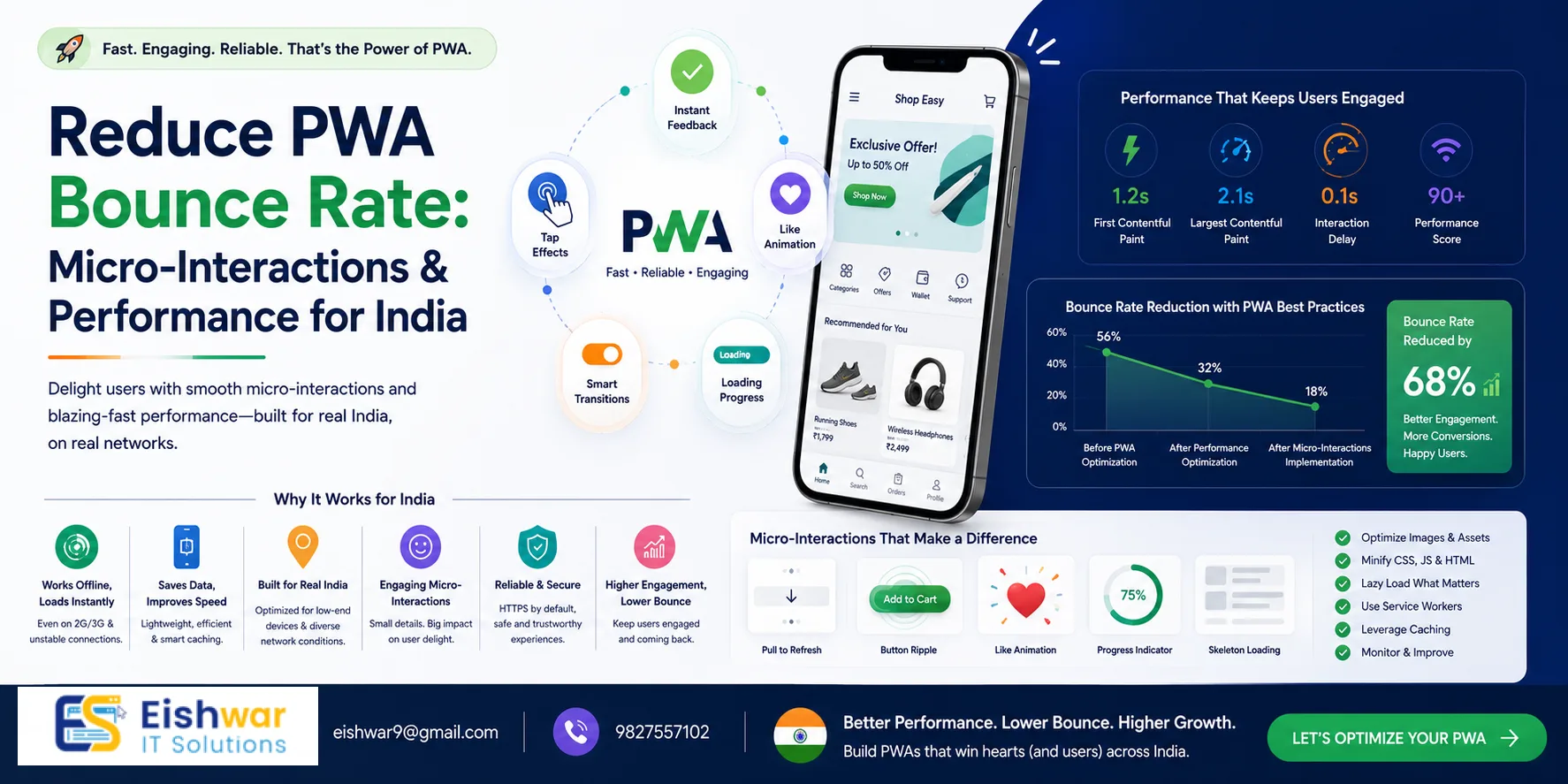
Reduce PWA Bounce Rate: Micro-Interactions & Performance for India
Published on: 29 Jun 2026
Reduce PWA Bounce Rate: Micro-Interactions & Performance for India
Introduction
In India's fast-paced digital landscape, every second counts. A Progressive Web App (PWA) can load in a flash, but if users bounce within moments, all that speed goes to waste. Bounce rate is a critical metric—especially for businesses targeting mobile-first Indian users. The good news? You can slash your bounce rate by blending performance tuning with thoughtful micro-interactions.
Learn more about our Website services
Micro-interactions are those tiny, delightful moments—like a button that subtly animates when tapped or a progress indicator that feels alive. When combined with rock-solid performance, they create an experience that keeps users exploring. In this guide, we'll show you exactly how to do that for your PWA, with examples and tips tailored to the Indian market.
Think about the last time you used a food delivery app: the instant feedback when you added an item to your cart, the smooth progress bar while your order was being confirmed—these micro-interactions made the experience feel responsive and trustworthy. For Indian users, who are often juggling multiple tabs on budget smartphones, such details can be the difference between a conversion and a bounce. We'll dive into practical strategies that blend performance optimization with psychological hooks, ensuring your PWA not only loads fast but also feels alive.
Main Section 1: Understanding Bounce Rate in the Indian Context
Bounce rate is the percentage of visitors who leave your PWA after viewing only one page. In India, where internet connectivity can vary from blazing fast 5G in metro cities to spotty 3G in semi-urban areas, the reasons for bouncing are unique:
- Slow loading: Even a 1-second delay can increase bounce rate by 20%. For a user on a 2G connection in a rural area, a 5-second load time might feel like an eternity.
- Unclear value proposition: Users don't instantly understand what you offer. If your hero section doesn't communicate your core benefit within 3 seconds, they're gone.
- Poor interactivity: Taps feel unresponsive, making the app seem broken. A button that takes 200ms to respond can feel sluggish compared to native apps.
- Data costs: Users in India are data-conscious; heavy pages with large images or unnecessary scripts can deter them, especially if they're on prepaid plans.
For Indian businesses—whether you're an e-commerce store, a service provider, or a content platform—reducing bounce rate directly impacts conversions and revenue. PWAs are already faster than traditional websites, but micro-interactions add the human touch that keeps users engaged. Consider a user in a tier-2 city searching for a local service: if your PWA loads quickly but feels static, they might assume it's broken and leave. Micro-interactions bridge that gap by providing real-time feedback.
Main Section 2: Micro-Interactions That Drive Engagement
Micro-interactions are small, purposeful animations or feedback loops that guide users. Here are three types that work wonders for PWAs targeting Indian audiences:
2.1 Tap Feedback
When a user taps a button, show an instant visual response—like a ripple effect or a color change. This confirms the action and feels responsive. For example, a "Buy Now" button on an Indian e-commerce PWA could pulse gently on tap, reassuring the user that their click registered. Implement this with CSS transitions: button:active { transform: scale(0.95); } or use a lightweight library like ripple.js (under 2 KB). Test on low-end devices to ensure the animation doesn't stutter.
👉 Don't wait for the perfect moment; turn your vision into reality today.
Free ConsultationPractical tip: For a grocery delivery PWA, add a subtle shake animation when a user adds an out-of-stock item to the cart. This provides immediate feedback without requiring a page reload.
2.2 Loading Indicators
Instead of a generic spinner, use a progress bar that mimics a real-world motion, like a train moving along a track. This keeps users engaged during load times. For a food delivery PWA, a loading animation showing a plate filling up can make waiting feel shorter. Use SVG-based animations (under 10 KB) from LottieFiles to keep performance high.
Example: A travel booking PWA could show a plane moving across a map while search results load. This not only entertains but also sets expectations about the service.
2.3 Empty States
When a user has no orders or no search results, don't leave them with a blank page. Show a friendly illustration with a message like "No orders yet? Let's fix that!" and a CTA. This turns a potential bounce into an opportunity. For a job portal PWA, an empty state could show a character looking at a blank board with a message: "No jobs found. Try a different keyword."
Implement these using CSS animations or lightweight JavaScript libraries. Keep file sizes small—under 50 KB—to avoid performance hits. Use will-change CSS property to hint the browser about animations, ensuring smooth rendering.
Main Section 3: Performance Tuning for Lightning-Fast PWAs
Micro-interactions only work if the PWA loads fast. Here are performance enhancements specifically for Indian users:
3.1 Optimize for Variable Networks
Use service workers to cache critical assets like your app shell, logo, and key CSS. Serve static content from a CDN with nodes in Mumbai, Delhi, and Bangalore to reduce latency. Implement lazy loading for images and videos below the fold using loading='lazy' attribute. For users on slow networks, consider serving compressed images via WebP format with fallback to JPEG.
Practical tip: Use the Network Information API to detect connection type and serve lower-resolution images on 2G/3G. For example, navigator.connection.effectiveType can help you adjust asset quality dynamically.
3.2 Reduce JavaScript Payload
Audit your JavaScript bundles using tools like Webpack Bundle Analyzer. Remove unused code via tree shaking. For micro-interactions, use CSS animations instead of JavaScript where possible—they're GPU-accelerated and lighter. Aim for a total JS payload under 150 KB for initial load.
Example: Instead of using a JavaScript library for a simple fade-in effect, use CSS: @keyframes fadeIn { from { opacity: 0; } to { opacity: 1; } }. This reduces parsing time and improves Time to Interactive.
3.3 Preload Key Resources
Preload fonts, hero images, and critical CSS. Use rel=preload to fetch these early. For example, preload your logo and primary CTA button styles so they render instantly. Also, preconnect to third-party origins like CDNs or analytics services to reduce DNS lookup time.
👉 Free Website Audit
Get Free AuditCode snippet:
3.4 Monitor Real User Metrics
Use tools like Google Lighthouse and Web Vitals to track First Contentful Paint (FCP) and Time to Interactive (TTI). Aim for FCP under 1.5 seconds and TTI under 3 seconds for Indian users. Set up Real User Monitoring (RUM) with tools like SpeedCurve or Google Analytics to track actual user experiences across different regions and devices.
Expert Tips
- Start with one micro-interaction: Don't overwhelm users. Add tap feedback first, then test its impact on bounce rate using A/B testing. A simple change can yield a 5-10% reduction in bounce rate.
- Use A/B testing: Compare a version with micro-interactions against a baseline to measure engagement lift. Tools like Google Optimize or VWO can help you run experiments without code changes.
- Leverage Indian festivals: Temporarily add festive micro-interactions (e.g., Diwali diya animations, Holi color splashes) to boost engagement during peak seasons. These can increase session duration by 15-20% when done tastefully.
- Keep it light: Use SVG for icons and animations instead of heavy GIFs or videos. SVGs are scalable, resolution-independent, and typically under 5 KB per asset.
- Test on real devices: Use services like BrowserStack to test on popular Indian devices like the Xiaomi Redmi Note series or Samsung Galaxy M series, which have varying screen sizes and processing power.
Common Mistakes
- Over-animating: Too many animations can distract and slow down the PWA. Stick to 2-3 key interactions per page. For example, animate the primary CTA and the loading indicator, but leave other elements static.
- Ignoring accessibility: Ensure animations respect prefers-reduced-motion settings. Provide a toggle to disable them for users with vestibular disorders. Use
@media (prefers-reduced-motion: reduce) { * { animation: none; } }. - Not testing on low-end devices: Many Indian users access PWAs on budget phones with 2GB RAM and slower CPUs. Test on devices like the Nokia 2.3 or Realme C11 to ensure smooth performance.
- Forgetting offline mode: Micro-interactions should still work offline. Cache animation assets via service workers. For example, use
caches.addAll(['/animations/loading.svg'])during install event. - Neglecting initial load: Don't load all micro-interaction assets upfront. Use code splitting to load them only when needed, reducing initial bundle size.
Future Trends
By 2026, PWAs in India will likely integrate AI-driven micro-interactions that adapt to user behavior. For example, a PWA might learn that a user prefers minimal animations and adjust accordingly, or it could detect frustration (e.g., repeated taps) and offer help proactively. Also, with 5G becoming widespread, richer micro-interactions (like haptic feedback via device APIs) will become feasible. Voice-triggered micro-interactions could also emerge, catering to India's multilingual user base—imagine a user saying "add to cart" in Hindi and seeing a visual confirmation.
Another trend is the use of WebAssembly for complex animations without JavaScript overhead, enabling near-native performance. PWAs might also leverage the WebXR API for augmented reality micro-interactions, such as virtually trying on clothes before purchase.
FAQs
- What is a good bounce rate for a PWA in India? A bounce rate below 40% is considered good, but it varies by industry. E-commerce PWAs often aim for 30-35%, while content platforms may see 50-60% as acceptable. Monitor your specific vertical's benchmarks.
- Can micro-interactions slow down my PWA? Only if poorly implemented. Use CSS animations and keep file sizes small (under 50 KB total) to avoid performance impact. Avoid JavaScript-heavy libraries for simple effects.
- How do I track bounce rate for my PWA? Use Google Analytics with event tracking for page views and user interactions. Set up a custom dashboard for PWA metrics, including FCP, TTI, and bounce rate segmented by device and region.
- Are micro-interactions necessary for all PWAs? Not mandatory, but they significantly improve user experience and retention, especially for consumer-facing apps like e-commerce, food delivery, and social platforms. For B2B tools, focus more on performance and clarity.
- What tools can I use to create micro-interactions? LottieFiles for lightweight animations (JSON-based), GreenSock for advanced timelines with GPU acceleration, or plain CSS for simple effects like hover states and transitions.
- How often should I update micro-interactions? Review quarterly. Update based on user feedback, seasonal campaigns (e.g., Diwali, Holi), and performance data. A/B test new interactions before rolling out widely.
- What's the impact of micro-interactions on SEO? Indirectly positive. Lower bounce rates and longer session durations signal better user engagement to search engines, potentially improving rankings. However, ensure animations don't block content rendering.
Conclusion
Reducing bounce rate in your PWA isn't about one magic fix—it's a blend of performance and psychology. By tuning your app for speed and adding thoughtful micro-interactions, you create an experience that resonates with Indian users. Start small, test often, and watch your engagement soar.
👉 Free Homepage Demo
Book DemoCTA
Ready to transform your PWA? Contact EishwarITSolution for a free consultation. Let's build a PWA that keeps users hooked—fast, delightful, and built for India.