
PWA Performance Audits for Indian Businesses: Tools, Metrics & Fixes
Published on: 12 Jun 2026
PWA Performance Audits for Indian Businesses: Tools, Metrics & Actionable Fixes
Introduction
In 2026, Progressive Web Apps (PWAs) are no longer a luxury—they are a necessity for Indian businesses aiming to capture the mobile-first audience. But building a PWA is only half the battle. The real challenge lies in maintaining peak performance across diverse devices, fluctuating network conditions, and varying user expectations. A PWA that loads slowly or fails offline can damage your brand reputation and drive users to competitors.
Learn more about our Website services
This comprehensive guide walks you through conducting a PWA performance audit—using the right tools, tracking the right metrics, and applying targeted fixes. Whether you run a small e-commerce store in Mumbai or a service platform in Delhi, these insights will help you deliver a lightning-fast, reliable experience that keeps users coming back.
Main Section 1: Why PWA Performance Audits Matter for Indian SMEs
India's internet landscape is unique. With over 800 million mobile users, many accessing the web on budget devices and 4G/5G networks, performance can make or break your business. Studies show that a 1-second delay in mobile load time can reduce conversions by up to 20%. For an Indian SME, that translates to lost revenue and missed opportunities. For example, a small online clothing retailer in Jaipur saw a 15% drop in sales after a site redesign increased load times by just 1.5 seconds—a problem caught too late without regular audits.
Regular performance audits help you:
- Identify bottlenecks specific to your PWA's architecture, such as unoptimized images or render-blocking scripts.
- Improve Core Web Vitals—metrics Google uses for ranking, which directly impact search visibility for local queries like 'best restaurant near me'.
- Enhance user retention by ensuring smooth, offline-capable experiences, especially in areas with intermittent connectivity.
- Reduce bounce rates on slower connections common in tier-2 and tier-3 cities, where users may abandon a page that takes more than 3 seconds to load.
Without audits, you're flying blind. You might think your PWA is fast, but real-world data could tell a different story. A business in Bangalore once assumed their PWA performed well because it worked smoothly on their high-end office Wi-Fi, but field data revealed a 40% bounce rate on 4G networks in rural Karnataka.
Main Section 2: Essential Tools for PWA Performance Audits
Here are the top tools every Indian business should use for PWA performance audits:
1. Google Lighthouse
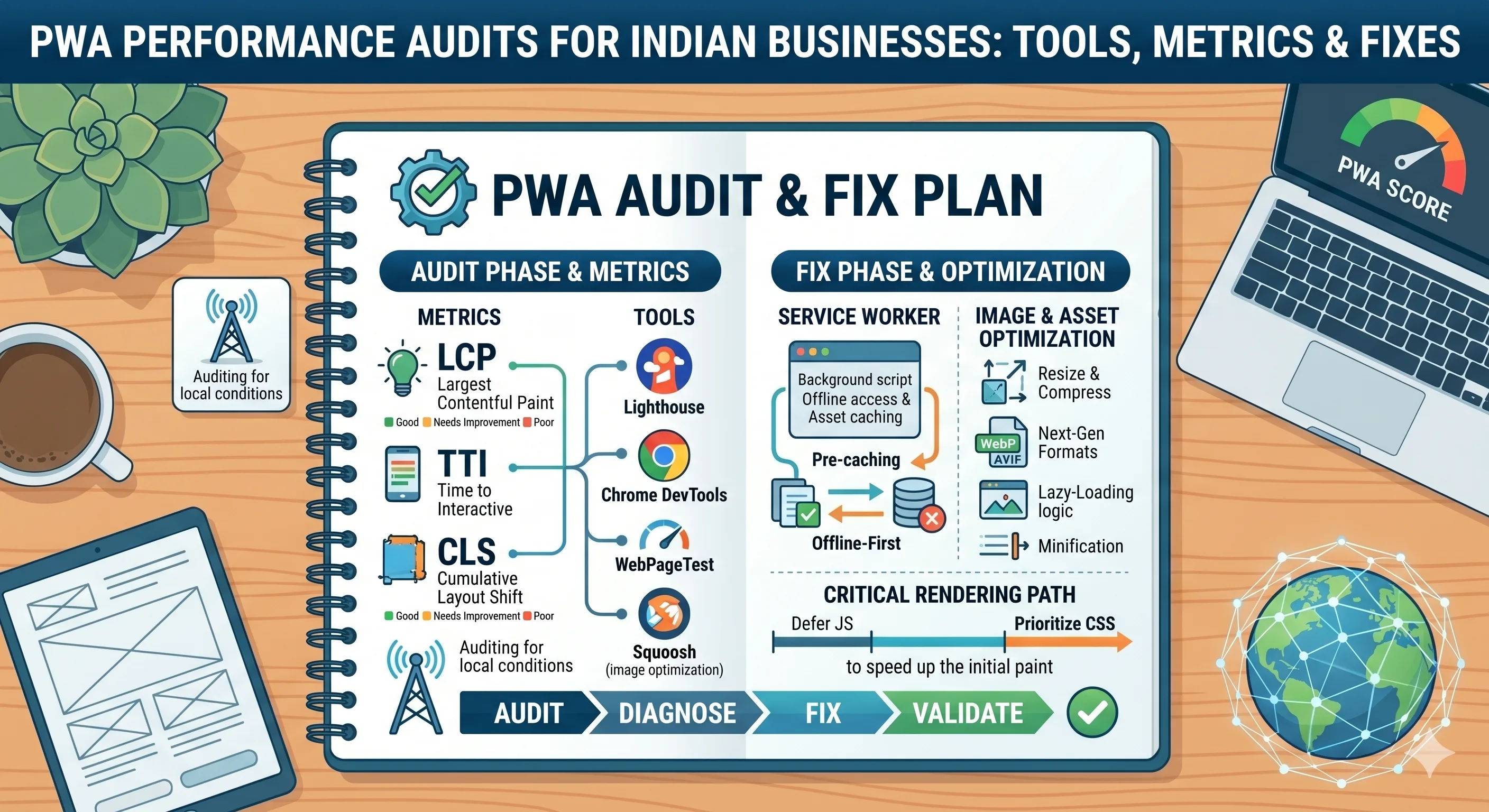
Lighthouse is the gold standard for PWA audits. It generates a comprehensive report covering performance, accessibility, best practices, SEO, and PWA compliance. Run it from Chrome DevTools or via PageSpeed Insights. Look for scores above 90 for all categories. For a more detailed analysis, use Lighthouse CLI to automate audits in your CI/CD pipeline.
2. WebPageTest
WebPageTest offers advanced testing from multiple locations. For Indian audiences, choose test servers in Mumbai or Bangalore. It provides filmstrip views, waterfall charts, and detailed metrics like Time to Interactive and First Contentful Paint. Use the 'Repeat View' feature to simulate returning users and measure cache effectiveness.
3. Chrome DevTools Performance Panel
Use this for in-depth profiling of your PWA's runtime performance. Record interactions, analyze JavaScript execution, and identify layout thrashing or long tasks. For example, you can pinpoint a heavy JavaScript function that blocks the main thread for 500ms, causing input delays.
👉 Don't wait for the perfect moment; turn your vision into reality today.
Free Consultation4. PWABuilder
Microsoft's PWABuilder lets you audit your PWA manifest and service worker. It checks for missing icons, incorrect scope, and offline support. It also provides a scoring system and suggestions for improvement, such as adding a splash screen or improving icon sizes for different devices.
5. Real User Monitoring (RUM) Tools
Tools like Google Analytics (with Web Vitals tracking), New Relic, or Datadog give you real-world performance data from your actual users. This is critical for understanding how your PWA performs on various devices and networks in India. For instance, RUM data might reveal that users on Jio 4G in rural areas experience higher LCP due to slower DNS resolution.
Main Section 3: Key Metrics to Track in Your PWA Audit
Focus on these metrics to gauge your PWA's health:
- Largest Contentful Paint (LCP): Should be under 2.5 seconds. Measures loading of the main content. For a news PWA, this might be the headline image; for an e-commerce site, the product image.
- First Input Delay (FID) / Interaction to Next Paint (INP): Target under 100ms (FID) or 200ms (INP). Measures responsiveness. A high FID often indicates heavy JavaScript execution during page load.
- Cumulative Layout Shift (CLS): Keep below 0.1. Measures visual stability. A common cause is images without dimensions, causing text to jump as they load.
- First Contentful Paint (FCP): Under 1.8 seconds. This is the first visual feedback to the user.
- Time to Interactive (TTI): Under 5 seconds for mobile. This is when the page is fully interactive.
- Service Worker Registration Success: Ensure 100% registration rate. A failed registration means no offline support.
- Offline Support Score: Your PWA should serve a custom offline page. Test by disconnecting the network and refreshing.
- Cache Hit Ratio: Aim for 80%+ to reduce network requests. A low ratio means your service worker caching strategy needs improvement.
Track these over time using dashboards. Set up alerts for regressions. For example, if LCP increases by 0.5 seconds after a deployment, you'll know immediately.
Main Section 4: Actionable Fixes for Common PWA Performance Issues
Here are practical fixes for issues discovered during audits:
Slow LCP
- Optimize hero images: Use WebP/AVIF format, lazy load below‑the‑fold images, and serve responsive sizes. For example, a 1200px hero image can be compressed from 500KB to 80KB using WebP.
- Preload key resources: Use
<link rel='preload'>for the hero image and critical CSS. This tells the browser to fetch these resources early. - Reduce server response time: Use a CDN with edge caching. For Indian users, consider CDNs with PoPs in Mumbai, Delhi, and Bangalore. A CDN can cut TTFB from 500ms to 100ms.
High CLS
- Set explicit width/height on images and videos. For example,
<img src='product.jpg' width='400' height='300'>prevents layout shifts. - Reserve space for ads and embeds. Use CSS placeholders or min-height to avoid sudden shifts.
- Use
font-display: swapfor web fonts to prevent invisible text. This ensures text appears immediately with a fallback font.
Poor Offline Experience
- Implement a service worker with a cache‑first strategy for static assets. For example, cache CSS, JS, and images on first visit.
- Create a meaningful offline fallback page with contact info and cached content. Include a form that stores data locally and syncs when online.
- Use IndexedDB for storing user data locally. For a booking app, store recent bookings so users can view them offline.
Render‑Blocking Resources
- Defer non‑critical CSS and JavaScript. Use
media='print'for print stylesheets. - Inline critical CSS for above‑the‑fold content. This eliminates a round trip for the first paint.
- Use async/defer for script tags.
asyncfor independent scripts,deferfor scripts that need DOM order.
JavaScript Bundle Size
- Code‑split using dynamic imports. For example, load the checkout module only when the user clicks 'Buy Now'.
- Tree‑shake unused code. Tools like Webpack can remove dead code during build.
- Compress with Brotli or Gzip. Brotli often achieves 20% better compression than Gzip for text assets.
Expert Tips
Here are insider tips from PWA performance specialists:
👉 Free Website Audit
Get Free Audit- Audit monthly, not quarterly. Performance regressions can happen with every deployment. Automate audits using Lighthouse CI in your CI/CD pipeline. For example, set a threshold of 90 for performance score; if it drops, the build fails.
- Use field data over lab data. Tools like Lighthouse give lab data; RUM tools give field data. Both are important, but field data reflects real user experiences. A lab test might show LCP of 1.5s, but field data could show 3s on slow networks.
- Optimize for the slowest device. Test on a mid‑range Android device (e.g., Moto G series) on 3G throttling. If it works there, it works everywhere. Many Indian users still use devices with 2GB RAM.
- Leverage the Cache API. Store API responses, images, and even partial HTML for instant loading on repeat visits. For a blog PWA, cache the last 10 articles.
- Monitor third‑party scripts. Analytics, chat widgets, and ads can bloat your PWA. Audit their impact and consider lazy loading. A single heavy ad script can add 2 seconds to load time.
Common Mistakes
Avoid these pitfalls when auditing PWA performance:
- Ignoring offline support. Many PWAs fail the offline test. Users in India often face network drops; a broken offline experience frustrates them. Always test with airplane mode.
- Over‑optimizing for desktop. Your PWA will be used mostly on mobile. Test and tune for mobile first. Desktop scores don't reflect mobile reality.
- Not updating the service worker. A stale service worker can cache old assets. Implement versioning and a clear update flow. Use the 'update' event to prompt users.
- Relying solely on Lighthouse score. A 100 Lighthouse score doesn't guarantee real‑world speed. Always cross‑check with RUM data. A perfect lab score might be achieved on a fast machine with a good connection.
- Neglecting security. PWAs require HTTPS. Mixed content warnings can break service workers and reduce trust. Use tools like SSL Labs to check your certificate.
Future Trends
The PWA performance landscape is evolving. Here’s what to watch for in the next 12–18 months:
👉 Free Homepage Demo
Book Demo- AI‑driven performance optimization: Tools that automatically suggest and implement fixes based on audit data. For example, an AI tool might recommend converting images to WebP and preloading critical CSS.
- WebAssembly (Wasm) for PWAs: Enables near‑native performance for compute‑heavy tasks like image processing or data compression. This could allow PWAs to handle tasks previously reserved for native apps.
- Better offline capabilities: Background sync, periodic background sync, and push notifications will become more reliable and battery‑friendly. This means PWAs can sync data even when the app is closed.
- Core Web Vitals evolution: Google may introduce new metrics like Responsiveness (already INP) and Smoothness. Staying ahead of these will be crucial for SEO.
- Edge computing integration: PWAs will leverage edge workers to execute logic closer to users, reducing latency. For example, a PWA could personalize content at the edge without a round trip to the origin server.
Indian businesses that stay ahead of these trends will dominate their markets.
FAQs
How often should I run a PWA performance audit?
At least once a month, and after every major deployment. Use automated tools like Lighthouse CI to catch regressions early. For high-traffic sites, consider weekly audits.
Which tool is best for PWA audit in India?
Google Lighthouse is the most comprehensive. For real‑user data, use Google Analytics with Web Vitals tracking. WebPageTest with Indian server locations gives detailed lab tests. Combine all three for a complete picture.
What is a good PWA Lighthouse score?
Aim for 90+ in Performance, Accessibility, Best Practices, and SEO. For PWA, a score of 100 is ideal, but 80+ is acceptable if offline support and manifest are correct. Remember, a high score doesn't guarantee real-world speed.
How can I improve my PWA's offline experience?
Implement a service worker with a cache‑first strategy for static assets, use IndexedDB for dynamic data, and create a custom offline page with essential information and a contact form. Test by disconnecting the network and navigating through your app.
Do Core Web Vitals affect PWA ranking in India?
Yes, Google uses Core Web Vitals as a ranking signal. Since most Indian users are on mobile, good CWV scores are critical for visibility in search results. For example, a PWA with poor LCP may rank lower for local queries.
What is the most common performance issue in Indian PWAs?
Large JavaScript bundles and unoptimized images are top issues. Many Indian PWAs load heavy frameworks without code-splitting, leading to slow TTI. Always audit your bundle size and use lazy loading.
How can I test my PWA on slow networks common in India?
Use Chrome DevTools network throttling to simulate 3G or 'Slow 3G'. Also, use WebPageTest with a server location in India and select a 'Mobile' device profile. Real user monitoring will give you actual data from your audience.
Conclusion
PWA performance audits are not a one‑time task—they are an ongoing commitment to excellence. For Indian businesses, where mobile is the primary screen and network conditions vary widely, regular audits ensure your PWA remains fast, reliable, and engaging. By using the right tools, tracking key metrics, and applying targeted fixes, you can deliver a superior user experience that drives conversions and builds brand loyalty. Start your audit today. Use Lighthouse, monitor Core Web Vitals, and fix the issues that matter most. Your users—and your bottom line—will thank you.
CTA
Ready to take your PWA’s performance to the next level? <a href='http://eishwar.com/contact'>Contact EishwarITSolution</a> for a free PWA audit and personalized optimization roadmap. Our experts specialize in helping Indian SMEs build blazing‑fast, offline‑first PWAs that users love. Don’t let slow load times cost you customers—get in touch today!