
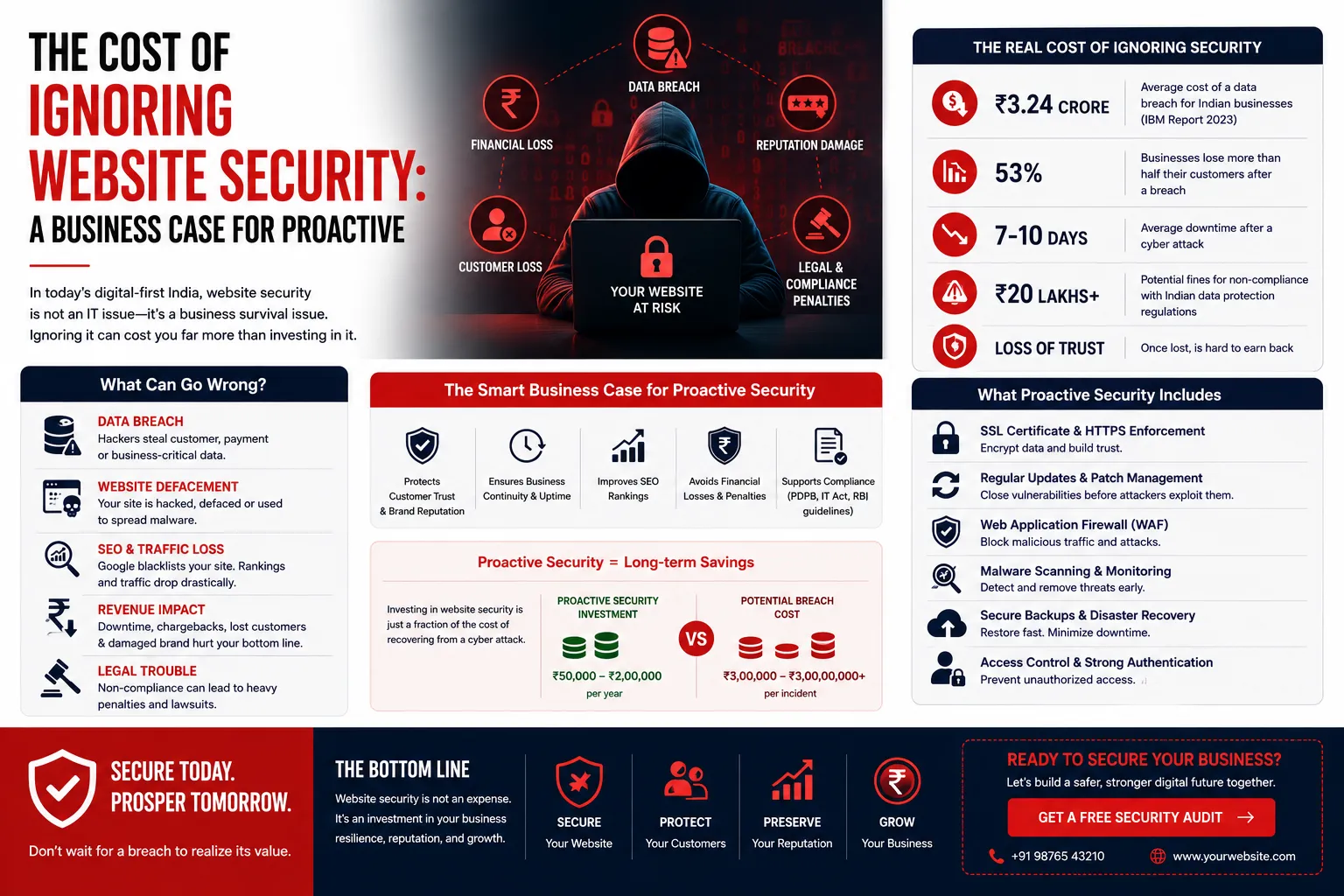
The Cost of Ignoring Website Security: A Business Case for Proactive M
Published on: 16 Jun 2026
The Cost of Ignoring Website Security: A Business Case for Proactive Maintenance
Introduction
Every business owner wants to save money. It's natural. But when it comes to website security, cutting corners can cost you much more than you save. In India, where digital adoption is skyrocketing, many small and medium businesses treat website security as an afterthought. The result? Data breaches, lost customers, and expensive recovery processes.
Learn more about our Website services
Consider this: a small e-commerce store in Mumbai ignored security updates for six months. A hacker exploited an outdated plugin, stole customer credit card details, and demanded a ransom. The store lost ₹12 lakh in direct costs—ransom payment, forensic investigation, and legal fees—plus an additional ₹8 lakh in lost sales during the three-week downtime. The owner later admitted that a ₹3,000-per-month maintenance plan would have prevented the entire ordeal.
This article is your business case for proactive website security. We'll explore the real costs of neglecting security, share practical examples, and show you why investing in regular maintenance is one of the smartest moves for your business. By the end, you'll have a clear roadmap to protect your online presence without breaking the bank.
Main Section 1: The Hidden Costs of Ignoring Website Security
When we talk about website security costs, most people think about the price of a security plugin or a maintenance plan. But the real costs are often invisible until it's too late. Let's break down the five major categories of hidden costs that can cripple your business.
Direct Financial Losses
A hacked website can lead to stolen customer data, fraudulent transactions, or ransomware. For a small business, this can mean thousands of rupees in losses. According to a 2023 report by IBM, the average cost of a data breach in India is around ₹14 crore. While large enterprises face the biggest numbers, small businesses are often hit harder because they lack reserves. For example, a Delhi-based travel agency lost ₹2.5 lakh when hackers redirected their booking payments to a fraudulent account. The recovery process took two months and cost an additional ₹1 lakh in IT consulting fees.
Practical Tip: Implement real-time transaction monitoring to detect anomalies. Even a basic alert system can flag unusual payment patterns before they escalate.
Reputational Damage
Trust is everything. If your website gets compromised and customer data leaks, your reputation takes a massive hit. Customers may leave negative reviews, spread word-of-mouth warnings, and never come back. Rebuilding trust can take years, if ever. A 2022 survey found that 65% of Indian consumers would stop using a brand after a data breach, and 40% would share their negative experience on social media.
Example: A popular online clothing retailer in Bengaluru suffered a breach that exposed 50,000 customer records. Within a week, their Google rating dropped from 4.5 to 2.8 stars. Sales fell by 60% over the next quarter, and the company spent ₹15 lakh on a PR campaign to restore its image.
Legal and Compliance Penalties
With India's Digital Personal Data Protection Act (DPDP) coming into effect, businesses that fail to protect user data face hefty fines. Ignoring security is no longer just a technical risk—it's a legal one. Under the DPDP Act, penalties can reach up to ₹250 crore for significant breaches. Even smaller violations can cost ₹50 lakh or more. For a small business, such fines can be catastrophic.
👉 Don't wait for the perfect moment; turn your vision into reality today.
Free ConsultationPractical Tip: Conduct a data mapping exercise to understand what personal data you collect, where it's stored, and how it's protected. This is a foundational step for DPDP compliance.
SEO and Traffic Loss
Google blacklists hacked websites. If your site is compromised, it may be flagged as unsafe, causing traffic to plummet. Even after cleanup, recovering search rankings can take months. That's lost revenue from organic traffic. For example, a Jaipur-based blog that relied on Google Adsense saw its traffic drop by 80% after being flagged for malware. The owner spent ₹50,000 on cleanup and SEO recovery, but it took six months to regain previous traffic levels.
Practical Tip: Enable Google Search Console alerts to get notified immediately if your site is flagged. This allows you to act quickly and minimize SEO damage.
Operational Downtime
When your site is hacked, you may need to take it offline for cleanup. Every hour of downtime means lost sales, especially for e-commerce businesses. Plus, you may need to hire experts to fix the mess, adding to costs. A study by Gartner found that the average cost of IT downtime is ₹5,600 per minute. For an online store generating ₹1 lakh per day, a 24-hour outage translates to ₹1 lakh in lost revenue, not including recovery costs.
Example: A Pune-based SaaS company experienced a ransomware attack that locked their servers for 72 hours. They lost ₹3.5 lakh in subscription revenue and paid ₹2 lakh to a cybersecurity firm for decryption and recovery.
Main Section 2: The Business Case for Proactive Maintenance
Proactive website maintenance is like regular health checkups. It prevents small issues from becoming big, expensive problems. Here's why it makes business sense.
Cost-Effectiveness
Preventive maintenance costs a fraction of what you'd pay for emergency recovery. A basic security audit and plugin updates cost a few thousand rupees per month, while a single breach can cost lakhs. It's simple math: invest a little now to avoid a huge expense later. For instance, a comprehensive maintenance plan from a provider like EishwarITSolution costs around ₹3,000 per month. Over a year, that's ₹36,000—far less than the average breach cost of ₹14 lakh for small businesses.
Practical Tip: Compare the cost of a maintenance plan to your monthly revenue. If your site generates ₹2 lakh per month, a ₹3,000 plan is just 1.5% of revenue—a small price for protection.
Peace of Mind
Knowing your website is monitored 24/7 frees you to focus on growing your business. You don't have to worry about sudden attacks or outdated software. Your team can sleep better, and so can you. One business owner told us, "After signing up for proactive maintenance, I stopped waking up at 3 a.m. to check if my site was still online. That peace of mind is priceless."
Better Performance and SEO
Regular maintenance doesn't just prevent attacks—it also improves site speed, uptime, and user experience. Google rewards fast, secure sites with better rankings. So proactive maintenance directly boosts your SEO efforts. For example, a Chennai-based travel portal optimized their images and updated their CMS as part of maintenance. Their page load time dropped from 4.5 seconds to 2.1 seconds, leading to a 25% increase in organic traffic within three months.
👉 Free Website Audit
Get Free AuditPractical Tip: Use tools like GTmetrix or Pingdom to monitor your site speed monthly. Include speed optimization in your maintenance checklist.
Customer Trust
When customers see an SSL certificate and a secure checkout, they feel safe. Displaying security badges and a clear privacy policy builds confidence. A well-maintained website signals professionalism and reliability. A 2023 survey by Norton found that 85% of Indian consumers would abandon a purchase if they didn't trust the site's security. Proactive maintenance ensures your site always meets these expectations.
Example: An online pharmacy in Hyderabad added a security seal and a detailed privacy policy. Their conversion rate increased by 12% within a month, as customers felt more comfortable sharing sensitive health information.
Compliance Readiness
Proactive maintenance helps you stay compliant with data protection laws. Regular backups, access controls, and vulnerability scans are part of a good security posture. This protects you from legal trouble. For instance, under the DPDP Act, businesses must conduct regular data protection impact assessments (DPIAs). A proactive maintenance plan can include these assessments as a standard service.
Practical Tip: Work with a maintenance provider that offers compliance checklists for Indian regulations. This ensures you're always audit-ready.
Main Section 3: Practical Steps to Build a Proactive Security Plan
You don't need to be a tech expert to secure your website. Here's a step-by-step plan that any business owner can follow.
Step 1: Conduct a Security Audit
Start by evaluating your current security. Check for outdated plugins, weak passwords, and missing SSL certificates. You can use free tools like Google's Security Checkup or hire a professional for a thorough audit. A typical audit should cover: software versions, user permissions, backup status, and firewall configuration.
Practical Tip: Schedule your first audit immediately. Even a basic scan can reveal critical vulnerabilities. For example, a simple check might find that your admin password is still 'admin123'.
Step 2: Implement Strong Access Controls
Use strong, unique passwords for all accounts. Enable two-factor authentication (2FA) for admin access. Limit user permissions to only what's necessary. Regularly review who has access to your site. For example, if a former employee still has admin access, remove it immediately.
Practical Tip: Use a password manager like LastPass or 1Password to generate and store complex passwords. This eliminates the temptation to reuse passwords.
Step 3: Keep Everything Updated
Outdated software is the #1 cause of hacks. Set up automatic updates for your CMS, plugins, and themes. If your platform doesn't support auto-updates, schedule monthly manual checks. For WordPress sites, enable automatic updates for minor releases and security patches.
Practical Tip: Before updating, always take a backup. Some updates can break your site, and a backup ensures you can roll back quickly.
👉 Free Homepage Demo
Book DemoStep 4: Regular Backups
Back up your website daily or weekly, depending on how often you update content. Store backups in a secure offsite location (like cloud storage). Test your backups regularly to ensure they work. A backup is useless if it's corrupted or incomplete.
Practical Tip: Use a backup plugin that offers automated scheduling and offsite storage. For example, UpdraftPlus can send backups to Google Drive or Dropbox.
Step 5: Monitor and Respond
Use security monitoring tools that alert you to suspicious activity. Services like Sucuri or Wordfence can detect malware and block attacks in real time. Have an incident response plan ready—know who to call if something goes wrong. Your plan should include steps for isolating the breach, notifying stakeholders, and restoring from backup.
Practical Tip: Create a simple one-page incident response checklist. Include contact numbers for your hosting provider, security team, and legal advisor.
Expert Tips
Tip 1: Don't rely solely on free security plugins. Invest in a managed security service for comprehensive protection. Free plugins often lack advanced features like real-time threat intelligence and 24/7 support.
Tip 2: Train your employees on basic security hygiene—like recognizing phishing emails and using strong passwords. Conduct quarterly training sessions and simulate phishing attacks to test their awareness.
Tip 3: Use a web application firewall (WAF) to block malicious traffic before it reaches your site. Cloud-based WAFs like Cloudflare are easy to set up and cost as little as ₹500 per month.
Tip 4: Perform quarterly security audits, not just annual ones. Threats evolve fast, and a quarterly review helps you catch new vulnerabilities early.
Tip 5: Consider cyber insurance. It won't prevent attacks, but it can cover recovery costs, legal fees, and even ransom payments. Policies start at around ₹10,000 per year for small businesses.
Common Mistakes
Mistake 1: Thinking 'my business is too small to be hacked.' Hackers target small sites precisely because they are easier to breach. Automated bots scan millions of sites daily, looking for vulnerabilities.
Mistake 2: Ignoring security after launch. Security is not a one-time setup; it's an ongoing process. New vulnerabilities are discovered daily, and your site needs constant updates.
Mistake 3: Using the same password for multiple accounts. If one gets compromised, all are at risk. Use a password manager to maintain unique passwords for every account.
Mistake 4: Neglecting mobile security. Mobile traffic is huge in India, so ensure your mobile site is also secure. Test mobile-specific features like in-app purchases and login forms.
Mistake 5: Skipping backups. Without backups, a hack can mean permanent data loss. Even a ransomware attack can be mitigated if you have a clean backup.
Future Trends
Website security is evolving rapidly. Here are trends to watch:
- AI-Powered Security: Artificial intelligence is being used to detect and respond to threats in real time, reducing human error. For example, AI can analyze traffic patterns to identify DDoS attacks before they cause damage.
- Zero Trust Architecture: No user or device is trusted by default. Every access request is verified, even from inside the network. This approach is becoming standard for enterprise security.
- Biometric Authentication: Fingerprint and facial recognition are becoming standard for admin access, adding an extra layer of security. Many modern smartphones already support biometrics for app logins.
- GDPR-Style Regulations in India: The DPDP Act will force stricter data protection practices, making proactive security mandatory. Businesses that fail to comply risk fines and legal action.
- Quantum-Resistant Encryption: As quantum computing advances, current encryption may become obsolete. Future-proofing your security is key. Look for solutions that support post-quantum cryptography.
FAQs
1. How much does proactive website maintenance cost in India?
Basic maintenance plans start from ₹1,500 to ₹5,000 per month, while comprehensive security services can cost ₹10,000 or more. Compare this to the potential loss from a breach—it's a small price for peace of mind. For example, a ₹3,000 plan covers weekly backups, plugin updates, and 24/7 monitoring.
2. Can I handle website security myself without technical skills?
Yes, with user-friendly tools and plugins, you can handle basic security tasks like updating software and setting up backups. However, for advanced protection—such as vulnerability scanning and incident response—consider hiring a professional service like EishwarITSolution.
3. What is the most common website vulnerability?
Outdated software and weak passwords are the top vulnerabilities. According to a 2023 report, 60% of breaches involve unpatched software. Keeping everything updated and using strong, unique passwords can prevent most attacks.
4. How often should I back up my website?
For most businesses, daily backups are ideal. If your site changes infrequently, weekly backups may suffice. Always store backups offsite—for example, in cloud storage like Google Drive or AWS S3. Test your backups monthly to ensure they are recoverable.
5. What should I do if my website gets hacked?
First, take the site offline to prevent further damage. Then, restore from a clean backup. Scan for malware, change all passwords, and update software. Finally, investigate how the breach occurred to prevent future attacks. If you're unsure, contact a professional security service immediately.
6. Is SSL certificate enough for security?
SSL encrypts data in transit, but it's not a complete security solution. You also need firewalls, malware scanning, and regular updates. Think of SSL as a lock on your front door—it's essential, but you still need an alarm system and security cameras.
7. How does website security affect SEO?
Google prioritizes secure sites. HTTPS is a ranking factor, and hacked sites can be de-indexed. Good security practices improve both safety and search rankings. For example, a site with an SSL certificate and fast load times is more likely to rank higher than an insecure, slow site.
Conclusion
Ignoring website security is a risky gamble that can cost your business dearly. The hidden costs—financial losses, reputational damage, legal penalties—far outweigh the investment in proactive maintenance. By taking simple steps like regular updates, strong passwords, and backups, you can protect your business and build customer trust.
Remember, website security is not a luxury; it's a necessity. For Indian businesses aiming for long-term growth, proactive maintenance is the smartest investment you can make. Don't wait for a breach to take action—start today.
CTA
Ready to secure your website and avoid costly breaches? Contact EishwarITSolution for a free security audit. Our experts will assess your site, identify vulnerabilities, and create a customized maintenance plan. Get started now and protect your online presence.