
Legacy System Modernization Roadmap for Indian SMEs: A Step-by-Step Mi
Published on: 17 Jun 2026
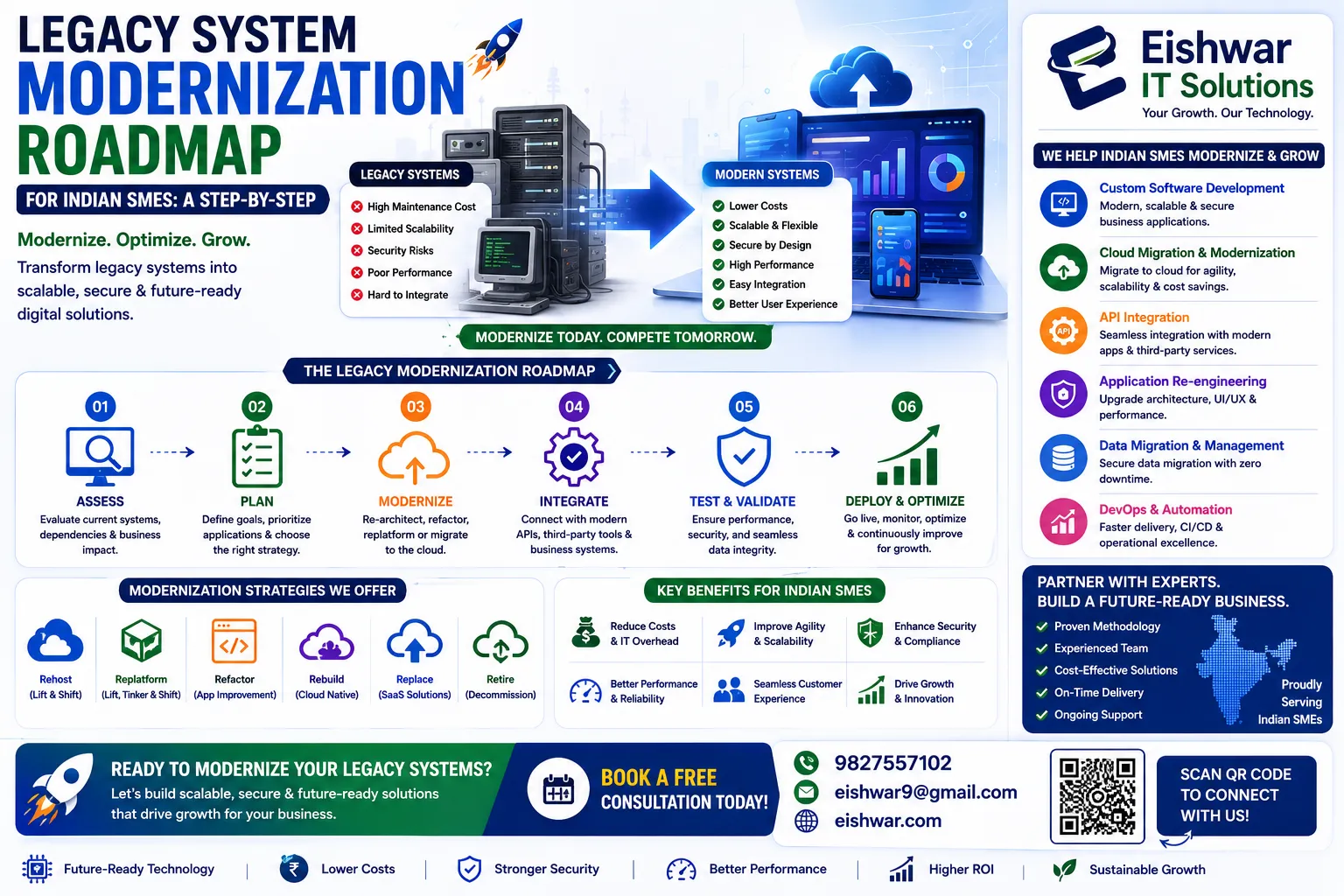
Legacy System Modernization Roadmap for Indian SMEs: A Step-by-Step Migration Guide
Introduction
In today's fast-paced digital economy, Indian SMEs often find themselves held back by outdated legacy systems—those creaky, custom-built software solutions or old hardware that were cutting-edge a decade ago. But now, they're slowing down operations, increasing security risks, and eating into profits. The good news? You don't need a massive IT budget to modernize. This roadmap walks you through a practical, step-by-step migration process tailored for Indian SMEs, with actionable tips to avoid common pitfalls.
Learn more about our Website services
Whether you're running a small manufacturing unit in Pune or a retail chain in Bangalore, legacy system modernization is your key to unlocking efficiency, scalability, and growth. Let's dive in.
Main Section 1: Why Legacy Systems Are a Hidden Liability for Indian SMEs
Legacy systems might feel comfortable, but they come with hidden costs that can cripple your business. Here's why you need to act now:
- Security vulnerabilities: Outdated software lacks modern patches, making you a prime target for cyberattacks. Indian SMEs are increasingly targeted because they're seen as easy prey. For instance, a 2023 report by the Data Security Council of India noted that over 40% of cyberattacks on SMEs exploited unpatched legacy systems. A single breach can cost lakhs in recovery and reputational damage.
- High maintenance costs: Aging hardware and custom code require expensive specialists to keep running. That money could be better spent on growth. Consider a small textile exporter in Surat that was paying ₹50,000 monthly to maintain a 12-year-old inventory system—funds that could have funded a cloud ERP subscription for half the cost.
- Compatibility issues: Legacy systems often don't integrate with modern tools like cloud CRMs or payment gateways, creating data silos. For example, a retailer in Chennai using an old billing system had to manually enter sales data into QuickBooks, leading to frequent errors and delayed financial reporting.
- Lost productivity: Employees waste hours on manual workarounds that modern systems automate. A study by NASSCOM found that Indian SMEs lose an average of 15% of employee time due to inefficient legacy processes.
Example: A small logistics company in Delhi used a 15-year-old dispatch system. After migrating to a cloud-based solution, they cut order processing time by 60% and reduced errors by 80%. Their monthly maintenance costs dropped from ₹40,000 to ₹8,000, and they could finally offer real-time tracking to customers—a feature that boosted client retention by 25%.
Main Section 2: The Step-by-Step Modernization Roadmap
Follow these six steps to modernize your legacy systems without disrupting your daily operations.
Step 1: Audit and Assess Your Current Systems
Start by listing all legacy systems, their age, dependencies, and pain points. Ask: What's critical? What's replaceable? Involve your IT team or a consultant to identify quick wins. Create a spreadsheet with columns for system name, purpose, age, vendor support status, integration requirements, and user satisfaction. For example, a small accounting firm in Mumbai discovered that their 8-year-old billing software was still supported but had no API for GST filing—a clear candidate for replacement. Prioritize systems that are end-of-life or causing the most friction.
👉 Don't wait for the perfect moment; turn your vision into reality today.
Free ConsultationStep 2: Define Clear Goals and KPIs
What do you want to achieve? Lower costs? Faster processing? Better customer experience? Set measurable targets, like reducing downtime by 50% or cutting maintenance spend by 30%. For instance, a logistics SME might aim to reduce order-to-dispatch time from 4 hours to 1 hour. Write down 3–5 KPIs and share them with your team to ensure alignment. Avoid vague goals like "improve efficiency"—be specific, e.g., "reduce manual data entry by 80%."
Step 3: Choose the Right Migration Strategy
Options include:
- Rehosting (lift-and-shift): Move as-is to the cloud for quick results. Ideal for SMEs that need immediate cost savings on hardware. For example, a small manufacturing unit in Coimbatore moved their on-premise ERP to AWS EC2 in two weeks, cutting server costs by 40%.
- Refactoring: Optimize code for cloud-native performance. Best for custom systems that are critical but need scalability. A retail chain in Bangalore refactored their inventory module to use microservices, enabling real-time stock updates across 10 stores.
- Replacing: Swap the legacy system with a modern SaaS solution. Perfect for standard functions like accounting or CRM. A dental clinic in Pune replaced their old appointment system with Zoho CRM, reducing no-shows by 30% through automated reminders.
- Retiring: Decommission obsolete systems entirely. If a system is no longer used or has a modern alternative, turn it off. For example, a small hotel in Jaipur retired their 20-year-old property management system after migrating to a cloud-based solution.
For most Indian SMEs, a hybrid approach works best—keep some critical functions while migrating others. For instance, you might rehost a legacy database while replacing the front-end with a modern web app.
Step 4: Plan the Migration in Phases
Don't try to do everything at once. Break it into phases: start with non-critical systems, test thoroughly, then move to core operations. Create a detailed timeline with rollback plans. For example, a small e-commerce business in Delhi planned a 4-phase migration: Phase 1 (Week 1–2): Migrate the customer support ticketing system to a cloud helpdesk. Phase 2 (Week 3–4): Migrate the product catalog database. Phase 3 (Week 5–6): Migrate the order management system. Phase 4 (Week 7–8): Migrate the payment gateway integration. Each phase included a 2-day parallel run to catch issues. Always have a rollback plan—if Phase 3 fails, revert to the old system within 24 hours.
Step 5: Execute with a Dedicated Team
Assign roles: project manager, IT lead, business stakeholders. Communicate regularly with employees to reduce resistance. Train them on new systems before the go-live date. For example, a small accounting firm in Hyderabad held weekly stand-up meetings during the 3-month migration. They created a WhatsApp group for quick questions and provided 2-hour hands-on training sessions for each module. The project manager tracked progress against the timeline and escalated issues immediately. Involve a power user from each department to champion the new system—they can help peers adapt faster.
Step 6: Monitor, Optimize, and Scale
After migration, track performance against KPIs. Gather feedback and fine-tune. Use the new system's analytics to identify further improvements. For instance, a logistics SME in Delhi monitored their new cloud dispatch system weekly for the first month. They found that the automated routing feature reduced fuel costs by 15%, but drivers needed better training on the mobile app. They scheduled a follow-up training session and saw a further 5% improvement. Set up dashboards to track key metrics like system uptime, user adoption rate, and error frequency. Plan quarterly reviews to identify new opportunities—like integrating with a vendor's API for automated invoicing.
👉 Free Website Audit
Get Free AuditMain Section 3: Cost-Effective Tools and Technologies for Indian SMEs
You don't need enterprise budgets. Here are affordable options:
- Cloud platforms: AWS, Google Cloud, or Azure offer pay-as-you-go models. Many have free tiers for SMEs. For example, AWS Free Tier includes 750 hours of EC2 usage per month for the first year. Google Cloud offers $300 in free credits for new users. Indian SMEs can also explore local providers like JioCloud or Tata Communications for lower latency.
- Open-source solutions: Use Odoo for ERP, WordPress for websites, or PostgreSQL for databases. Odoo's community edition is free and includes modules for accounting, inventory, and HR. A small manufacturing unit in Pune used Odoo to replace their legacy ERP, saving ₹2 lakhs in licensing fees annually.
- Low-code platforms: Tools like Zoho Creator or AppSheet let you build custom apps without coding. For example, a small logistics company in Chennai built a custom dispatch tracking app in Zoho Creator in 2 days, replacing a manual Excel-based process. Costs start at ₹500 per user per month.
- Integration tools: Zapier or Make can connect legacy systems with modern apps. For instance, a retail chain in Bangalore used Zapier to automatically sync sales data from their old POS system to Google Sheets, eliminating manual data entry. Zapier's free plan allows 100 tasks per month.
Tip: Start with a free trial to test before committing. Many vendors offer Indian SME discounts. For example, Zoho offers a 20% discount for annual plans, and AWS has a special startup program for Indian businesses. Always negotiate—vendors like Freshworks or Razorpay often provide custom pricing for SMEs.
Expert Tips
- Don't over-customize: Stick to standard configurations to avoid future migration headaches. For example, a small retail chain in Mumbai customized their new POS system extensively, only to find that the next update broke all their changes. They lost 2 weeks of work. Use built-in features first—customize only when absolutely necessary.
- Back up everything: Before any migration, create full backups and test restoration processes. For instance, a small accounting firm in Delhi backed up their legacy database to an external drive and cloud storage before migrating. When a data transfer error occurred, they restored from the backup in 4 hours, avoiding any data loss.
- Involve end-users early: Get feedback from employees who use the system daily—they'll spot issues you miss. For example, a small manufacturing unit in Pune involved their warehouse staff in selecting a new inventory system. The staff pointed out that the proposed system lacked a barcode scanning feature, which was critical for their workflow. The team chose a different solution that included it, saving hours of manual entry.
- Plan for data migration: Clean your data first. Duplicate or outdated records will cause problems in the new system. For instance, a small e-commerce business in Bangalore spent a week deduplicating their customer database before migration. This reduced errors in order processing by 40% and improved customer satisfaction scores.
- Set a realistic timeline: Most migrations take 3–6 months for SMEs. Rushing leads to errors. For example, a small logistics company in Chennai tried to complete their migration in 1 month, but ended up with data inconsistencies and had to roll back. They restarted with a 4-month plan and succeeded. Build in buffer time for unexpected issues—add 20% to your initial estimate.
Common Mistakes
- Migrating all at once: This increases risk. Always phase your migration. A small retail chain in Delhi tried a big bang migration and lost 3 days of sales data when the new system crashed. They had to manually re-enter 500 transactions.
- Ignoring security: New systems need proper access controls and encryption from day one. For example, a small healthcare clinic in Mumbai migrated to a cloud EMR system but forgot to enable two-factor authentication. A phishing attack compromised patient records, leading to a ₹5 lakh penalty under the IT Act.
- Skipping testing: Test every module in a sandbox environment before going live. A small manufacturing unit in Coimbatore skipped testing their new inventory module and discovered that stock levels were miscalculated, causing a production halt. They lost ₹2 lakhs in downtime.
- Underestimating training: Employees need hands-on training, not just a manual. For instance, a small accounting firm in Hyderabad provided only a PDF guide for their new cloud accounting software. Employees struggled for weeks, and errors increased by 30%. After a 2-day workshop, error rates dropped to 5%.
- Forgetting compliance: Ensure the new system meets Indian data protection laws (e.g., IT Act, upcoming DPDP Act). A small e-commerce business in Bangalore migrated to a US-based cloud platform without checking data localization requirements. They faced legal notices and had to migrate again at additional cost.
Future Trends
The landscape of legacy system modernization is evolving. Here's what's coming:
👉 Free Homepage Demo
Book Demo- AI-driven migration: Tools that automatically analyze legacy code and suggest optimal cloud configurations. For example, AWS's Migration Evaluator uses machine learning to recommend instance types and cost estimates. Indian SMEs can use these tools to reduce manual analysis time by 50%.
- Serverless architecture: Reduces infrastructure management and costs even further. For instance, a small food delivery startup in Bangalore used AWS Lambda for their order processing, paying only for compute time used. Their monthly cloud bill dropped from ₹15,000 to ₹3,000.
- Edge computing: For SMEs with IoT devices, processing data locally reduces latency. A small manufacturing unit in Pune used edge computing for their quality control sensors, reducing data processing time from 5 seconds to 0.5 seconds.
- Low-code/no-code dominance: More business users will build and manage their own applications. For example, a small retail chain in Chennai used AppSheet to create a custom inventory tracking app without any developer involvement, saving ₹1 lakh in development costs.
Start planning now to stay ahead of the curve. Even small steps—like trying a low-code tool or migrating one non-critical system—can build momentum.
FAQs
1. How long does a typical legacy system modernization take for an SME?
Depending on complexity, it can take 3–6 months for a phased migration. Simple rehosting may take a few weeks. For example, a small retail chain in Bangalore completed a lift-and-shift of their database to the cloud in 3 weeks, while a full refactoring of their ERP took 5 months. Plan for at least 1–2 months of testing and training after the technical migration.
2. What is the average cost of modernizing legacy systems for a small business in India?
Costs vary widely. A basic cloud migration for a single system can start at ₹1–3 lakhs, while full modernization may run ₹10–20 lakhs or more, but the ROI is often realized within 12–18 months. For instance, a small logistics company in Delhi spent ₹8 lakhs on a cloud migration and saved ₹3 lakhs annually in maintenance costs, achieving payback in under 3 years. Always get multiple quotes and consider phased investments.
3. Can I migrate without losing data?
Yes, with careful planning, data migration tools, and thorough testing. Always keep backups and run parallel systems during transition. For example, a small accounting firm in Mumbai used a data migration tool like Talend to transfer 50,000 customer records without any loss. They ran the old and new systems in parallel for 2 weeks to verify data integrity. Use checksums to validate data after migration.
4. What if my legacy system is custom-built and no longer supported?
You can still migrate by using API wrappers or reverse-engineering the logic. Alternatively, replace it with a modern SaaS solution that matches your workflows. For instance, a small manufacturing unit in Pune had a custom inventory system built in FoxPro. They used an API wrapper to expose its data as REST APIs, then migrated to a cloud ERP over 3 months. If reverse-engineering is too complex, consider a complete replacement—many SaaS vendors offer data import services.
5. How do I ensure my team adapts to the new system?
Provide hands-on training, create a support channel for questions, and involve them in the selection process. Change management is key. For example, a small retail chain in Bangalore held weekly Q&A sessions during the first month after migration. They appointed a "super user" in each store to help colleagues. Employee satisfaction scores improved from 3.2 to 4.5 out of 5 within 3 months. Offer incentives for early adopters, like a small bonus or recognition.
6. Is it better to migrate to the cloud or on-premise?
Cloud is generally more cost-effective for SMEs due to lower upfront costs, scalability, and reduced maintenance. On-premise may be needed for specific compliance or latency requirements. For example, a small healthcare clinic in Mumbai chose on-premise for patient records due to data localization laws, but moved their billing system to the cloud. Evaluate your specific needs—most SMEs benefit from a hybrid approach.
7. What should I do if my migration fails mid-way?
Have a rollback plan ready. For instance, a small e-commerce business in Delhi had a detailed rollback procedure that included restoring the old database and reconfiguring DNS. They tested the rollback in a sandbox environment first. If you encounter a critical failure, pause the migration, revert to the old system, and analyze the root cause before retrying. Document lessons learned to avoid repeating mistakes.
8. How do I choose between rehosting and refactoring?
Rehosting is faster and cheaper, but refactoring offers better long-term performance and scalability. For example, a small logistics company in Chennai rehosted their legacy dispatch system to save costs quickly, but later refactored it to add real-time tracking features. As a rule of thumb, rehost if the system is stable and you need quick wins; refactor if you plan to add new features or scale significantly.
Conclusion
Legacy system modernization isn't just a tech upgrade—it's a strategic move to future-proof your Indian SME. By following this roadmap, you can reduce costs, improve security, and unlock new growth opportunities. Start with a thorough audit, choose the right strategy, and take it step by step. The longer you wait, the more you risk falling behind competitors who have already modernized. Remember, even a small step—like migrating a single non-critical system—can build momentum and demonstrate value to your team. The journey may seem daunting, but with careful planning and the right partners, you can transform your legacy systems into a competitive advantage.
CTA
Ready to modernize your legacy systems but not sure where to start? Contact EishwarITSolution today for a free consultation. Our experts will help you create a customized migration plan that fits your budget and timeline. Don't let outdated systems hold your business back—take the first step now!