
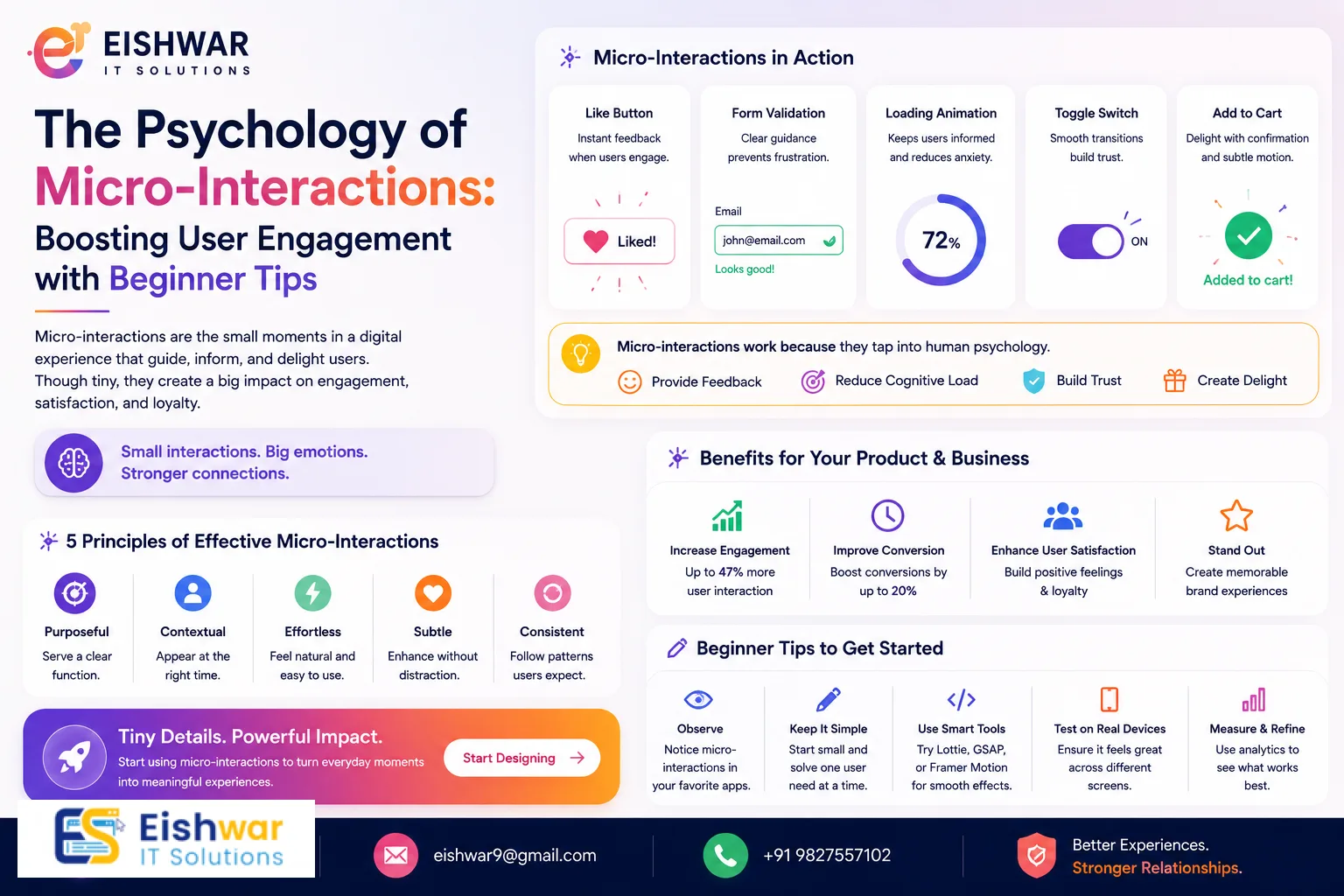
The Psychology of Micro-Interactions: Boosting User Engagement with Be
Published on: 10 Jun 2026
The Psychology of Micro-Interactions: Boosting User Engagement with Behavioural Design
Introduction
Every time you like a post on social media, the little animation of a heart or a thumbs-up makes you feel good. That's a micro-interaction at work. These tiny moments in design—a button changing colour, a subtle vibration, a loading spinner—are often overlooked, but they hold immense power. They tap into our psychology, creating delight, reducing friction, and building habits.
Learn more about our Website services
For business owners, marketers, and professionals in India, understanding micro-interactions is no longer optional. With users expecting seamless, intuitive experiences, even the smallest detail can determine whether they stay or bounce. In this guide, we'll explore the psychology behind micro-interactions, how they boost user engagement, and how you can apply behavioural design principles to your digital products. Whether you're running an e-commerce store, a SaaS platform, or a service website, these insights will help you create memorable experiences that drive results.
Main Section 1: What Are Micro-Interactions and Why Do They Matter?
Micro-interactions are the small, moment-based interactions that accomplish a single task. Think of them as the building blocks of user experience. They include everything from a pull-to-refresh gesture to an error message that winks at you. They have four parts: trigger, rules, feedback, and loops/modes.
Why do they matter? Because they shape how users feel about your brand. A well-designed micro-interaction can evoke joy, trust, and satisfaction. A poorly designed one can cause frustration and abandonment. For example, when you submit a form and see a smooth success animation, you feel a sense of accomplishment. That positive emotion reinforces the behaviour, making users more likely to complete future actions.
In India, where mobile-first usage is high, micro-interactions are crucial. Users often have limited attention spans and data constraints. A quick, satisfying interaction can make the difference between a conversion and a bounce. Consider the 'swipe to delete' gesture in email apps—it's fast, intuitive, and gives immediate feedback. This reduces cognitive load and keeps users engaged.
To put this into perspective, think of a popular Indian e-commerce app like Flipkart. When you add an item to your cart, a small animation of the item flying into the cart icon provides instant feedback. This micro-interaction not only confirms the action but also creates a sense of anticipation and satisfaction. Similarly, when you apply a coupon code and see a discount animation, it reinforces the value of the action. These small moments build trust and encourage repeat usage.
Another example is the 'like' button on Instagram. The heart animation, complete with a subtle colour change and a small burst, triggers a dopamine release in the brain. This is why users keep scrolling and liking—it's addictive. For Indian businesses, integrating such micro-interactions can significantly boost user retention and engagement.
Main Section 2: The Psychology Behind Micro-Interactions
To design effective micro-interactions, you need to understand a few psychological principles. Let's break them down.
1. The Peak-End Rule
People judge an experience based on its peak (most intense point) and end. Micro-interactions can create positive peaks. For instance, a colourful confetti animation after a purchase creates a memorable end, leaving the user happy. This increases the likelihood of repeat purchases. In practice, consider a food delivery app like Zomato. After you place an order, a short animation of a delivery person moving towards your location can be the peak moment. The end, such as a thank-you message with a smiley, leaves a lasting positive impression.
👉 Don't wait for the perfect moment; turn your vision into reality today.
Free Consultation2. Feedback Loops
We crave feedback. Every action we take needs a reaction. Micro-interactions provide instant feedback—a button press gives a visual or haptic response. This satisfies our need for control and predictability. In behavioural terms, it reinforces the action-reward cycle, encouraging users to continue. For example, when you toggle a switch in a settings menu, a smooth transition with a click sound (if enabled) confirms the change. This reduces uncertainty and builds confidence in the interface.
3. The Zeigarnik Effect
Our brains remember incomplete tasks better than completed ones. Micro-interactions can leverage this by creating a sense of progress. For example, a progress bar that animates smoothly keeps users motivated to finish a multi-step form. Each micro-interaction signals forward movement, reducing drop-off. In a loan application form on a fintech app like Paytm, a step-by-step progress indicator with checkmarks and subtle animations can make the process feel less daunting. Users are more likely to complete the form because they see progress.
4. Cognitive Fluency
Easy-to-process information feels more true and pleasant. Micro-interactions that are smooth and intuitive reduce mental effort. For example, a toggle switch that moves with a satisfying click feels more natural than a checkbox. This fluency enhances user satisfaction and trust. In a banking app, a simple animation when transferring money—like a checkmark with a brief glow—makes the transaction feel secure and effortless.
Additionally, the concept of 'chunking' applies here. Micro-interactions can break complex tasks into smaller, manageable steps. For instance, a travel booking site might use a step-by-step wizard with micro-interactions at each stage—selecting dates, choosing seats, and making payment. Each step's animation provides a sense of completion, reducing cognitive load and increasing conversion.
Main Section 3: How to Apply Micro-Interactions in Your Design
Now that you know the 'why', let's dive into the 'how'. Here are practical ways to integrate micro-interactions into your digital products.
1. Onboarding and Tutorials
First impressions matter. Use micro-interactions to guide users through your app or website. Animated tooltips, pulsing buttons, or swipe hints can make onboarding feel like a game. For example, a dating app might use a subtle bounce animation to encourage users to swipe right. In practice, a language learning app like Duolingo uses a cheerful owl character that nods and cheers as you complete lessons. This gamified micro-interaction keeps users engaged and motivated to continue.
2. Form Completion
Forms are necessary but often boring. Add micro-interactions to make them engaging. When a user fills in a field correctly, show a green checkmark with a gentle animation. If they make an error, use a red shake but with a friendly tone. This reduces anxiety and encourages completion. For instance, a job portal like Naukri.com could use a progress bar that fills up as you complete your profile, with each section showing a small celebration animation when done. This turns a tedious task into a rewarding experience.
👉 Free Website Audit
Get Free Audit3. Notifications and Alerts
Notifications can be intrusive or delightful. Use micro-interactions to soften the blow. A badge that appears with a bounce, a sound that's pleasant, or a subtle vibration can make notifications feel less annoying. For instance, a shopping app might show a small animation of an item dropping into a cart when added. In a messaging app like WhatsApp, the 'typing' indicator is a classic micro-interaction that builds anticipation. Similarly, when you receive a new message, a subtle vibration and a brief animation of the message appearing can make the experience more engaging.
4. Loading States
Waiting is frustrating. Use micro-interactions to distract and engage users during load times. A fun spinner, a progress bar with personality, or a skeleton screen that fades in can make the wait feel shorter. For example, a food delivery app might show a cooking animation while the order is being prepared. In a video streaming app like Hotstar, a loading spinner that mimics a spinning disc with a subtle glow can reduce perceived wait time. Skeleton screens, which show a grey placeholder that gradually fills with content, are also effective. They give users a sense of progress and reduce anxiety.
5. Error Handling
Errors are inevitable, but how you handle them matters. Instead of a boring '404' page, use a playful micro-interaction. A lost astronaut animation or a friendly message with a button to go home can turn frustration into a smile. This builds brand loyalty. For example, a travel booking site might show a cute illustration of a suitcase with a broken wheel and a message like 'Oops, we took a wrong turn!' along with a button to retry. This humanizes the error and reduces user frustration.
Another practical tip: use micro-interactions to guide users through recovery. For instance, if a payment fails, show a gentle animation of the transaction reversing, followed by a clear call-to-action to retry. This provides feedback and reduces confusion.
Expert Tips
- Keep it subtle: Micro-interactions should enhance, not distract. Avoid over-animating; users might get annoyed. For example, a simple colour change on a button is often enough.
- Test with real users: Use A/B testing to see which micro-interactions improve engagement. Tools like Hotjar or Google Analytics can help track behaviour. For instance, test two versions of a 'like' button—one with a heart animation and one without—and measure click-through rates.
- Align with brand personality: Your micro-interactions should reflect your brand's tone. A playful brand can use bouncy animations; a professional brand might prefer smooth, minimal transitions. For example, a fintech app should use subtle, secure-feeling animations, while a gaming app can use vibrant, energetic ones.
- Optimize for mobile: In India, many users access the internet via mobile. Ensure micro-interactions work well on small screens and touch interfaces. Use touch-friendly gestures like swipe and tap, and avoid hover-dependent interactions.
- Use sound sparingly: Sound can be powerful but also intrusive. Offer users the option to mute sounds. For example, a notification sound should be optional, and the default should be silent or subtle.
- Consider performance: Heavy animations can slow down your site, especially on low-end devices. Use lightweight libraries like Lottie for vector animations, and optimize with lazy loading.
- Leverage haptic feedback: On mobile devices, haptic feedback (vibration) can enhance micro-interactions. For example, a long press on a button can trigger a subtle vibration, confirming the action without visual clutter.
Common Mistakes
- Overloading the interface: Too many micro-interactions can overwhelm users. Focus on key actions. For instance, avoid animating every button on a page; reserve animations for primary actions like 'Add to Cart' or 'Submit'.
- Ignoring accessibility: Some users may have motion sensitivity. Provide options to reduce animations (e.g., prefers-reduced-motion). Use CSS media queries to detect this preference and disable animations accordingly.
- Inconsistent feedback: If a button animates on one page but not another, users get confused. Maintain consistency across your product. Create a design system that defines standard micro-interactions for common actions.
- Slow performance: Heavy animations can slow down your site, especially on low-end devices. Optimize for performance. Use CSS transitions instead of JavaScript for simple animations, and compress assets.
- Forgetting the context: A micro-interaction that works for a gaming app might not suit a banking app. Always consider the user's emotional state. For example, during a financial transaction, users want reassurance, not playfulness.
- Ignoring cultural nuances: In India, certain colours and symbols have cultural meanings. For example, red might signify danger or auspiciousness depending on context. Test micro-interactions with local users to avoid misinterpretation.
Future Trends
The future of micro-interactions is exciting. We'll see more integration with AI and machine learning to personalize interactions. For example, a fitness app might adjust its animation speed based on your workout intensity. Voice and gesture-based micro-interactions will also grow, especially with smart speakers and AR/VR. In India, as internet penetration increases, micro-interactions will become even more critical for standing out in a crowded market. Expect more use of haptic feedback on mobile devices and seamless cross-device interactions.
👉 Free Homepage Demo
Book DemoAnother trend is the use of micro-interactions for accessibility. For instance, voice-activated micro-interactions can help users with visual impairments navigate apps. Additionally, augmented reality (AR) micro-interactions, like virtual try-ons for clothing or furniture, will become more common. For Indian e-commerce, this can reduce return rates and increase customer satisfaction.
We'll also see more data-driven micro-interactions. By analysing user behaviour, designers can trigger specific animations at optimal moments. For example, if a user hesitates on a checkout page, a subtle animation of a discount code appearing can nudge them to complete the purchase. This combines behavioural design with real-time analytics.
FAQs
1. What are micro-interactions in UX/UI design?
Micro-interactions are small, moment-based interactions that accomplish a single task, such as liking a post, swiping to delete, or a button changing colour. They provide feedback and enhance user experience. They consist of four parts: trigger, rules, feedback, and loops/modes.
2. How do micro-interactions boost user engagement?
They create positive emotions, reduce friction, and provide instant feedback. This reinforces user behaviour, making them more likely to return and complete desired actions. For example, a 'like' animation triggers a dopamine release, encouraging repeated use.
3. Can micro-interactions improve conversion rates?
Yes, by reducing anxiety during form fills, making loading times feel shorter, and creating delightful moments at key touchpoints, micro-interactions can significantly improve conversion rates. For instance, a progress bar with animations can reduce form abandonment by up to 20%.
4. What tools can I use to create micro-interactions?
Tools like Adobe XD, Figma, Principle, and Framer can help design micro-interactions. For implementation, CSS animations, JavaScript libraries like GSAP, and frameworks like Lottie are popular. For prototyping, tools like ProtoPie allow for advanced interactions.
5. Are micro-interactions suitable for all types of websites?
Yes, but they should be tailored to the audience and context. A professional service site might use subtle transitions, while a gaming site can use more playful animations. Always test with your target users to ensure they enhance rather than distract.
6. How do I measure the impact of micro-interactions?
Use A/B testing to compare engagement metrics like click-through rates, time on page, and conversion rates. Tools like Google Analytics, Hotjar, and Mixpanel can track user behaviour. Also, conduct user surveys to gather qualitative feedback on delight and satisfaction.
7. What are some common mistakes to avoid when designing micro-interactions?
Common mistakes include overloading the interface with too many animations, ignoring accessibility (e.g., motion sensitivity), inconsistent feedback across pages, slow performance, and forgetting the user's context. Always test on multiple devices and with diverse user groups.
Conclusion
Micro-interactions are more than just design flourishes—they are powerful tools rooted in psychology that can dramatically boost user engagement. By understanding principles like the peak-end rule, feedback loops, and cognitive fluency, you can create experiences that delight users and drive business results. For Indian businesses, where competition is fierce and user expectations are high, investing in micro-interactions is a smart move. Start small, test often, and always keep the user's needs at the centre. Remember, the smallest details often make the biggest impact.
CTA
Ready to elevate your digital experience? At EishwarITSolution, we specialize in data-driven UX/UI design that incorporates the latest trends, including micro-interactions. Contact us today for a free consultation and let's create something delightful together.