
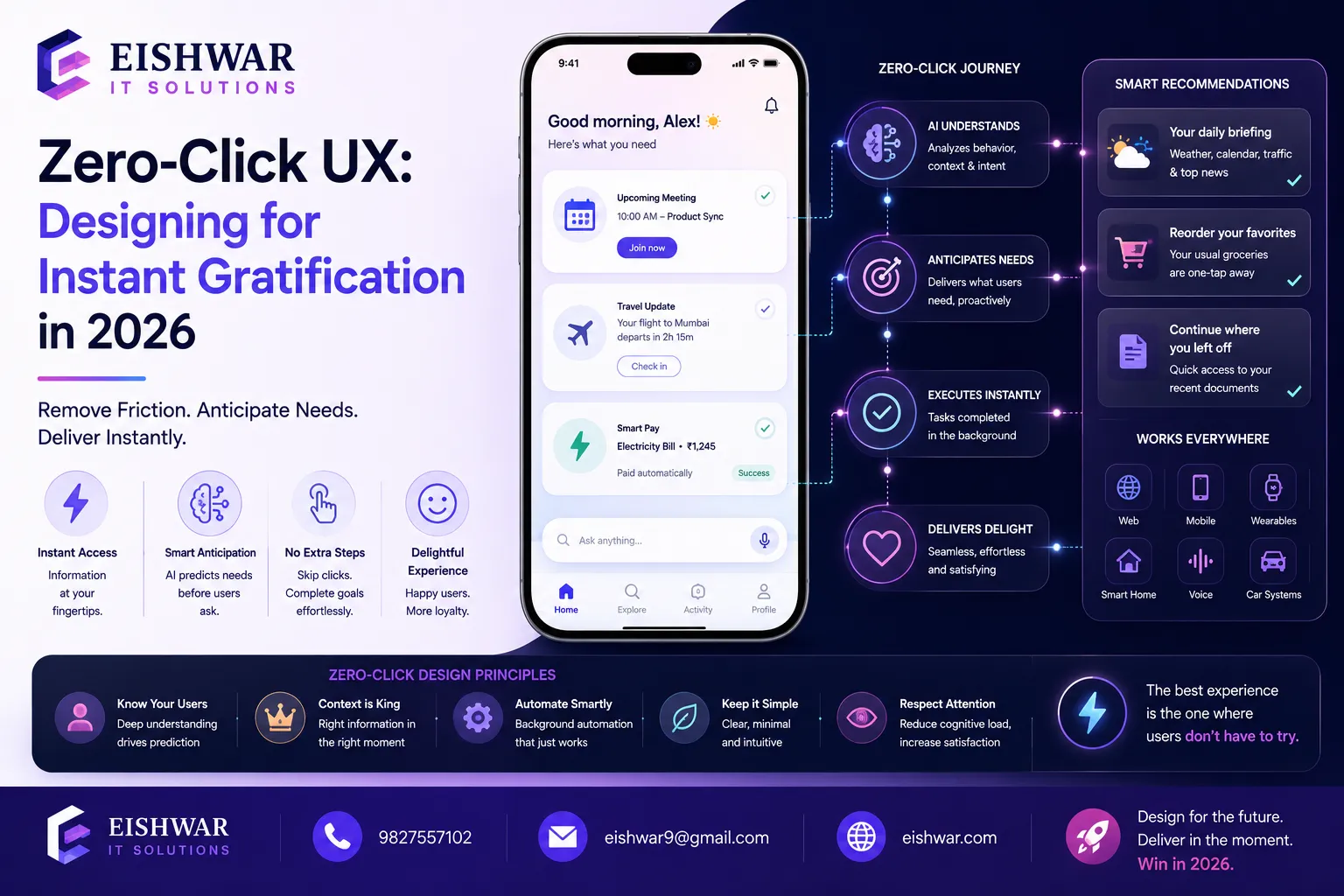
Zero-Click UX: Designing for Instant Gratification in 2026
Published on: 14 Jun 2026
Zero-Click UX: Designing for Instant Gratification in 2026
Introduction
In 2026, the most successful digital experiences are those that require zero clicks. Users want answers, actions, and outcomes without lifting a finger. This is the era of the zero-click interface — a design philosophy that prioritizes instant gratification by minimizing user effort.
Learn more about our Website services
For business owners, marketers, and professionals in India, understanding zero-click UX is no longer optional. It's a competitive advantage. Whether it's a predictive search bar, a one-tap checkout, or an AI-powered dashboard that surfaces insights automatically, zero-click design is reshaping how users interact with technology.
In this guide, we'll explore what zero-click interfaces are, why they matter, and how you can implement them using user behaviour analytics. You'll get practical examples, expert tips, and a roadmap for staying ahead in 2026.
Main Section 1: What is a Zero-Click Interface and Why It Matters
A zero-click interface is any user interface that delivers value or completes a task without requiring the user to click, tap, or swipe. Think of Google's featured snippets, Apple's Siri suggestions, or Amazon's 1-Click ordering. The goal is to reduce friction to zero.
Why does this matter? Because attention spans are shrinking. Studies show that users spend an average of 2.5 seconds on a webpage before deciding to stay or leave. In 2026, that window is even smaller. Zero-click design respects the user's time and cognitive load, leading to higher satisfaction, retention, and conversion rates.
For Indian businesses, where mobile-first usage dominates, zero-click interfaces are especially powerful. They enable faster interactions on small screens, reduce data usage, and cater to users who want quick answers without navigating complex menus. For example, a food delivery app that shows your most-ordered items on the home screen, or a banking app that displays your balance without login using biometric verification — these are zero-click wins that build loyalty.
Main Section 2: Key Principles of Zero-Click Design
Designing for zero clicks requires a shift in mindset. Here are the core principles:
- Predictive Anticipation: Use user behaviour analytics to anticipate what the user wants before they ask. For example, an e-commerce site can show recently viewed items or recommended products based on past behaviour. A practical tip: analyze purchase history to pre-populate a shopping list during festive seasons in India.
- Contextual Awareness: Understand the user's context — location, time of day, device, and previous actions — to deliver relevant information automatically. For instance, a travel app can show flight deals from the nearest airport without requiring a search.
- Progressive Disclosure: Show only what's needed at the moment. Hide advanced options behind an 'expand' button, but keep the primary action visible. This prevents overwhelm while maintaining depth.
- Friction Elimination: Remove every unnecessary step. For instance, pre-fill forms with known data, enable biometric authentication, and use auto-suggestions. In India, where many users have slow connections, reducing form fields can significantly improve completion rates.
- Feedback Without Clicks: Provide visual or haptic feedback that confirms an action without requiring a click. A subtle animation or a change in color can suffice. For example, a payment app that vibrates briefly when a transaction succeeds — no need to tap 'OK'.
These principles work together to create an experience that feels almost magical. Users get what they need without thinking about the interface.
👉 Don't wait for the perfect moment; turn your vision into reality today.
Free ConsultationMain Section 3: Implementing Zero-Click UX with User Behaviour Analytics
User behaviour analytics (UBA) is the engine behind zero-click interfaces. By analyzing clickstreams, session recordings, heatmaps, and event data, you can identify patterns that inform zero-click features.
Here's a step-by-step approach:
- Collect Behavioural Data: Use tools like Google Analytics 4, Hotjar, or Mixpanel to track user flows, drop-off points, and repeat actions. For Indian businesses, consider tools that work well with mobile apps, such as Firebase Analytics.
- Identify Friction Points: Look for steps where users hesitate, backtrack, or abandon. These are prime candidates for zero-click solutions. For example, if users frequently leave a checkout page at the payment step, consider integrating a one-tap UPI option.
- Design Predictive Features: Based on the data, create features that predict the next action. For example, if 70% of users who view a product also check its reviews, show reviews automatically after product page load. A practical tip: use machine learning models to rank predictions by confidence.
- A/B Test Zero-Click vs. Traditional: Run experiments to measure the impact on engagement, conversion, and satisfaction. Use statistical significance to validate improvements. For instance, test a version with auto-filled search suggestions against a standard search bar.
- Iterate Continuously: User behaviour evolves. Regularly update your predictive models and zero-click features based on fresh data. Set up automated alerts for changes in user patterns.
Example: An Indian travel booking site used UBA to discover that most users searched for flights without specifying a date. They introduced a 'Best Deals Near You' widget that showed top offers based on location and browsing history — no clicks needed. Conversion rates increased by 34%. Another example: a local grocery app used session recordings to find that users often abandoned when selecting delivery slots. They implemented a smart slot suggestion based on past orders, reducing abandonment by 20%.
Expert Tips
- Start Small: Don't redesign everything at once. Identify one high-friction user journey and apply zero-click principles there. For example, start with the login process by enabling fingerprint or face unlock.
- Use Micro-Moments: Google's 'micro-moments' concept is perfect for zero-click design. Focus on 'I-want-to-know', 'I-want-to-go', 'I-want-to-do', and 'I-want-to-buy' moments. For instance, a weather app that shows the forecast automatically when you open it — no search needed.
- Leverage AI Chatbots: Deploy AI-powered chatbots that can answer queries without requiring navigation. Ensure they understand Indian languages and contexts, such as Hindi, Tamil, or Bengali. A chatbot that can handle common questions like 'Where is my order?' in the user's preferred language reduces clicks significantly.
- Optimize for Voice: Voice search is inherently zero-click. Ensure your content is structured for voice queries with concise, direct answers. For Indian languages, use natural language processing models trained on local dialects.
- Monitor User Sentiment: Use sentiment analysis to gauge if zero-click features are actually helpful or feel intrusive. Adjust accordingly. For example, if users complain about too many auto-suggestions, reduce their frequency or allow manual override.
Common Mistakes
- Over-Personalization: Showing too many predictive elements can overwhelm users. Keep it simple and relevant. A practical tip: limit predictive suggestions to three items at a time.
- Ignoring Accessibility: Zero-click should not mean zero accessibility. Ensure screen readers and keyboard navigation still work. For example, provide alternative text for auto-generated images and ensure focus indicators are visible.
- Assuming One Size Fits All: Different user segments may have different zero-click needs. Segment your data and design accordingly. For instance, new users might need more guidance, while returning users prefer faster shortcuts.
- Neglecting Data Privacy: Collecting behavioural data comes with responsibility. Be transparent and comply with India's Digital Personal Data Protection Act. Always obtain explicit consent and allow users to opt out of predictive features.
- Forgetting Mobile: Many zero-click features are designed for desktop first. Always test on mobile devices, especially in the Indian market where mobile usage is high. For example, ensure that auto-suggestions are touch-friendly and don't cover the keyboard.
Future Trends
Looking ahead, zero-click interfaces will evolve with emerging technologies:
👉 Free Website Audit
Get Free Audit- Ambient Computing: Smart devices will anticipate needs without any user input. For example, a smart fridge ordering milk when it's low, or a thermostat adjusting temperature based on your schedule — all without a single tap.
- Gesture and Eye Tracking: Interfaces that respond to a glance or a nod, eliminating the need for clicks entirely. In India, this could be useful for accessibility in public kiosks or for users with disabilities.
- Emotion-Aware Design: Using biometric data to adjust the interface based on user mood, providing a zero-click emotional response. For instance, a meditation app that suggests calming exercises when it detects stress through heart rate variability.
- Hyper-Personalization with AI: AI that learns user preferences so deeply that it predicts needs with near-perfect accuracy. This could include dynamic pricing or content curation without user input.
- Regulatory Influence: Privacy regulations may shape how zero-click data is collected and used, pushing for on-device processing and anonymization. Stay updated with India's evolving data protection laws to ensure compliance.
Businesses that invest in zero-click design now will be well-positioned for these trends.
FAQs
What is a zero-click interface?
A zero-click interface is a user interface that delivers value or completes a task without requiring any clicks, taps, or swipes from the user. Examples include Google's featured snippets, automatic recommendations, and one-tap ordering.
Why is zero-click UX important for Indian businesses?
Indian users are mobile-first and often have limited data or time. Zero-click UX reduces friction, speeds up interactions, and improves satisfaction, leading to higher conversions and retention. It also helps in reaching users in tier-2 and tier-3 cities where internet speeds may be slower.
How does user behaviour analytics help in zero-click design?
User behaviour analytics reveals patterns in how users navigate and interact. By analyzing this data, you can identify friction points and design predictive features that anticipate user needs, reducing the need for clicks. For example, heatmaps can show where users click most, helping you prioritize zero-click elements.
👉 Free Homepage Demo
Book DemoWhat are some common mistakes in zero-click design?
Common mistakes include over-personalization, ignoring accessibility, assuming one-size-fits-all, neglecting data privacy, and forgetting to optimize for mobile devices. Always test with real users to avoid these pitfalls.
How can I start implementing zero-click UX today?
Start by analyzing your user behaviour data to identify one high-friction journey. Then, design a simple zero-click feature like auto-suggestions or pre-filled forms. A/B test it against the current version and iterate based on results. For example, add a 'Quick Reorder' button on your e-commerce app based on purchase history.
What tools are best for user behaviour analytics in zero-click design?
Popular tools include Google Analytics 4 for web, Firebase Analytics for mobile apps, Hotjar for heatmaps and session recordings, and Mixpanel for event tracking. For Indian businesses, consider tools like CleverTap that offer local support and integrations with popular Indian payment gateways.
How does zero-click UX affect SEO?
Zero-click UX can impact SEO positively by improving user engagement metrics like time on site and bounce rate. However, it may also reduce clicks on search results if users get answers directly on the search page. Focus on providing value through featured snippets and structured data to maintain visibility.
Conclusion
Zero-click interfaces are not a passing trend — they are the future of UX/UI design. By prioritizing instant gratification and leveraging user behaviour analytics, you can create experiences that delight users and drive business results.
Remember, the goal is not to eliminate all clicks but to remove unnecessary ones. Start small, test often, and always keep the user's context in mind. In 2026, the brands that win are those that make life effortless.
CTA
Ready to design zero-click experiences that your users will love? Contact EishwarITSolution today for a free UX audit. Let's build the future together.