
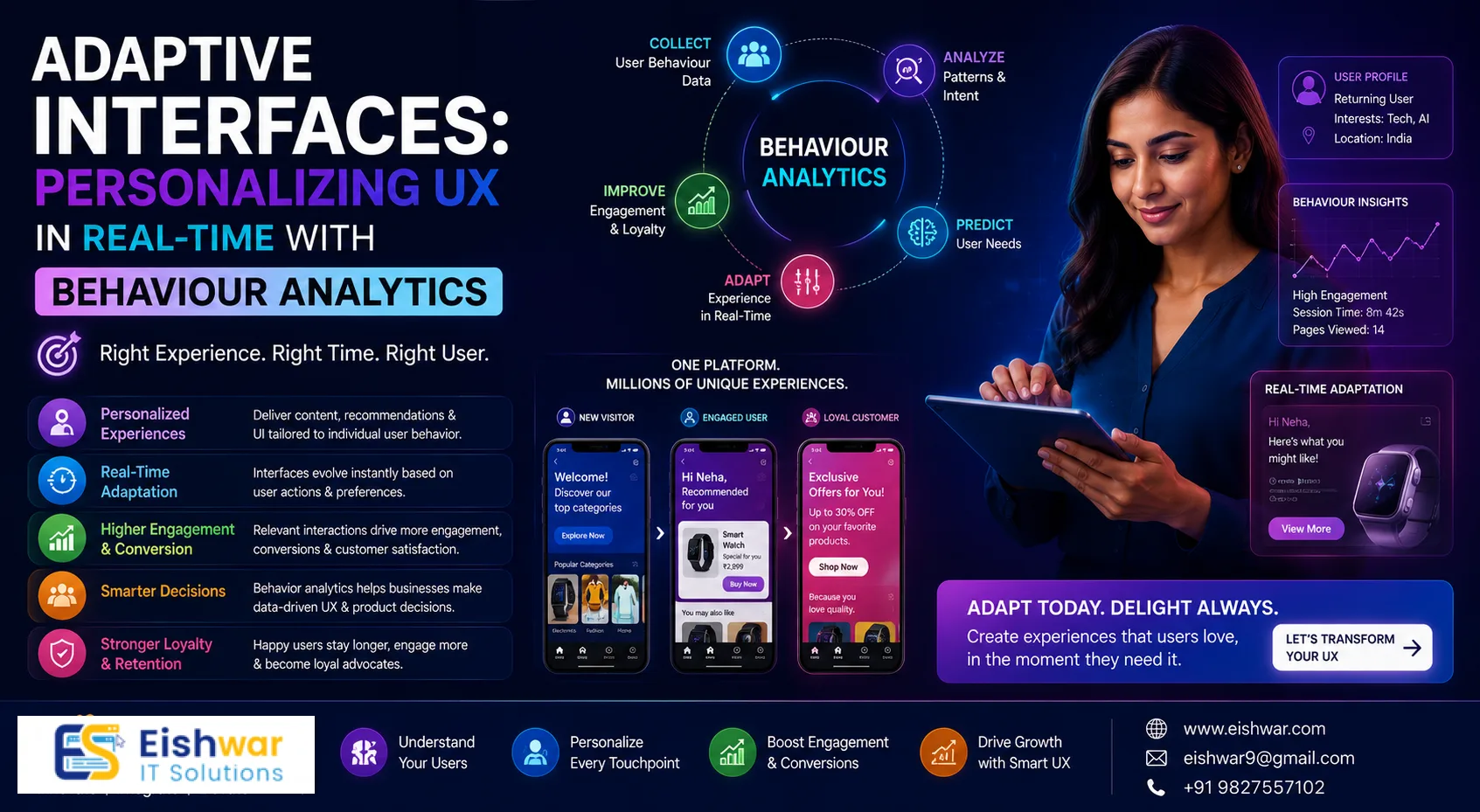
Adaptive Interfaces: Personalizing UX in Real-Time with Behaviour Anal
Published on: 06 Jul 2026
Adaptive Interfaces: Personalizing UX in Real-Time with Behaviour Analytics
Introduction
In 2026, users expect every digital interaction to feel tailor-made. Static, one-size-fits-all interfaces are losing ground to adaptive interfaces—dynamic designs that shift in real-time based on individual user behaviour. Powered by user behaviour analytics, these interfaces learn from clicks, scrolls, dwell times, and navigation patterns to deliver a uniquely personalized experience. For business owners, marketers, and professionals in India, adopting adaptive interfaces isn't just a trend—it's a competitive necessity. This article explores how behaviour analytics fuels real-time personalization, offers actionable strategies, and highlights what to avoid.
Learn more about our Website services
What Are Adaptive Interfaces and Why Do They Matter?
Adaptive interfaces are UI systems that automatically adjust content, layout, navigation, and even visual elements based on real-time user data. Unlike responsive design, which adapts to device size, adaptive interfaces adapt to user intent and context. For example, an e-commerce site might rearrange product categories based on a user's browsing history, or a SaaS dashboard might prioritize features the user frequently accesses. According to a 2025 McKinsey report, companies that excel at personalization generate 40% more revenue than average players. In India, where digital adoption is skyrocketing, adaptive interfaces can significantly reduce bounce rates and boost conversions.
Behaviour analytics tools—such as heatmaps, session recordings, and event tracking—provide the raw data needed to trigger these adaptations. By analyzing patterns, you can predict what a user wants next and serve it instantly. This creates a frictionless experience that feels intuitive and almost magical. For instance, a leading Indian edtech platform used session recordings to discover that users often abandoned the sign-up process when asked for too many details. By adapting the interface to show only essential fields first, they increased sign-up completion by 35%.
How Behaviour Analytics Powers Real-Time Personalization
Real-time personalization relies on a continuous loop of data collection, analysis, and UI adjustment. Here's how it works:
- Data Collection: Tools like Hotjar, Mixpanel, or Google Analytics capture user actions—mouse movements, clicks, scroll depth, form interactions, and time on page. For example, tracking scroll depth can reveal which sections of a landing page are most engaging.
- Pattern Recognition: Machine learning algorithms identify segments and intents. For instance, a user who visits pricing pages twice in one session likely has high purchase intent. An Indian SaaS company used this pattern to trigger a personalized demo request pop-up, resulting in a 20% increase in demo bookings.
- UI Adaptation: The interface dynamically changes—showing a discount pop-up, simplifying navigation, or highlighting a demo request button. The key is to make these changes feel seamless, not jarring.
Example: An Indian travel booking site uses behaviour analytics to detect users searching for flights to Goa. The interface immediately shows a banner with hotel deals in Goa, adjusts the search bar to prioritize flight+hotel combos, and changes the hero image to a Goan beach. This real-time shift increases booking conversions by 25%. As a practical tip, ensure that such adaptations are tested on slow network connections common in parts of India to avoid frustrating users.
👉 Don't wait for the perfect moment; turn your vision into reality today.
Free ConsultationKey Strategies for Building Adaptive Interfaces
Implementing adaptive interfaces requires a thoughtful approach. Start with these strategies:
- Segment by Behaviour, Not Demographics: Group users based on actions—new visitors, power users, cart abandoners—rather than age or location. A returning user might see a simplified checkout, while a first-timer gets a guided tour. For example, an Indian e-commerce site segments users who abandon carts and shows a personalized discount code on their next visit.
- Use Progressive Disclosure: Show only what's relevant at the moment. For example, a financial app hides advanced portfolio tools until a user completes their first investment. This reduces cognitive load and keeps beginners engaged.
- A/B Test Adaptations: Not every change improves UX. Test variations—like different CTAs for different behaviour segments—and iterate based on metrics. For instance, test whether a 'Get Started' button works better than a 'Learn More' button for first-time visitors.
- Leverage Contextual Cues: Combine behaviour data with time, device, and location. A food delivery app might suggest breakfast items in the morning and dinner options in the evening. In India, also consider regional festivals—suggesting sweets during Diwali can boost orders.
- Ensure Speed: Adaptive changes must happen in milliseconds. Use lightweight JavaScript and server-side rendering to avoid lag. A delay of even 200ms can increase bounce rates by 10%.
Expert Tips for Maximizing Adaptive UX
- Start Small: Pick one high-traffic page and test one adaptive element—like a dynamic call-to-action button. Measure the impact before scaling. For example, an Indian news site tested a dynamic 'Read More' button that changed colour based on user engagement, leading to a 15% increase in article reads.
- Use Predictive Analytics: Tools like Adobe Target or Optimizely can forecast user needs based on past behaviour. For instance, predict which product a user will buy and pre-load its page. An Indian fashion retailer used this to reduce page load times by 30% for returning customers.
- Respect Privacy: Be transparent about data use. Offer opt-out options and comply with India's Digital Personal Data Protection Act, 2023. For example, display a clear cookie consent banner that explains how data is used for personalization.
- Monitor for Bias: Behaviour analytics can reinforce biases if not checked. Ensure your adaptations don't exclude certain user groups. For instance, if your algorithm favours users who click fast, it might neglect older users who take more time. Regularly audit your models for fairness.
Common Mistakes to Avoid
- Over-Personalization: Too many changes can overwhelm users. Stick to 2-3 adaptive elements per page. For example, changing both the hero image and the CTA simultaneously might confuse users.
- Ignoring Mobile: Most Indian users access the web via mobile. Ensure adaptations work seamlessly on small screens. Test on various devices and network speeds.
- Neglecting Testing: Deploying adaptive changes without A/B testing can harm UX. Always validate with real users. A common mistake is assuming that all users will react positively to personalization.
- Data Silos: If behaviour data isn't shared across teams, adaptations may be inconsistent. Use a unified analytics platform like Google Analytics 4 or a CDP (Customer Data Platform) to ensure all teams have access to the same insights.
Future Trends for Adaptive Interfaces
Looking ahead, adaptive interfaces will become even smarter. Voice-enabled adaptations will let users change UI via speech, such as saying 'simplify this page' to hide advanced options. Emotion AI will detect frustration from typing speed or mouse pressure and simplify the interface accordingly. Hyper-localization will tailor content to regional languages and cultural norms—for example, an Indian e-commerce site might show product recommendations in Hindi for users in Uttar Pradesh and in Tamil for users in Tamil Nadu. By 2028, adaptive interfaces will be the norm, not the exception, and businesses that invest now will have a significant competitive advantage.
👉 Free Website Audit
Get Free AuditFrequently Asked Questions
- What is an adaptive interface? An adaptive interface is a UI that changes in real-time based on user behaviour, preferences, or context to deliver a personalized experience.
- How is it different from responsive design? Responsive design adapts to screen size; adaptive interfaces adapt to user intent and behaviour.
- What tools are best for behaviour analytics? Popular tools include Hotjar, Mixpanel, Google Analytics 4, and FullStory. For advanced AI, try Adobe Target or Optimizely.
- Is real-time personalization expensive? Costs vary. Basic implementations using free analytics tools are affordable. Enterprise-grade solutions may require investment but offer higher ROI.
- How do I ensure user privacy? Anonymize data, get explicit consent, and follow local regulations like India's DPDP Act. Provide clear opt-out options.
- Can small businesses use adaptive interfaces? Yes. Start with simple changes—like dynamic CTAs or personalized content blocks—using affordable analytics tools.
- How do I measure the success of adaptive interfaces? Track metrics like conversion rate, bounce rate, time on site, and user satisfaction scores. Use A/B testing to compare adaptive vs. static versions.
- What are the technical requirements for implementing adaptive interfaces? You need a robust analytics platform, a way to trigger UI changes (e.g., JavaScript, server-side logic), and a testing framework. Ensure your tech stack can handle real-time data processing.
Conclusion
Adaptive interfaces represent the next frontier in UX design, blending real-time data with intelligent UI to create experiences that feel personal and effortless. By leveraging user behaviour analytics, you can move beyond guesswork and deliver exactly what your users need, when they need it. For Indian businesses, this approach can significantly improve engagement, retention, and revenue. Start small, test often, and always prioritize user trust.
Ready to Transform Your UX?
At EishwarITSolution, we specialize in building adaptive interfaces powered by behaviour analytics. Whether you're a startup or an enterprise, our team can help you design a personalized user experience that drives results. Contact us today for a free consultation and start your journey toward smarter, more adaptive design.
FAQs
What is an adaptive interface?
An adaptive interface is a UI that changes in real-time based on user behaviour, preferences, or context to deliver a personalized experience.
How is it different from responsive design?
Responsive design adapts to screen size; adaptive interfaces adapt to user intent and behaviour.
👉 Free Homepage Demo
Book DemoWhat tools are best for behaviour analytics?
Popular tools include Hotjar, Mixpanel, Google Analytics 4, and FullStory. For advanced AI, try Adobe Target or Optimizely.
Is real-time personalization expensive?
Costs vary. Basic implementations using free analytics tools are affordable. Enterprise-grade solutions may require investment but offer higher ROI.
How do I ensure user privacy?
Anonymize data, get explicit consent, and follow local regulations like India's DPDP Act. Provide clear opt-out options.
Can small businesses use adaptive interfaces?
Yes. Start with simple changes—like dynamic CTAs or personalized content blocks—using affordable analytics tools.
How do I measure the success of adaptive interfaces?
Track metrics like conversion rate, bounce rate, time on site, and user satisfaction scores. Use A/B testing to compare adaptive vs. static versions.
What are the technical requirements for implementing adaptive interfaces?
You need a robust analytics platform, a way to trigger UI changes (e.g., JavaScript, server-side logic), and a testing framework. Ensure your tech stack can handle real-time data processing.
CTA
Ready to transform your UX? At EishwarITSolution, we specialize in building adaptive interfaces powered by behaviour analytics. Whether you're a startup or an enterprise, our team can help you design a personalized user experience that drives results. <a href="http://eishwar.com/contact">Contact us today</a> for a free consultation and start your journey toward smarter, more adaptive design.