
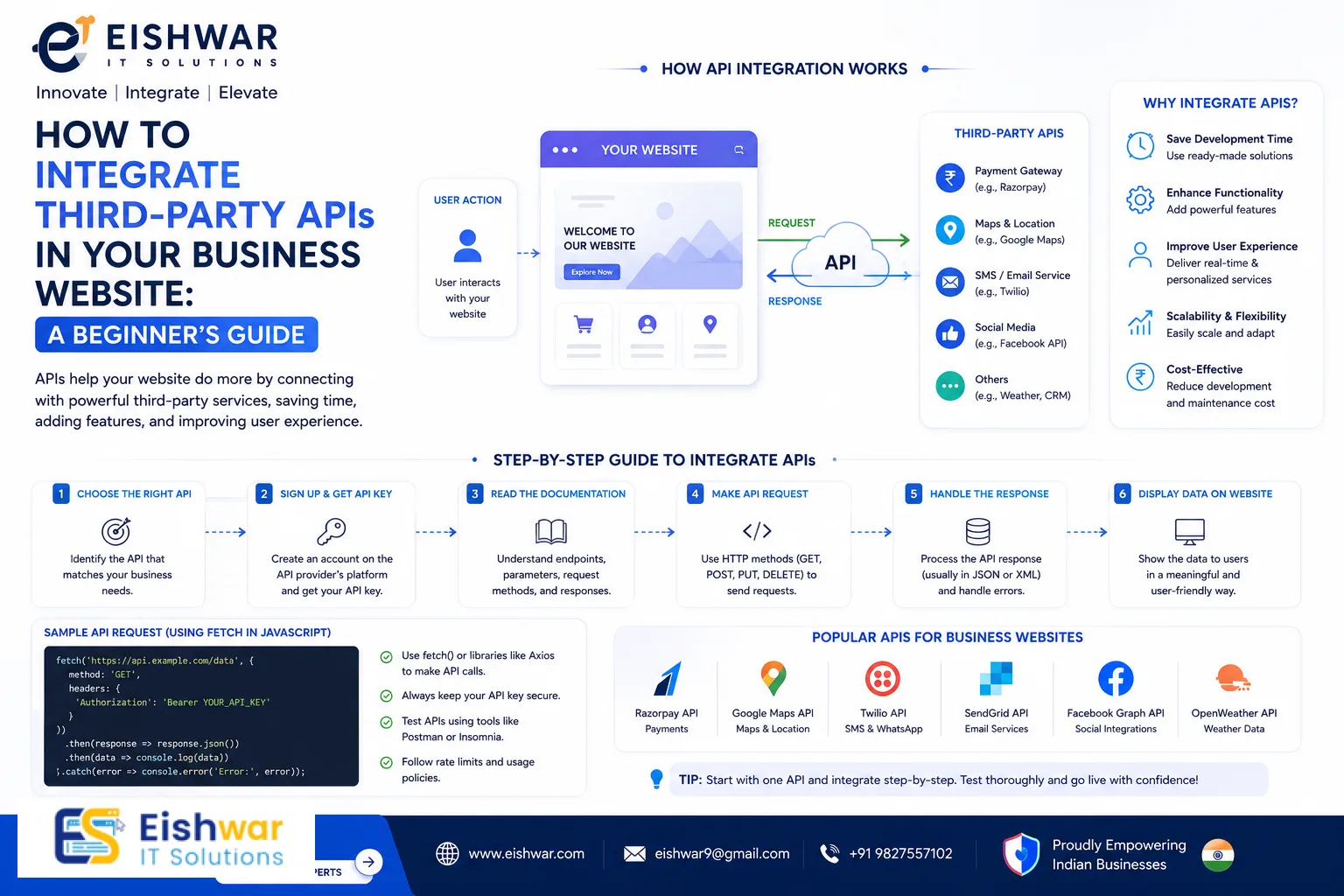
How to Integrate Third-Party APIs in Your Business Website: A Beginner
Published on: 06 Jul 2026
How to Integrate Third-Party APIs in Your Business Website: A Beginner's Guide
Introduction
Imagine your business website as a high-performance car. It looks great, runs smoothly, but to truly stand out, you need to add some premium features—like GPS navigation, a premium sound system, or real-time traffic updates. In the digital world, these features come from third-party APIs (Application Programming Interfaces). They allow your website to tap into external services—think payment gateways, social media feeds, mapping services, email marketing tools, and more—without you having to build everything from scratch.
Learn more about our Website services
For business owners, marketers, and professionals in India, integrating APIs can transform a basic website into a dynamic, powerful business asset. Whether you want to accept online payments via Razorpay, display Google Maps for your store locations, or send automated email campaigns through Mailchimp, APIs make it possible—quickly and cost-effectively. For instance, a small e-commerce store in Jaipur can integrate Razorpay to accept UPI payments within hours, rather than spending weeks building a custom payment system. Similarly, a local restaurant chain in Bangalore can use the Google Maps API to show real-time store locators, helping customers find the nearest outlet with ease.
But if you're new to website development, the idea of 'API integration' might sound intimidating. Don't worry. This guide will walk you through everything you need to know about integrating third-party APIs into your business website, in plain, simple language. By the end, you'll be ready to choose, implement, and manage APIs like a pro.
Main Section 1: What Are Third-Party APIs and Why Your Business Website Needs Them
Understanding APIs in Simple Terms
An API is like a digital waiter. When you (your website) want something from another service (like a payment processor), the API takes your request, communicates it to that service, and brings back the response. For example, when a customer clicks 'Pay Now' on your site, the payment API securely sends the transaction details to the bank and returns a success or failure message. Think of it as a messenger that bridges your website with external systems, handling all the complex negotiations behind the scenes.
Third-party APIs are built and maintained by external companies. You don't need to write the complex code behind them—you just need to learn how to 'talk' to them using standard protocols like HTTP and JSON. JSON (JavaScript Object Notation) is a lightweight data format that both humans and machines can read easily. For example, a weather API might return data like: {"temperature": 32, "condition": "sunny"}. Your website can parse this and display it to users instantly.
Why Your Business Website Needs APIs
- Save Time and Money: Building features like payment processing, SMS notifications, or live chat in-house takes months and costs lakhs. APIs let you add these features in hours. For example, integrating Twilio for SMS costs just a few rupees per message, while building your own SMS gateway would require telecom partnerships and infrastructure.
- Enhance User Experience: APIs let you offer real-time data—like currency conversion, stock availability, or weather updates—making your site more useful and engaging. Imagine a travel booking site that uses the Amadeus API to show live flight prices; users get accurate information without refreshing the page.
- Scale Easily: As your business grows, you can add more APIs (like CRM integration, analytics, or marketing automation) without rewriting your entire site. A startup in Pune that initially integrates only payment APIs can later add Shiprocket for shipping and Zoho for email campaigns, all without major code changes.
- Stay Competitive: Competitors are using APIs to offer faster checkouts, personalized recommendations, and seamless social logins. You need to keep up. For instance, a fashion retailer using the Instagram Graph API can display user-generated content on their site, building trust and driving sales.
Common Examples for Indian Businesses
- Payment Gateways: Razorpay, PayU, Instamojo—these support UPI, net banking, and cards, crucial for Indian customers.
- Maps & Location: Google Maps API for store locators, especially useful for businesses with multiple branches like clinics or restaurants.
- Social Media: Facebook, Twitter, Instagram login and share buttons to increase engagement and reduce sign-up friction.
- Email Marketing: Mailchimp, SendGrid, Zoho Campaigns for automated newsletters and follow-ups.
- SMS & Notifications: Twilio, MSG91 for order confirmations and alerts—essential for e-commerce in India where SMS is still widely used.
- Analytics: Google Analytics, Facebook Pixel to track user behavior and optimize campaigns.
- Shipping & Logistics: Shiprocket, Delhivery for real-time tracking and label generation, saving hours of manual work.
Main Section 2: Step-by-Step Guide to Integrating a Third-Party API
Step 1: Choose the Right API for Your Needs
Start by listing the features you want. Do you need online payments? Email automation? Real-time inventory sync? Then research APIs that offer these services. Look for:
👉 Don't wait for the perfect moment; turn your vision into reality today.
Free Consultation- Documentation: Good docs make integration easier. For example, Razorpay's documentation includes code samples in PHP, Python, and Node.js, with clear explanations of each endpoint.
- Pricing: Many APIs have free tiers for small businesses (e.g., Razorpay charges only per transaction, typically 2% for UPI). Google Maps offers $200 monthly credit, enough for most small sites.
- Support: Active community or customer support in India. Twilio has a dedicated Indian support team, while MSG91 offers local language assistance.
- Security: Ensure the API uses HTTPS and follows data protection norms (like PCI-DSS for payments). For example, Razorpay is PCI-DSS Level 1 compliant, the highest security standard.
Practical tip: Use comparison sites like G2 or Capterra to read reviews from other Indian businesses. For instance, a quick search for 'payment gateway for small business India' can reveal which APIs have the best uptime and customer service.
Step 2: Get Your API Key
Most APIs require authentication. You'll need to create an account with the provider, generate an API key (a unique code), and keep it secret. Never expose your API key in client-side code (like JavaScript) unless you use appropriate security measures. For example, if you're building a React app, store the key in a server-side environment variable and call the API from your backend. A common mistake is hardcoding keys in GitHub repositories—use a .env file instead.
👉 Free Website Audit
Get Free AuditStep 3: Understand the API Documentation
Documentation tells you how to make requests (endpoints, methods like GET/POST), what parameters to send, and what response to expect. For example, to use the Google Maps Geocoding API, you'd send a request like:GET https://maps.googleapis.com/maps/api/geocode/json?address=1600+Amphitheatre+Parkway&key=YOUR_API_KEY
Don't worry if this looks technical. Many APIs provide code samples in popular languages like PHP, Python, or JavaScript. Copy-paste and adapt. For instance, if you're using Python, the requests library simplifies this: response = requests.get(url, params=params). Always test the sample code in a tool like Postman or Insomnia before integrating into your site.
Step 4: Write the Integration Code
If you're using a CMS like WordPress, there are plugins that handle API integration for you (e.g., WooCommerce for payments). For custom sites, you'll write code. Here's a simple PHP example to send an SMS via Twilio:
require_once '/path/to/vendor/autoload.php';
use Twilio\Rest\Client;

$sid    = "your_account_sid";
$token  = "your_auth_token";
$twilio = new Client($sid, $token);

$message = $twilio->messages
                  ->create("+919876543210",
                           array("from" => "+15017122661",
                                 "body" => "Hello from EishwarITSolution!")
                  );
print($message->sid);
Test the code on a staging environment first. For a real-world scenario, you might wrap this in a function that takes the phone number and message as parameters, making it reusable across your site.
Step 5: Handle Errors Gracefully
APIs can fail due to network issues, rate limits, or invalid data. Always add error handling. For example, if a payment API returns an error, show a friendly message like 'Payment failed. Please try again.' Log the error for debugging. In PHP, you can use try-catch blocks: try { // API call } catch (Exception $e) { error_log($e->getMessage()); }. For JavaScript, use .catch() with promises.
Step 6: Test Thoroughly
Test with real and test data. Many APIs provide sandbox environments (e.g., Razorpay test mode). Check all scenarios: success, failure, timeout, partial data. For example, simulate a payment failure by using invalid card numbers, and ensure your site displays the correct error message. Also, test under load—use tools like JMeter to simulate multiple users making API calls simultaneously.
Step 7: Go Live and Monitor
Once testing is complete, switch to live API keys. Monitor the integration using analytics and logs. Set up alerts for unusual activity. For instance, use a service like Sentry to track API errors in real-time, or set up a cron job to check API uptime every hour. Many providers offer dashboards—Razorpay's dashboard shows transaction volumes and failure rates, helping you spot issues early.
Main Section 3: Practical Implementation Tips for Indian Businesses
Start with One API at a Time
Don't try to integrate everything at once. Pick the most critical feature—like payment processing—and get it right. Then add SMS notifications, then maps, and so on. This approach reduces complexity and allows you to learn from each integration. For example, a small bakery in Chennai might start with Razorpay for online orders, then add Google Maps for delivery tracking, and later integrate Mailchimp for promotional emails.
👉 Free Homepage Demo
Book DemoUse a Middleware or Integration Platform
If you're not comfortable coding, consider no-code tools like Zapier or Integromat (Make). They connect your website to hundreds of APIs without writing a single line. For example, you can automatically add new customer data from your website to a Google Sheet or Mailchimp list. A typical workflow: when a user submits a contact form on your site, Zapier triggers an action to add them to your email list. This is especially useful for small businesses without a dedicated developer.
Optimize for Mobile Users in India
Many Indians access websites via slow 4G or 3G connections. Ensure your API calls are lightweight. Use caching where possible (e.g., cache map tiles for a day). Minimize the number of API requests per page load. For example, instead of calling the weather API every time a user visits, cache the data for an hour. Also, consider using lazy loading—load API data only when the user scrolls to that section.
Consider Data Privacy and Compliance
India's Digital Personal Data Protection Act (DPDP) 2023 requires businesses to handle user data responsibly. When using APIs that collect personal data (like email or phone), inform users and get consent. Store API keys securely (environment variables, not in code). For example, if you're using a CRM API to store customer data, ensure you have a privacy policy that explains how data is used. Also, use encryption for sensitive data in transit and at rest.
Localize APIs for Indian Users
Use APIs that support Indian languages, currencies, and payment methods. For example, Razorpay supports UPI, Netbanking, and credit/debit cards popular in India. Google Maps API can display directions in Hindi or Tamil. If you're building a multilingual site, choose APIs that offer localization options. For instance, the SendGrid email API allows you to send emails in multiple languages based on user preferences.
Expert Tips
- Read the Rate Limits: Every API has a limit on how many requests you can make per minute/hour. Exceeding it can block your site. Plan accordingly. For example, the Google Maps Geocoding API allows 50 requests per second for free tier. If your site has high traffic, consider upgrading or implementing a queue system.
- Use API Wrappers: Many languages have libraries that simplify API calls. For example,
requestsin Python orAxiosin JavaScript. They handle authentication and parsing for you. For instance, therazorpay-phplibrary abstracts all the complexity of payment integration, letting you focus on business logic. - Version Your APIs: Providers update their APIs. Always use a specific version (e.g., v2) and test before upgrading. For example, when Twilio upgraded from v1 to v2, many sites broke because the endpoints changed. Pin your version in the URL to avoid surprises.
- Implement Webhooks: Some APIs send real-time updates (e.g., payment confirmation). Use webhooks to trigger actions on your site instantly. For example, when a payment is successful, a webhook from Razorpay can update your order status and send a confirmation email automatically.
- Keep Documentation Handy: Bookmark the API docs. They are your best friend during integration and troubleshooting. Also, join community forums—many APIs have active Slack channels or Stack Overflow tags where you can ask questions.
Common Mistakes
- Exposing API Keys in Public Repositories: Never commit API keys to GitHub. Use environment variables or secret managers. For example, a developer once accidentally pushed a Google Maps API key to a public repo, resulting in a $10,000 bill from unauthorized usage.
- Ignoring Error Responses: Always handle both success and error cases. A failed API call should not break your site. For instance, if the payment API times out, show a retry button instead of a blank page.
- Not Testing in Sandbox: Jumping straight to live can lead to unexpected charges or data corruption. Always use the sandbox environment first. For example, Razorpay's test mode uses fake card numbers, so you can simulate transactions without real money.
- Overlooking Documentation Updates: APIs change. Check for deprecation notices and update your integration. For example, Twitter's API v1.1 was deprecated in 2023, and sites still using it broke. Subscribe to provider changelogs.
- Forgetting to Set Timeouts: Without timeouts, your site may hang waiting for an API response. Set a reasonable timeout (e.g., 10 seconds) and handle the timeout gracefully. In PHP, you can set
curl_setopt($ch, CURLOPT_TIMEOUT, 10);.
Future Trends
The API landscape is evolving rapidly. For Indian businesses, these trends matter:
- GraphQL: A more flexible alternative to REST APIs. It lets you request exactly the data you need, reducing payload size. For example, instead of fetching an entire user profile, you can request only the name and email. This is particularly useful for mobile apps with limited bandwidth.
- API-First Design: More companies are building their websites around APIs, making integration seamless. This means your site can easily plug into multiple services without custom code. For instance, a headless CMS like Strapi exposes APIs by default, allowing you to connect to any frontend.
- AI & Machine Learning APIs: Services like Google Cloud Vision or OpenAI allow you to add image recognition, chatbots, or personalized recommendations. A small business could use the OpenAI API to power a customer support chatbot, reducing response times.
- Low-Code/No-Code Integration: Tools like Zapier and Make will become more sophisticated, enabling non-developers to connect APIs easily. For example, a marketing manager can set up a workflow that automatically adds new leads from Facebook Ads to a CRM without IT involvement.
- Government APIs: India's Open Government Data Platform (data.gov.in) offers APIs for weather, census, and more—useful for local businesses. For instance, a real estate site can use the census API to show population density data for different areas.
FAQs
- What is a third-party API?
An API (Application Programming Interface) created by an external company that allows your website to use its features, like payment processing or maps. It acts as a bridge between your site and the service provider. - Do I need coding skills to integrate an API?
Not necessarily. Many APIs offer plugins for WordPress or no-code tools like Zapier. However, basic coding knowledge helps for custom integrations. For example, if you use WooCommerce, you can add payment gateways via plugins without writing code. - How much does it cost to use third-party APIs?
Costs vary. Some APIs are free for limited use (e.g., Google Maps has a free tier of $200 monthly credit). Others charge per transaction (e.g., Razorpay charges ~2% per payment) or subscription (e.g., Mailchimp starts at ₹1,000/month). Always check pricing before integrating. - Is it safe to use third-party APIs for my business website?
Yes, if you choose reputable providers and follow security best practices: use HTTPS, keep API keys secret, and validate data. For example, Razorpay is PCI-DSS compliant, ensuring secure transactions. - Can I integrate multiple APIs on one website?
Absolutely. Many websites use several APIs—payment, maps, email, analytics—simultaneously. Just ensure they don't conflict. For instance, a travel site might use Google Maps for location, Amadeus for flights, and Stripe for payments, all working together. - What if an API stops working?
Always have a fallback plan. For example, if the payment API fails, show a message and log the error. Monitor API status pages for outages. You can also use multiple providers—e.g., integrate both Razorpay and PayU as backups. - How do I choose between REST and GraphQL APIs?
REST is simpler and widely supported, making it ideal for beginners. GraphQL offers more flexibility and efficiency, especially for complex data needs. Start with REST unless you have specific requirements for reducing data overfetching. - What is a sandbox environment?
A sandbox is a testing environment that mimics the live API but uses fake data. It allows you to test integrations without affecting real users or incurring costs. Most providers offer sandbox keys for development.
Conclusion
Integrating third-party APIs into your business website is no longer a luxury—it's a necessity for staying competitive in today's digital marketplace. By leveraging APIs, you can add powerful features quickly, improve user experience, and scale your business without massive development costs.
Remember to start small, choose reliable providers, test thoroughly, and always prioritize security. Whether you're a small business in Mumbai or a growing enterprise in Delhi, APIs can help you deliver more value to your customers. The key is to take that first step—choose one API, integrate it, and learn from the process. As you gain confidence, you'll unlock new possibilities for your website.
CTA
Ready to supercharge your business website with powerful API integrations? Contact EishwarITSolution today for expert guidance and custom development. Let's build a website that works smarter for you. Our team specializes in API integration for Indian businesses, from payment gateways to logistics, ensuring a seamless experience for your customers.