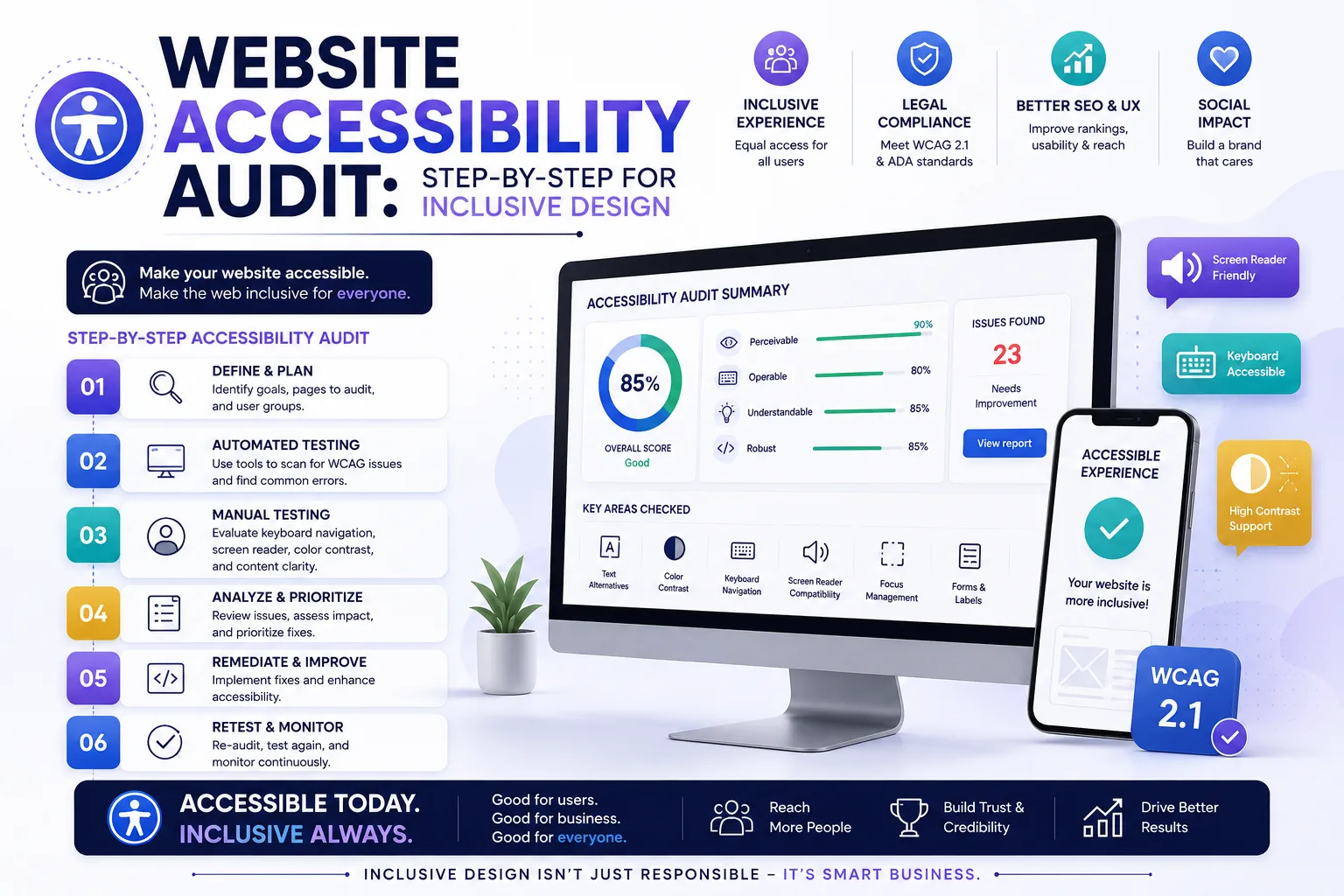
How to Conduct an Inclusive Accessibility Audit for Your Website
Introduction
Web accessibility isn't just a legal checkbox—it's a gateway to reaching a broader audience, improving user experience, and building brand trust. Yet many Indian businesses treat it as an afterthought. An accessibility audit is the first step toward making your website truly inclusive. This guide walks you through a practical, step-by-step audit process that balances automated tools with human judgment. By the end, you'll have a clear roadmap to identify barriers, prioritize fixes, and create a digital experience that welcomes everyone—from a person using a screen reader to someone navigating with a keyboard due to a temporary injury.
Main Section 1: Why Accessibility Audits Matter for Your Business
An accessibility audit systematically evaluates your website against established guidelines—primarily the Web Content Accessibility Guidelines (WCAG). For Indian businesses, the stakes are high: over 2.68 crore people in India live with some form of disability, according to the 2011 Census. That's a population larger than many countries. Ignoring accessibility means excluding a significant market segment—one that collectively wields substantial purchasing power and brand loyalty.
Beyond compliance, an audit uncovers usability issues that affect all users—slow load times, confusing navigation, poor mobile responsiveness. Fixing these improves SEO, reduces bounce rates, and boosts conversions. For example, adding alt text to images not only helps screen readers but also improves image search rankings, driving organic traffic. Similarly, ensuring proper heading structure helps search engines understand your content hierarchy, which can boost your position in search results.
Moreover, the Indian government's Rights of Persons with Disabilities Act, 2016 mandates accessibility in public spaces, including websites. Non-compliance can lead to legal repercussions, such as fines or lawsuits, as seen in cases abroad. An audit helps you stay ahead of regulations while demonstrating corporate social responsibility. For instance, a leading Indian e-commerce platform recently revamped its checkout process after an audit revealed that users with motor impairments couldn't complete purchases—a change that increased overall conversion rates by 12%.
Main Section 2: Step-by-Step Framework for an Inclusive Audit
Step 1: Define Your Scope and Standards
Start by deciding which WCAG level you aim for: A (minimum), AA (recommended), or AAA (advanced). For most businesses, WCAG 2.1 Level AA is the sweet spot—it balances comprehensiveness with practicality. Also, choose a sample set of pages—homepage, key landing pages, forms, and checkout flows. For a typical Indian business website, include pages with regional language content, as accessibility issues often differ for non-English text. Document your scope in a spreadsheet to track progress.
Step 2: Automated Testing
Use tools like WAVE, axe DevTools, or Lighthouse to scan for common issues: missing alt text, low contrast, improper heading hierarchy. Automated tools catch about 30% of problems quickly, but they're not perfect. For example, WAVE might flag a missing alt attribute, but it can't tell if the alt text you've written is actually descriptive. Run these scans on your selected pages and document findings in a structured report. For a practical tip, run automated tests on both desktop and mobile views, as issues like touch target size only appear on smaller screens.
Step 3: Manual Testing with Assistive Technologies
Automated tools miss nuanced issues. Test with a screen reader (NVDA on Windows or VoiceOver on macOS), keyboard-only navigation, and zoom to 200%. Check if all interactive elements are reachable and operable. For instance, can a user tab through a form without getting stuck? When testing with a screen reader, listen for logical reading order—does the content flow naturally? A common pitfall is that dynamic content, like error messages in a form, isn't announced to screen reader users. To fix this, use ARIA live regions to alert users of changes.
Step 4: Content and Design Review
Review your content for clarity: use plain language, descriptive link text (not 'click here'), and proper heading structure. Evaluate color contrast using tools like WebAIM's contrast checker—ensure a ratio of at least 4.5:1 for normal text and 3:1 for large text. For Indian businesses, pay special attention to color combinations used in regional language content, as some scripts (like Devanagari) may require higher contrast due to complex character shapes. Ensure images have meaningful alt text—for example, instead of 'image1.jpg', use 'A woman using a smartphone to access a banking app' if that's the context.
Step 5: User Testing with People with Disabilities
The gold standard: invite users with diverse abilities to test your site. Their feedback uncovers real-world barriers that automated tools and even expert reviewers may miss. Even a small sample of 3–5 users can provide invaluable insights. For example, a user with low vision might point out that your font size is too small even at 200% zoom, while a screen reader user might highlight that your navigation menu is confusing when read aloud. Partner with local disability organizations in India, such as the National Association for the Blind, to recruit testers. Offer incentives like gift cards or small payments to show appreciation.
Step 6: Document and Prioritize
Create a report listing issues by severity (critical, major, minor). Prioritize fixes that block core tasks—like submitting a form or completing a purchase. Assign ownership and timelines. For example, a critical issue might be a form that can't be submitted via keyboard, while a minor issue could be a decorative image missing an empty alt attribute. Use a simple matrix: impact (how many users are affected) vs. effort (time to fix). Fix high-impact, low-effort items first to build momentum.
Main Section 3: Tools and Resources for Your Audit
Here are some essential tools to streamline your audit:
- WAVE (WebAIM): Browser extension that highlights accessibility issues visually, making it easy to spot problems like missing labels or low contrast.
- axe DevTools: Integrates with browser developer tools for detailed reports, including code-level recommendations.
- Lighthouse: Built into Chrome, provides accessibility scores and recommendations, and can be run from the command line for automated CI/CD pipelines.
- Color Contrast Analyser: Check color pairs against WCAG thresholds; it even simulates color blindness.
- NVDA: Free screen reader for Windows, with a large user base in India.
- VoiceOver: Built-in screen reader on macOS and iOS, essential for testing Apple devices.
For Indian businesses, consider tools that support multiple languages, such as the Accessibility Insights extension, which can test for reading order in Hindi or Tamil. Also, refer to the W3C's WCAG Quick Reference for detailed guidance. For a practical tip, create a checklist based on WCAG success criteria and share it with your team to ensure consistency across audits.
Expert Tips
- Start small, iterate often: You don't need to fix everything at once. Tackle high-impact issues first, like ensuring all forms are keyboard-accessible, then move to lower-priority items like decorative image alt text.
- Involve your development team early: Accessibility is easier to build in than retrofit. For example, using semantic HTML (like
<nav> and <main>) from the start saves hours of ARIA role additions later. - Use semantic HTML: Proper landmarks, headings, and ARIA roles reduce custom code. For instance, use
<button> instead of <div> for clickable elements—it's automatically keyboard-focusable and screen-reader-friendly. - Test on real devices: Emulators are helpful, but nothing beats testing on actual smartphones and tablets. A touch target that works on a desktop emulator might be too small on a 5-inch screen.
- Keep a living style guide: Document accessibility patterns so new pages are compliant by default. Include code snippets for common components like accessible modals and accordions.
Common Mistakes
- Relying solely on automated tools: They miss context—like whether alt text is meaningful. For example, an automated tool might pass an image with alt text 'photo', but a human reviewer would know it should say 'Team meeting at the office'.
- Ignoring mobile accessibility: Many accessibility issues are magnified on small screens, such as tiny touch targets or text that doesn't reflow at 200% zoom.
- Using vague link text: 'Learn more' or 'click here' is useless for screen reader users who navigate by links. Instead, use descriptive text like 'Learn more about our accessibility audit services'.
- Overlooking dynamic content: Pop-ups, carousels, and AJAX updates often lack proper focus management. For example, when a modal opens, focus should move to it, and when it closes, focus should return to the triggering element.
- Forgetting about PDFs and documents: Ensure downloadable files are also accessible. For instance, use tagged PDFs with proper heading structure and alt text for images.
Future Trends
Accessibility is evolving rapidly. Here's what's coming:
- AI-powered testing: Tools like Accessibility Insights use AI to detect complex issues like improper reading order or missing focus indicators, reducing manual effort.
- Voice and gesture control: As smart assistants grow, websites must support voice navigation. For example, a user might say 'Go to checkout' instead of clicking a button.
- Personalized accessibility: Users may soon customize contrast, font size, and navigation preferences per session, stored in browser settings or via a user profile.
- Regulatory tightening: India is likely to enforce stricter accessibility mandates, similar to the EU's European Accessibility Act, which requires compliance by 2025 for many digital products.
FAQs
- How often should I conduct an accessibility audit? At least once a year, or after major site updates like a redesign, new feature launch, or CMS upgrade. For high-traffic sites, consider quarterly audits.
- What is the cost of an accessibility audit? It varies: DIY with tools is free; professional audits range from ₹50,000 to ₹2,00,000 depending on site size and complexity. For a small business site with 10–20 pages, expect ₹50,000–₹75,000; for larger e-commerce sites, costs can go higher.
- Can I fix all issues in-house? Many issues (alt text, contrast) are easy to fix; complex ones (ARIA, focus management) may need developer help. For example, fixing a missing form label is a quick HTML change, but implementing an accessible carousel requires JavaScript expertise.
- Do I need to comply with WCAG 2.1 or 2.2? WCAG 2.2 is the latest, but 2.1 Level AA is still widely accepted. Plan to upgrade to 2.2 within a year, as it adds new success criteria like focus appearance and accessible authentication.
- What if my site uses a CMS like WordPress? Use accessibility plugins (e.g., WP Accessibility) and choose themes that are WCAG-ready. For instance, the 'Twenty Twenty-Four' theme has built-in accessibility features. Also, ensure your content editors use proper heading levels and alt text.
- Is accessibility only for people with disabilities? No—it improves UX for everyone, including those with temporary impairments (e.g., broken arm) or situational limitations (bright sunlight). For example, captions on videos help users in noisy environments, and high contrast mode aids reading in direct sunlight.
- How do I handle third-party widgets like chatbots or payment gateways? Ensure they meet accessibility standards by requesting VPATs (Voluntary Product Accessibility Templates) from vendors. If they don't, consider alternatives or custom solutions.
Conclusion
Conducting an inclusive accessibility audit is not a one-time project—it's an ongoing commitment to your users. By following this structured approach, you'll not only meet compliance standards but also create a website that welcomes everyone. Start with a simple audit today, and iterate as you learn. Your business will benefit from increased reach, better SEO, and a reputation for inclusivity. Remember, every barrier you remove is a step toward a more equitable digital world.
CTA
Ready to make your website inclusive? Contact EishwarITSolution for a professional accessibility audit tailored to your business needs. Let's build a web that works for everyone.