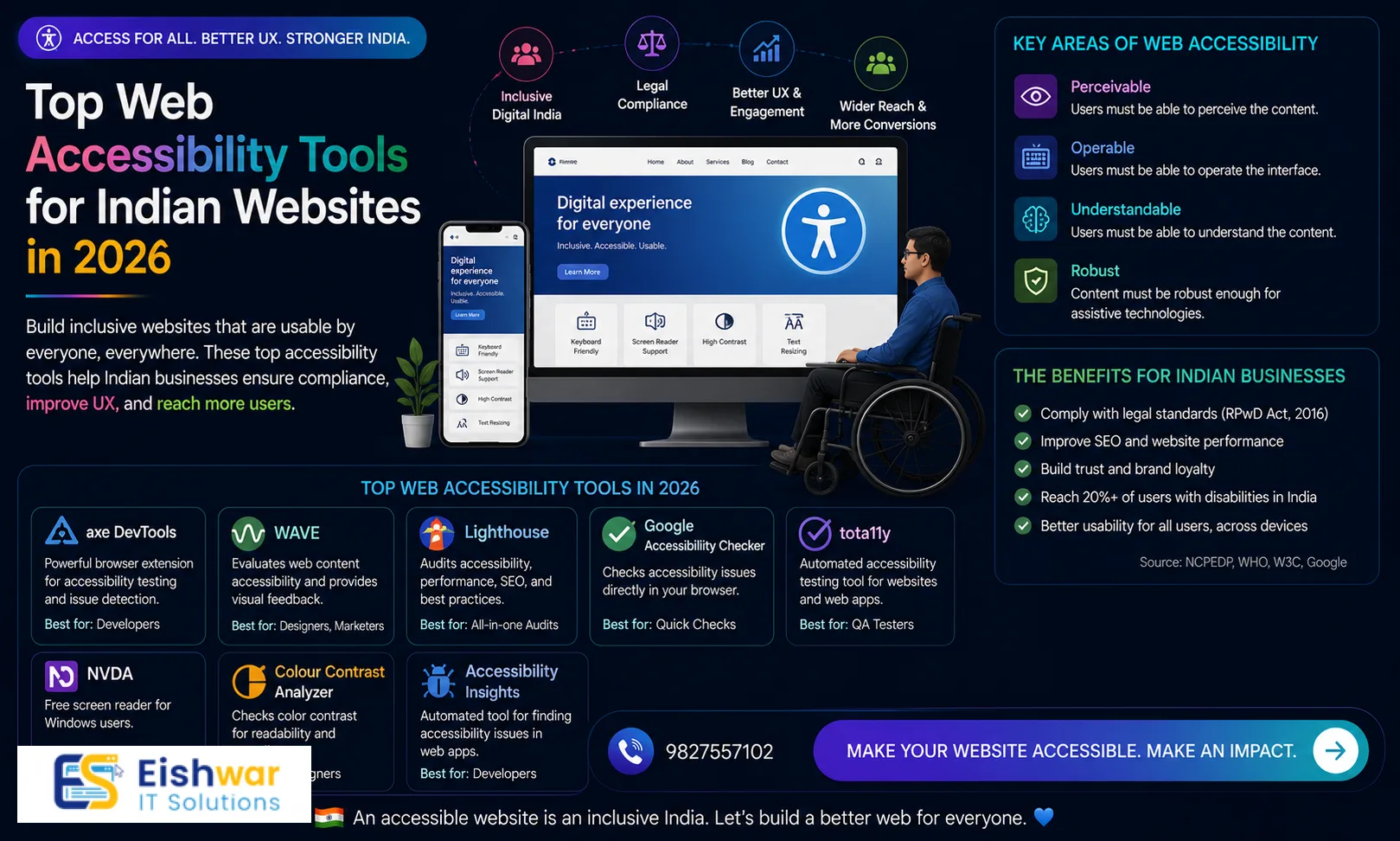
Discover top web accessibility tools for Indian websites in 2026. Ensure compliance, boost UX, and reach more users with our practical guide.
Published 12 min readKeywords: web accessibility tools, accessibility tools India, WCAG compliance, website accessibility, UX tools, Indian websites, 2026 tools
Top Web Accessibility Tools for Indian Websites in 2026: Compliance and UX Guide
Introduction
Did you know that over 40% of Indian websites fail basic accessibility checks? As we step into 2026, web accessibility isn't just a legal requirement—it's a business advantage. For business owners, marketers, and professionals in India, making your website accessible means reaching a wider audience, improving SEO, and enhancing user experience. In this guide, we'll explore the top web accessibility tools tailored for Indian websites, helping you achieve compliance with WCAG 2.2 standards and beyond. Whether you run a small e-commerce store in Jaipur or a corporate portal in Mumbai, these tools will help you identify and fix barriers that exclude over 70 million people with disabilities in India. The shift toward inclusive design is accelerating, and early adopters are already seeing tangible benefits—from higher conversion rates to better brand loyalty. Let's dive into the practical steps and tools you need to make your website work for everyone.
Main Section 1: Why Web Accessibility Matters for Indian Businesses
India has over 70 million people with disabilities, yet many websites remain inaccessible. With the Rights of Persons with Disabilities Act (2016) and increasing awareness, compliance is becoming mandatory. Accessible websites also rank higher on Google, load faster, and reduce bounce rates. For example, a travel agency in Mumbai saw a 25% increase in bookings after making their site screen-reader friendly. Tools like axe DevTools and WAVE can help you audit and fix issues quickly.
But the benefits go beyond legal compliance. Consider this: a study by WebAIM found that 98% of home pages had detectable accessibility issues. In India, where mobile-first browsing dominates, inaccessible sites often frustrate users with low vision or motor impairments. By addressing these issues, you not only serve a large underserved market but also improve the overall user experience for everyone. For instance, adding descriptive alt text to images helps users with slow internet connections who disable images, and proper heading structure aids in faster navigation for all users.
Actionable tip: Start with a quick audit using WAVE's browser extension—it's free and highlights contrast errors, missing alt text, and more. Set a goal to fix at least 10 critical issues per week. For a real-world example, a Delhi-based online bookstore reduced its bounce rate by 18% after improving keyboard navigation and adding skip-to-content links. These small changes can have a big impact on your bottom line.
Main Section 2: Top Web Accessibility Tools for 2026
Here are the best tools to ensure your Indian website is accessible:
1. axe DevTools – A powerful browser extension for automated testing. It integrates with Chrome and Edge, offering detailed reports and remediation guidance. Ideal for developers and QA teams. In 2026, axe DevTools has improved its support for Indian languages, flagging issues with lang attributes and script direction. For example, it can detect if a page in Hindi uses the wrong language tag (e.g., 'en' instead of 'hi').
2. WAVE (Web Accessibility Evaluation Tool) – User-friendly for non-technical users. It provides visual feedback on your page, highlighting errors like low contrast and missing form labels. Perfect for marketers and business owners. WAVE's color contrast checker is particularly useful for Indian websites that often use vibrant color schemes. For instance, a wedding planning site using gold text on a white background would immediately get flagged.
3. Lighthouse (Google) – Built into Chrome DevTools, it audits performance, SEO, and accessibility. It gives a score out of 100 and actionable suggestions. Great for quick checks. In 2026, Lighthouse includes new audits for focus indicators and accessible authentication, aligning with WCAG 2.2. Use it to benchmark your site before and after fixes.
4. Color Contrast Analyzers – Tools like Contrast Ratio (by Lea Verou) and the Stark plugin for Figma help designers ensure text meets WCAG contrast ratios (4.5:1 for normal text). For Indian websites, consider the contrast of text over images—a common design trend in festival promotions. For example, a Diwali banner with white text on a bright orange background may fail the 3:1 ratio for large text.
5. Screen Reader Testing Tools – Use NVDA (free) or JAWS (paid) to test how your site sounds. For Indian languages, ensure support for Hindi, Tamil, and other scripts. NVDA now offers better support for Devanagari script, but you should still test with real users. A practical tip: create a test script that includes navigating through product listings in Hindi to ensure proper pronunciation.
Actionable tip: Combine automated tools with manual testing. No tool catches everything—especially logical navigation and screen reader flow. For instance, automated tools may not detect if a 'Read More' link is ambiguous in context. Pair your tool audit with a manual review using a screen reader for the best results.
Main Section 3: How to Implement Accessibility in Your Workflow
Integrating accessibility doesn't have to be overwhelming. Start small:
Step 1: Audit Your Current Site – Use axe DevTools or Lighthouse to get a baseline score. Aim for 90+. Document all issues in a spreadsheet, categorizing them by severity (critical, major, minor). For example, missing alt text on product images is critical, while a slightly low contrast on a decorative element is minor.
Step 2: Fix Critical Issues First – Focus on alt text, heading structure, and keyboard navigation. For example, ensure all images have descriptive alt text like “Banner: Diwali sale 2026” instead of “image1.jpg”. Also, add skip-to-content links and ensure all form fields have labels. A common mistake is using placeholder text instead of labels—screen readers often skip placeholders.
Step 3: Train Your Team – Use free resources from WebAIM or the W3C. Include accessibility in your design and development sprints. For instance, create a checklist for designers to follow before handing off mockups: check contrast, ensure focus states are visible, and use semantic elements. For developers, add accessibility tests to your CI/CD pipeline using tools like axe-core.
Step 4: Test with Real Users – Partner with local disability organizations. For instance, the National Association of the Blind in Delhi can provide feedback. Conduct usability tests with 3-5 users who rely on assistive technologies. Record their sessions to identify pain points. One Bangalore-based fintech company discovered that their OTP input field was not announced by screen readers, leading to a 30% drop in form completions.
Actionable tip: Add an accessibility statement to your website footer—it builds trust and shows commitment. Include your compliance level (e.g., WCAG 2.2 AA), a contact email for feedback, and a date of last review. This also helps with SEO as Google considers accessibility signals.
Expert Tips
Use semantic HTML (headings, landmarks) to improve screen reader navigation. For example, use
Ensure all interactive elements (buttons, links) are keyboard accessible. Test by tabbing through your site—if you can't reach all elements, you have a problem. Add visible focus indicators, like a 2px solid outline, for keyboard users.
Provide transcripts for audio and video content—especially for educational sites. For Indian languages, consider offering transcripts in multiple scripts. A transcript not only helps deaf users but also improves SEO by adding text content.
Test on mobile devices; many users access websites via smartphones in India. Use mobile screen readers like TalkBack (Android) or VoiceOver (iOS). Check that touch targets are at least 44x44 pixels and that gestures are not the only way to interact.
Keep up with WCAG updates; version 2.2 introduces new criteria for focus indicators and accessible authentication. For example, WCAG 2.2 requires that authentication mechanisms do not rely on cognitive tests (like CAPTCHAs) unless alternatives are provided. Consider using WebAuthn or biometric options.
Use ARIA (Accessible Rich Internet Applications) roles sparingly and correctly. Overusing ARIA can confuse screen readers. For instance, if you use a
as a button, add role='button' and ensure it's keyboard accessible.
Common Mistakes
Relying solely on automated tools—they miss about 30% of issues. For example, automated tools cannot determine if alt text is meaningful or if a video has accurate captions.
Ignoring color contrast for text on images or gradients. A common example is a testimonial section with white text over a gradient background—this often fails contrast checks.
Using non-descriptive link text like “click here” or “read more”. Instead, use descriptive text like “Read our guide on accessibility tools” or “View Diwali sale details”.
Forgetting to add labels to form fields—essential for screen readers. Use
Not testing with actual assistive technologies like screen readers or voice control. Developers often test only with automated tools and assume the site works. A real test can reveal issues like missing focus management in single-page apps.
Overlooking dynamic content updates. If you load content via AJAX, ensure screen readers are notified using ARIA live regions. For example, a shopping cart update should announce “Item added to cart”.
Future Trends
By 2026, AI-powered accessibility tools will become mainstream. Expect features like automated alt text generation using computer vision and real-time contrast adjustment. For Indian websites, AI tools are being trained on regional languages and cultural contexts, making them more accurate for local content. For example, an AI tool might generate alt text for a photo of a street food vendor in Mumbai as “Vendor selling vada pav at a busy street corner” instead of a generic description.
Voice navigation and gesture-based interfaces will also grow, especially in Indian languages. With the rise of voice assistants like Alexa and Google Assistant in Hindi, users expect websites to support voice commands. Consider implementing voice search and voice form filling to cater to this trend.
The Indian government is likely to enforce stricter compliance for e-commerce and government portals, making early adoption a competitive edge. For instance, the Ministry of Electronics and Information Technology (MeitY) may mandate WCAG 2.2 AA for all government websites by 2027. Businesses that proactively comply will avoid penalties and gain a reputation for inclusivity.
Another trend is the integration of accessibility into design systems. Companies like Microsoft and Google are releasing accessible component libraries that Indian developers can use. For example, the Fluent Design System includes pre-built accessible buttons, modals, and forms. Adopting such systems can save time and ensure consistency.
Finally, expect more focus on cognitive accessibility. WCAG 2.2 includes new criteria for reducing cognitive load, such as providing clear instructions and avoiding unnecessary complexity. For Indian websites with heavy content, this means simplifying navigation and using plain language.
FAQs
What is WCAG and why is it important for Indian websites?
WCAG (Web Content Accessibility Guidelines) is a set of standards to make web content accessible to people with disabilities. For Indian websites, following WCAG ensures compliance with the Rights of Persons with Disabilities Act and improves user experience for millions. WCAG 2.2, the latest version, includes new criteria for focus indicators and accessible authentication, which are particularly relevant for e-commerce and banking sites in India.
Are there free web accessibility tools for small businesses in India?
Yes! WAVE, Lighthouse, and axe DevTools offer free versions. NVDA screen reader is also free. These tools are perfect for small businesses to start auditing and fixing issues without investment. For example, a small bakery in Chennai can use Lighthouse to get a quick accessibility score and fix low-contrast text on their menu page.
How can I test accessibility for Indian languages?
Use screen readers that support Indian languages like NVDA with language packs. Also, test with real users who speak Hindi, Tamil, or other regional languages. Tools like Google Lighthouse can check language attributes. For example, ensure your HTML has lang='hi' for Hindi pages and that the screen reader pronounces words correctly. You may need to adjust pronunciation using ARIA attributes.
What are the most common accessibility issues on Indian websites?
Common issues include low color contrast, missing alt text, non-descriptive link text, lack of keyboard navigation, and improper heading structure. These are easy to fix with proper tools. For instance, many Indian websites use images of text for festival greetings, which are not accessible. Instead, use actual text with proper contrast.
How long does it take to make a website accessible?
It depends on the site size. A small business site can become compliant in 1-2 weeks. Larger e-commerce sites may take 1-3 months. Start with critical pages like homepage and checkout. For example, a travel booking site can prioritize fixing the search form and payment page first, as these are high-traffic areas.
Do I need to hire a specialist for web accessibility?
Not necessarily for basic fixes. Many issues can be resolved using automated tools and free resources. However, for complex sites or WCAG 2.2 compliance, hiring an accessibility consultant can save time and ensure thoroughness. They can also help with user testing and provide training for your team.
What are the legal implications of not having an accessible website in India?
Under the Rights of Persons with Disabilities Act (2016), websites of government and public entities must be accessible. While private businesses are not yet strictly penalized, there is growing legal pressure. In 2025, a Delhi court ruled that a private e-commerce site must make its platform accessible within six months. Early compliance reduces legal risk and enhances brand reputation.
Conclusion
Web accessibility is no longer optional—it's a necessity for Indian businesses in 2026. By using the right tools and following best practices, you can create an inclusive website that serves everyone, improves SEO, and boosts conversions. Start your accessibility journey today with a simple audit and see the difference it makes. Remember, accessibility is not a one-time fix but an ongoing commitment. As technology evolves and user expectations rise, staying proactive will set your business apart. The tools and strategies outlined in this guide provide a solid foundation, but the real impact comes from a mindset shift—viewing accessibility as an opportunity rather than a burden. Embrace it, and you'll build a web that truly works for all.
CTA
Ready to make your website accessible? Contact EishwarITSolution for a free accessibility audit and customized compliance plan. Let's build a web that works for all! Our team of experts will help you identify issues, prioritize fixes, and implement solutions that meet WCAG 2.2 standards. Don't wait—take the first step toward inclusivity today.