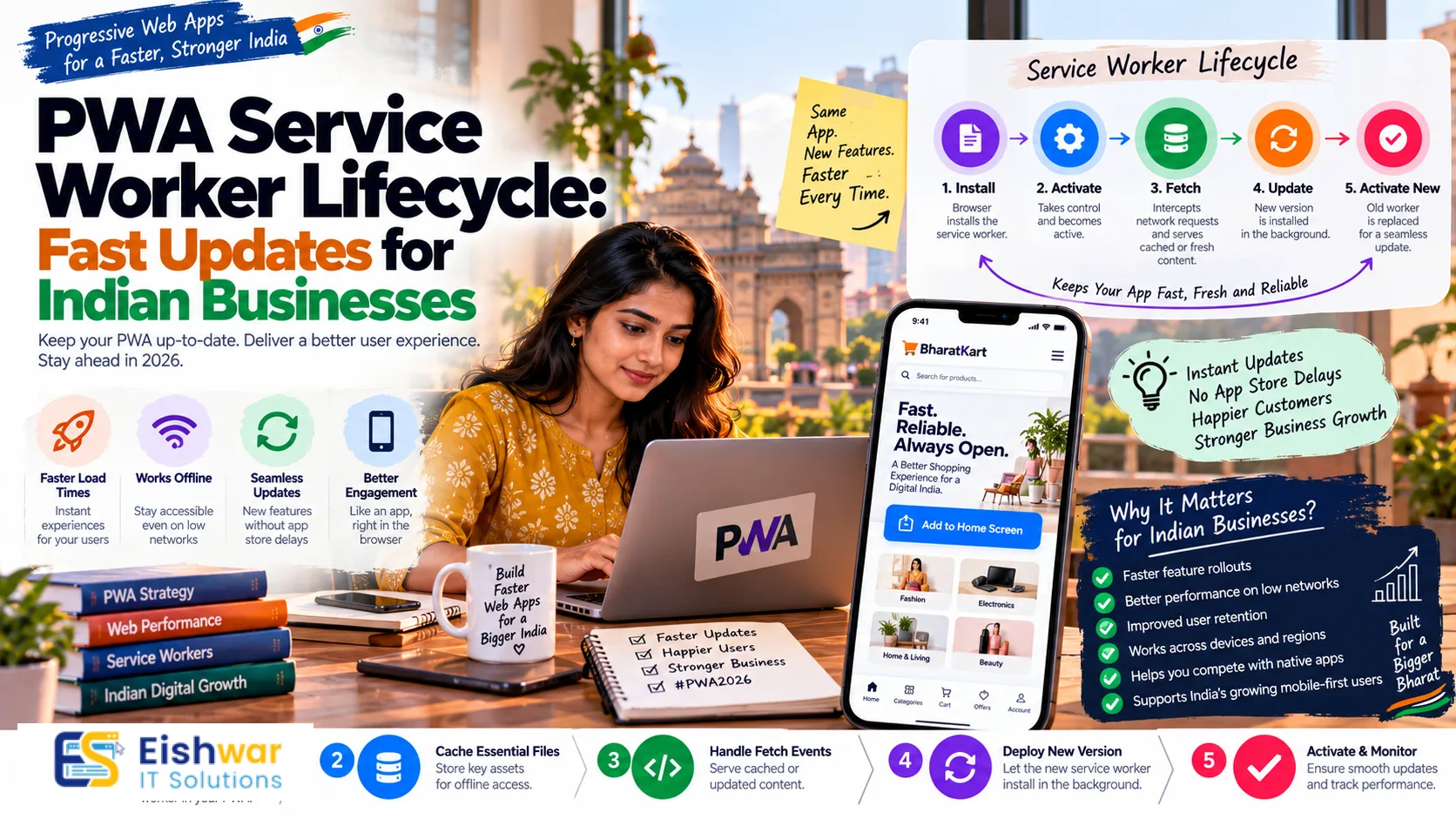
PWA Service Worker Lifecycle: Fast Updates for Indian Businesses
Introduction
Indian users are mobile-first, data-conscious, and impatient in the best possible way. They expect a website or app to open instantly, work when the network drops, and show fresh content the moment they return. Progressive Web Apps (PWAs) make that possible. But behind every fast PWA sits a quiet engine called the service worker. Its lifecycle decides whether your users get speed and reliability or stale pages and frustrating delays.
For business owners, marketers, and professionals, the term service worker lifecycle may sound deeply technical. In reality, it is a business asset. A well-managed lifecycle improves repeat visits, reduces bounce, supports conversions, and builds trust. A poorly managed one can silently cost you customers. This guide explains the PWA service worker lifecycle in plain English, with practical steps for Indian businesses in 2026.
Understanding the PWA Service Worker Lifecycle Without the Jargon
A service worker is a JavaScript file that runs in the background, separate from your web page. It acts like a smart proxy between your website and the network. It can cache files, serve them offline, intercept requests, and manage updates. Because it runs independently, it can keep working even when the browser tab is closed.
What a service worker actually does
Think of a service worker as a trusted store manager. When a customer asks for a product, the manager checks the local shelf first. If the item is there, it is handed over instantly. If not, the manager fetches it from the warehouse. The service worker does the same for web assets. It decides what to serve from cache, what to fetch from the network, and what to show when the network is unavailable.
For Indian businesses, this matters because network quality varies wildly. A user may be on strong 5G in Mumbai, weak 4G in a Tier-2 city, or unreliable Wi-Fi in a small office. A well-designed service worker makes your PWA feel consistent across all these conditions.
The lifecycle stages that matter
The service worker lifecycle has several stages. Understanding each one helps you control performance and updates.
- Registration: Your web page tells the browser to register the service worker file. This happens once per scope. If registration fails, no caching or offline features work.
- Install: The browser installs the service worker and runs the install event. This is where you typically precache important assets like the logo, CSS, and core pages.
- Waiting: If an old service worker is still controlling pages, the new one waits. This prevents sudden changes that could break the user experience. However, a long wait means users see old content longer.
- Activate: The new service worker takes control. The activate event is where you clean up old caches and prepare new ones.
- Fetch: Every network request from your PWA can be intercepted. The service worker decides whether to respond from cache, network, or a mix.
- Update: The browser periodically checks for a new service worker file. When found, the cycle repeats.
- Redundant: An outdated service worker is discarded. This is normal and helps keep things clean.
Why the waiting phase frustrates Indian users
Imagine a customer in Jaipur opens your PWA to check a new offer. You have already deployed the update, but their service worker is still waiting. They see the old price. They leave. The sale is lost. The waiting phase is safe, but it can hurt businesses that rely on timely content.
The solution is not to remove waiting altogether. The solution is to manage it intelligently. You can prompt users to refresh, use skipWaiting carefully, or design your update flow so critical content stays fresh without breaking the app.
Building a Fast, Reliable Service Worker Strategy for Indian Users
A service worker strategy should balance speed, freshness, data usage, and reliability. Indian users often deal with limited data packs, older Android devices, and fluctuating networks. Your strategy must respect those realities.
1. Choose the right caching strategy for each asset
Not all assets are equal. Using one caching rule for everything is a common mistake.
- Cache-first: Best for static assets like logos, fonts, and CSS. These rarely change, so serving them from cache is fast and saves data.
- Network-first: Best for dynamic content like account details, order status, or live pricing. You want the latest data, but you can fall back to cache if the network fails.
- Stale-while-revalidate: Best for product listings, blog feeds, and category pages. Users get a fast cached response while the service worker fetches fresh content in the background.
- Cache-only: Best for offline fallback pages and essential UI elements that must always be available.
For an Indian e-commerce PWA, you might use cache-first for product images, stale-while-revalidate for category pages, and network-first for cart and checkout data. This mix keeps the experience fast without showing outdated prices at checkout.
2. Control update timing without breaking trust
Updates are where many PWAs stumble. If you call skipWaiting immediately, the new service worker takes over at once. That can cause open tabs to break if they expect old assets. If you never update, users see stale content.
A safer approach is to show a gentle update prompt. For example, a small banner saying, New version available. Refresh to see the latest. When the user taps refresh, you can activate the new service worker. This gives users control and avoids surprise errors.
For critical updates, such as security fixes or major pricing changes, you may decide to force activation. But do it rarely and communicate clearly. Trust is harder to rebuild than a cache.
3. Optimize fetch events for speed and data savings
The fetch event is the heart of service worker performance. Every request can be handled in milliseconds, and those milliseconds add up.
- Use navigation preload to start network requests for page navigations while the service worker is still starting. This can improve first-load speed.
- Avoid caching huge files unnecessarily. Indian users with 64GB phones and limited data plans appreciate small caches.
- Compress images and use modern formats like WebP or AVIF. The service worker can serve cached versions without re-downloading.
- Set cache expiration rules. Old caches consume storage and can slow down cache lookups.
- Limit background sync to essential tasks. Too much background activity drains battery and data.
4. Test on real Indian networks and devices
Testing on a fast office Wi-Fi is not enough. Use Chrome DevTools to throttle to Slow 3G and Fast 3G. Test on low-end Android phones that are common in India. Check how your PWA behaves when the network switches from Wi-Fi to 4G, or when the user goes offline in a basement or rural area.
Also test update flows. Deploy a new version, then open the PWA on a phone that already has the old version. Does the update prompt appear? Does the app still work? Does the old cache get cleaned up? These real-world tests reveal issues that lab tests miss.
Measuring and Maintaining Service Worker Performance
Once your service worker is live, you need to measure it. Performance is not a one-time project. It is an ongoing practice.
Key metrics to track
- Update latency: How long does it take for a new service worker to activate across your user base?
- Cache hit rate: What percentage of requests are served from cache? A healthy rate reduces data usage and speeds up repeat visits.
- Fetch failure rate: How often does the service worker fail to get a response? High failures mean users see errors or fallback pages.
- Service worker startup time: Slow startup delays every request. Keep the service worker file lean.
- Navigation preload effectiveness: Does preloading actually improve page load times for your users?
- Cache storage size: Large caches can fill up storage on budget phones. Monitor and prune regularly.
A simple monthly checklist for Indian businesses
- Review cache hit and failure rates by device and region.
- Check for old cache versions and delete them.
- Test the update flow on at least three real devices.
- Run Lighthouse and WebPageTest on mobile.
- Review service worker error logs from real user monitoring.
- Update your offline fallback page if offers or contact details changed.
- Confirm that critical APIs are never cached with personal data.
Expert Tips
- Version your caches: Use names like app-v3-static and app-v3-api. When you deploy, delete the old version. This prevents cache bloat.
- Do not cache everything: Cache what improves speed. Avoid caching sensitive data, large videos, or rarely used pages.
- Use Workbox if you can: It handles many lifecycle details, routing, and cleanup. It reduces bugs and saves development time.
- Prompt before skipWaiting: Let users choose when to refresh. This avoids broken tabs and lost form data.
- Keep the service worker small: Every millisecond of startup matters. Move heavy logic to the page when possible.
- Monitor storage quota: Many Indian users have limited phone storage. A bloated cache can cause the browser to evict your data.
- Design a useful offline page: Show contact details, store hours, or saved items. An offline page is still a brand experience.
Common Mistakes
- Calling skipWaiting blindly: It can break open tabs and interrupt checkout flows. Use it with a user prompt or only for critical updates.
- Forgetting to clean old caches: Old caches waste space and can serve outdated assets.
- Caching API responses with personal data: This creates privacy and security risks. Never cache private account data without strict rules.
- Ignoring the offline experience: If the offline page is blank, users think your app is broken.
- Over-relying on the service worker: A slow main thread still feels slow. Optimize JavaScript, images, and server response times too.
- Testing only on high-end phones: Most Indian users are on mid-range or budget Android devices. Test there.
- Assuming all browsers behave the same: Service worker support and behavior vary. Test on Chrome, Samsung Internet, and other popular browsers in India.
Future Trends
The service worker landscape is evolving. Here is what Indian businesses should watch.
- AI-driven caching: Machine learning may predict which assets a user needs next, making PWAs even faster.
- Smarter update prompts: Browsers and frameworks are improving how updates are surfaced without disrupting users.
- Privacy-first caching: Stricter data rules will push businesses to cache less personal data and more static assets.
- 5G and beyond: Faster networks will change the balance between caching and fetching. But rural and Tier-2/3 users will still need offline resilience.
- Core Web Vitals evolution: New metrics like INP will keep performance focused on real user experience, not just load time.
FAQs
What is a service worker in a PWA?
A service worker is a background script that sits between your PWA and the network. It caches assets, serves content offline, and manages updates. It is essential for PWA speed and reliability.
How often should a PWA update?
Your PWA should check for updates whenever the user opens it or at a set interval. Critical updates can be prompted immediately. Non-critical updates can wait for a convenient moment, such as when the user returns to the app.
Does a service worker improve SEO?
Indirectly, yes. A fast, reliable PWA improves Core Web Vitals, reduces bounce, and increases engagement. Search engines reward good user experience, so service worker performance can support SEO.
Can service workers work on slow Indian networks?
Yes. In fact, they are most valuable on slow or unstable networks. A good caching strategy lets your PWA load instantly from cache and fetch updates in the background.
What happens if I use skipWaiting incorrectly?
The new service worker takes control immediately. Open tabs may lose access to old assets, causing errors or broken forms. Use skipWaiting only with a user prompt or for critical fixes.
How do I clear old PWA caches?
In the activate event, delete caches that do not match your current version. You can also provide a clear cache option in settings for support purposes.
Is a service worker required for a PWA?
Yes. A service worker is one of the core requirements for a PWA. Without it, you cannot reliably offer offline support, caching, or installable app-like behavior.
Conclusion
The PWA service worker lifecycle is not just a technical detail. It controls how fast your app feels, how fresh your content stays, and how much data your users spend. For Indian businesses, where mobile usage is massive and network conditions vary, mastering this lifecycle is a competitive advantage.
Start by mapping your assets to the right caching strategies. Control updates with user-friendly prompts. Measure performance monthly. Avoid the common mistakes that cause stale content or broken tabs. When done well, your PWA becomes a reliable, fast, and engaging experience that users trust and return to.
CTA
Ready to make your PWA faster and more reliable for Indian users? Contact EishwarITSolution for a service worker performance review and a practical optimization plan. Visit eishwar.com to get started.