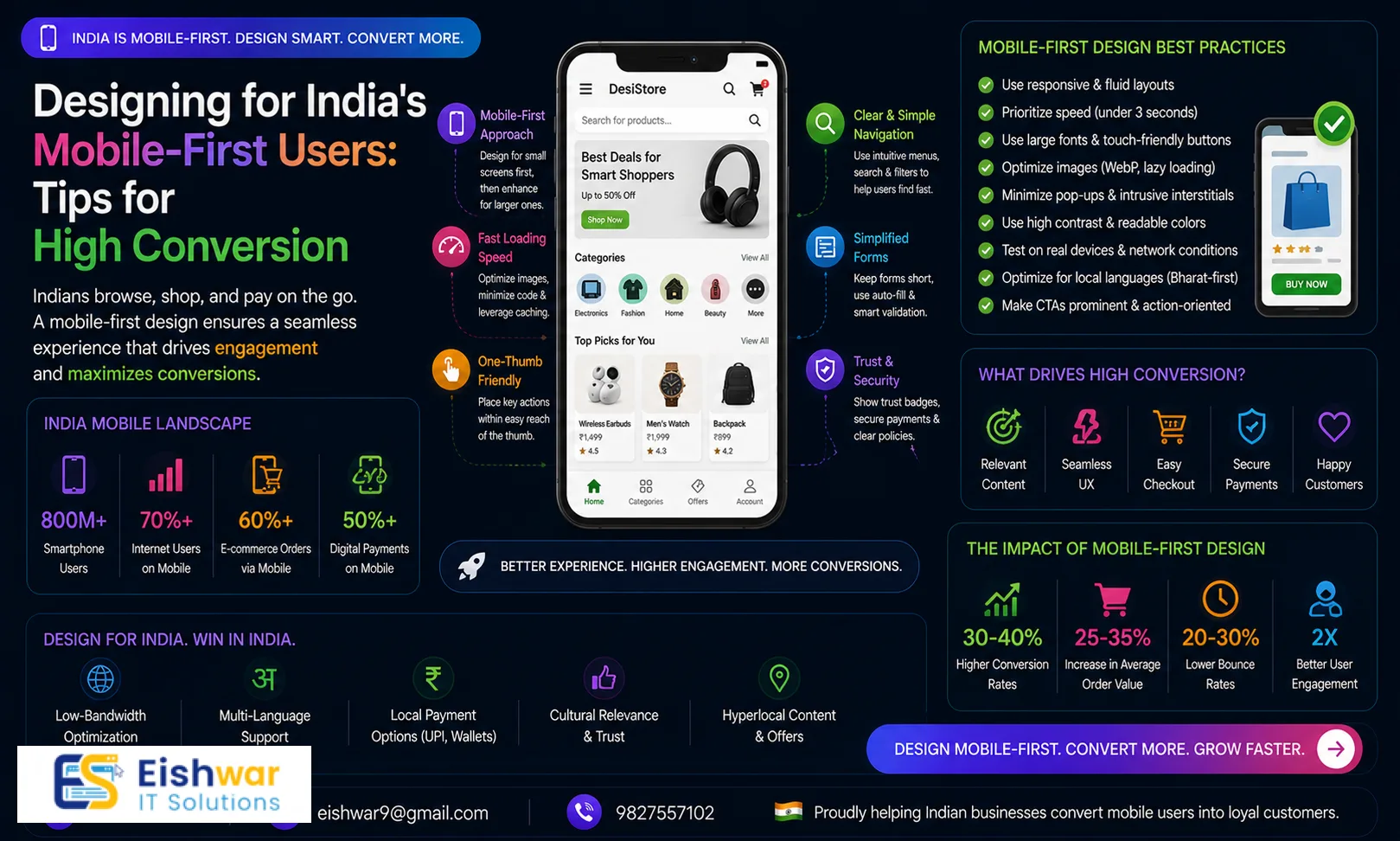
Designing for India's Mobile-First Users: Tips for High Conversion
Introduction
India has the second-largest internet user base in the world, with over 800 million users accessing the web primarily through mobile devices. For businesses targeting Indian audiences, a mobile-first design is no longer optional—it's essential. At EishwarITSolution, we've seen how a well-optimized mobile experience can transform casual visitors into loyal customers. In this guide, we'll share practical, actionable tips to design a mobile-first website that drives high conversions for your Indian audience.
Consider the reality: a user in a tier-2 city like Lucknow or Coimbatore might be browsing on a budget smartphone with 2GB of RAM and a 3G connection. They expect your site to load in under three seconds, or they'll bounce to a competitor. This isn't just about aesthetics; it's about survival in a hyper-competitive digital landscape. By adopting a mobile-first mindset, you prioritize what matters most: speed, clarity, and trust.
Understanding India's Mobile-First Behavior
Indian users often face unique challenges: slower network speeds, high data costs, and varying screen sizes. They expect fast-loading, easy-to-navigate sites that respect their data and time. A mobile-first approach means starting the design process from the smallest screen and scaling up, ensuring core functionality and content are prioritized for mobile users.
For example, a user in a rural area might rely on a 4G connection with frequent drops. If your site requires heavy assets like uncompressed videos or large JavaScript files, it will fail them. Instead, think of progressive enhancement: deliver a basic, functional experience first, then layer on advanced features for devices that can handle them. Also, note that many Indian users are first-time internet adopters, so intuitive icons and clear labels are crucial. A study by Google found that 53% of mobile users abandon sites that take longer than three seconds to load—and in India, that number can be higher due to network variability.
Key Design Principles for High Conversion
1. Speed is King
Optimize images, leverage browser caching, and minimize HTTP requests. Use tools like Google PageSpeed Insights to test performance. A one-second delay can reduce conversions by 7%.
Practical tip: Use next-gen formats like WebP for images, which offer 25-35% smaller file sizes compared to JPEG or PNG without quality loss. Implement lazy loading so that images below the fold load only when users scroll to them. For instance, an e-commerce site selling sarees can compress product images to under 100KB while maintaining clarity. Also, consider using a Content Delivery Network (CDN) with servers in Mumbai, Delhi, and Bangalore to reduce latency. A real-world example: Flipkart's mobile site loads in under 2 seconds on 3G networks by aggressively caching and using AMP for product pages.
2. Thumb-Friendly Navigation
Place key elements—menu, CTA buttons, search—within easy reach of the thumb. Use hamburger menus sparingly; consider bottom navigation bars for core actions.
Practical tip: Design for a thumb zone that covers the lower half of the screen, as most users hold their phones with one hand. Place primary CTAs like 'Add to Cart' or 'Call Now' at the bottom center, where thumbs naturally rest. Avoid placing critical buttons in the top-left corner, which is hard to reach. For example, a food delivery app like Swiggy uses a bottom tab bar with 'Home', 'Search', 'Orders', and 'Profile'—all easily accessible. Test your navigation on devices with 5.5-inch screens, which are common in India.
3. Clear CTAs Above the Fold
Your primary call-to-action should be visible without scrolling. Use contrasting colors and action-oriented text like 'Get Started' or 'Buy Now'.
Practical tip: Use a color that stands out from your brand palette, such as a bright orange or green against a white background. Ensure the CTA button is at least 48x48 pixels to meet touch target guidelines. For a service-based business like a travel agency, the CTA could be 'Book a Free Consultation' placed prominently at the top. A/B test different text: 'Get Quote' vs. 'Start Your Journey' to see what resonates with your audience. Also, avoid multiple CTAs above the fold—one clear action is enough.
4. Simplified Forms
Reduce form fields to essentials. Use autofill, dropdowns, and radio buttons to minimize typing. Enable one-click payments via UPI or wallets for faster checkout.
Practical tip: For a lead generation form, ask only for name, phone number, and a single dropdown for interest area. Use autofill attributes like 'autocomplete=\"tel\"' to speed up input. For e-commerce, integrate UPI options like Google Pay, PhonePe, or Paytm, which are used by over 300 million Indians. A case study: an online grocery store reduced checkout abandonment by 30% by replacing a 10-field form with a 4-field version and adding a 'Pay via UPI' button. Also, use inline validation to show errors immediately, not after submission.
5. Optimize for Local Languages
India has 22 official languages. Offer localized content or at least a language toggle. Hindi, Tamil, Telugu, and Bengali are top priorities for many businesses.
Practical tip: Start with Hindi and one regional language relevant to your target market (e.g., Tamil for Chennai, Marathi for Mumbai). Use Unicode fonts that render correctly on all devices. For example, a fintech app like CRED offers a Hindi interface, which increased engagement in tier-2 cities by 40%. Implement a simple language switcher in the header or footer, and ensure that translated content doesn't break layout—Hindi text can be 20-30% longer than English. Also, consider voice search in local languages, as 70% of Indian users prefer voice input in their native tongue.
6. Leverage AMP and Progressive Web Apps
Accelerated Mobile Pages (AMP) and PWAs provide near-instant loading and offline capabilities. They improve user experience and boost SEO rankings.
Practical tip: Use AMP for content-heavy pages like blogs or news articles, where speed is critical. For e-commerce, a PWA can cache product catalogs and allow users to browse offline. For instance, MakeMyTrip's PWA loads in 2.5 seconds on 3G and has a 3x higher conversion rate than their native app. Implement service workers to handle offline fallbacks, and add an 'Add to Home Screen' prompt for repeat visits. Test your PWA using Lighthouse in Chrome DevTools to ensure it meets the 90+ score threshold.
Expert Tips from EishwarITSolution
- Test on Real Devices: Use emulators but also test on actual low-end devices common in India, like the Redmi 9 or Samsung Galaxy M series. These devices have limited RAM and smaller screens, revealing performance bottlenecks emulators miss.
- Prioritize Core Content: Show essential info first—product details, price, reviews. Hide secondary content like return policies or FAQs behind expandable sections (accordions). This reduces cognitive load and speeds up perceived load time.
- Use Visual Hierarchy: Guide users' eyes with size, color, and spacing. Make the most important action prominent. For example, a 'Buy Now' button should be larger and brighter than a 'Learn More' link.
- Incorporate Social Proof: Display ratings, testimonials, and purchase counts to build trust quickly. For instance, show '1,200+ sold today' or '4.8 stars from 500 reviews' near the CTA. This is especially effective in Indian markets where word-of-mouth is valued.
- Optimize for Voice Search: Many Indian users prefer voice search due to low literacy rates or convenience. Use natural language in your content and schema markup (e.g., FAQ schema) to appear in voice search results. For example, a user might say 'find me a cheap flight to Delhi tomorrow'—your site should have structured data that answers this.
Common Mistakes to Avoid
- Ignoring Data Costs: Heavy media files can deter users, especially those on prepaid plans with limited data. Compress images and use lazy loading. A 5MB page can cost a user ₹5-10 per visit, which is significant for budget-conscious users.
- Overcomplicating Navigation: Too many menu items confuse users. Stick to 4–5 core categories. For example, an online bookstore should have 'Fiction', 'Non-Fiction', 'Children's Books', 'Deals', and 'My Account'—not 15 subcategories.
- Neglecting Touch Targets: Buttons smaller than 48x48 pixels are hard to tap. Ensure adequate spacing (at least 8px between elements) to prevent accidental taps. Test on a device with large fingers.
- Forgetting Offline Functionality: PWAs can cache content for offline browsing—a huge plus for users with unstable connections. For example, a news site can cache the top 10 articles so users can read them even without internet.
- Using Auto-Play Videos: Auto-playing videos consume data and can annoy users. Instead, use static thumbnails with a play button, and let users choose to watch. This respects their data and attention.
Future Trends in Mobile-First Design for India
As 5G rolls out and device capabilities grow, expect richer experiences like augmented reality (AR) try-ons and video-first interfaces. Voice commerce will also rise. Stay ahead by adopting these trends early while keeping performance and accessibility at the core.
For instance, AR try-ons for eyewear or furniture are already gaining traction—Lenskart uses AR to let users 'try on' glasses via their phone camera. With 5G, these experiences will become seamless. Video-first interfaces, like those used by TikTok or Instagram, are influencing e-commerce; consider adding short product demo videos. Voice commerce, powered by AI assistants like Alexa or Google Assistant, will allow users to order groceries or book services using voice commands. Start experimenting with these now, but always test on low-end devices to ensure broad accessibility.
FAQs
- What is mobile-first design? Mobile-first design means creating a website layout for mobile devices first, then scaling up for tablets and desktops. It ensures the core experience is optimized for the smallest screens.
- Why is mobile-first important for Indian businesses? Over 90% of Indian internet users access the web via mobile. A mobile-first site improves user experience, SEO, and conversion rates.
- How can I speed up my mobile site? Compress images, use a CDN, enable caching, minimize code, and consider AMP or PWA implementation.
- Should I support multiple Indian languages? Yes, if your target audience is diverse. Start with Hindi and one regional language relevant to your market.
- What is a PWA? A Progressive Web App is a website that behaves like a native app—fast, reliable, and installable. It works offline and sends push notifications.
- How do I measure mobile conversion? Use Google Analytics to track mobile-specific goals, bounce rates, and user flow. A/B test different layouts.
- What is the ideal mobile page load time for India? Aim for under 3 seconds on a 3G connection. Tools like WebPageTest can simulate Indian network conditions.
- How do I handle pop-ups on mobile? Avoid intrusive pop-ups that cover content. Use slide-in banners or bottom sheets instead, and ensure they are easy to dismiss.
Conclusion
Designing for India's mobile-first users is about empathy and performance. By focusing on speed, simplicity, and local relevance, you can create a website that not only attracts but converts. At EishwarITSolution, we specialize in crafting high-converting mobile-first designs. Start implementing these tips today and watch your engagement soar.
Ready to Transform Your Mobile Experience?
Contact EishwarITSolution for a free mobile UX audit. Let's build a website that India loves to use.
CTA
Ready to Transform Your Mobile Experience? Contact EishwarITSolution for a free mobile UX audit. Let's build a website that India loves to use.