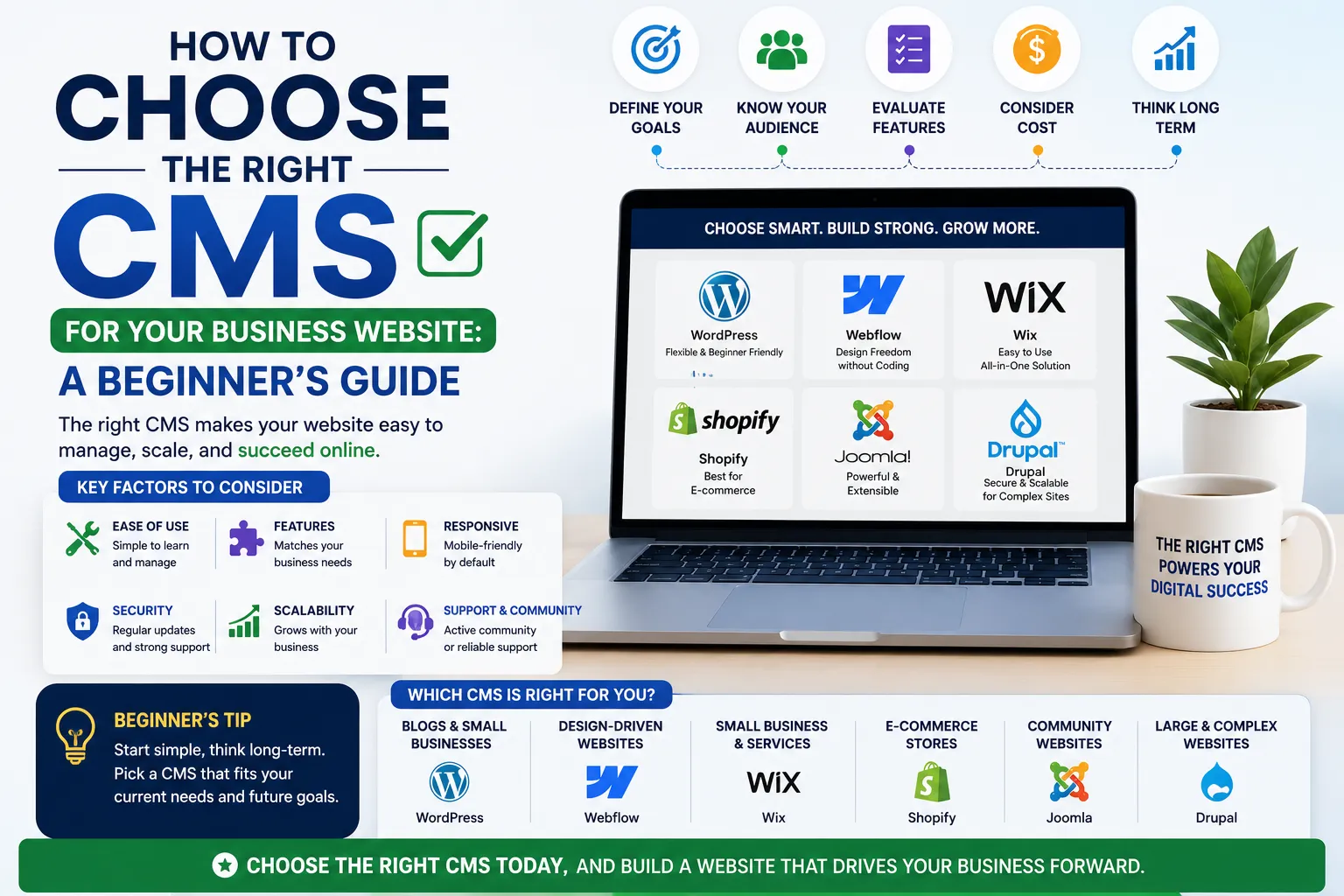
How to Choose the Right CMS for Your Business Website: A Beginner's Guide
Introduction
Building your first business website is exciting, but one of the biggest decisions you'll make is choosing the right Content Management System (CMS). A CMS is the software that lets you create, manage, and update your website without needing to code. With so many options available—WordPress, Shopify, Wix, Joomla, and more—it can feel overwhelming, especially for business owners and marketers in India who want a site that's fast, secure, and easy to maintain.
In this guide, we'll break down the key factors to consider, compare popular CMS platforms, and give you practical steps to make the right choice for your business. Whether you're a solopreneur, a growing startup, or a local service provider, this guide will help you avoid common pitfalls and set your website up for success. We'll also share real-world examples and actionable tips tailored to the Indian market, so you can move forward with confidence.
Main Section 1: What is a CMS and Why Does It Matter for Your Business?
A CMS (Content Management System) is like the engine behind your website. It handles everything from text and images to blogs and e-commerce products. Instead of writing HTML or CSS, you use a dashboard to add content, change layouts, and manage users. Think of it as a control panel that empowers you to run your site without technical expertise.
Why does it matter? Because the right CMS can save you time, money, and headaches. For example, if you run a small retail business in Mumbai, you need a CMS that supports inventory management and payment gateways like Razorpay or Paytm. If you're a freelance consultant, you might prioritize blogging features and SEO tools. A poorly chosen CMS can lead to slow load times, security vulnerabilities, and high maintenance costs—all of which hurt your business.
Key benefits of using a CMS:
- Ease of use: No coding skills required. You can update content with a few clicks.
- Scalability: Add pages, products, or features as your business grows. For instance, a WordPress site can start as a simple blog and later integrate a full e-commerce store.
- SEO-friendly: Many CMS platforms come with built-in SEO tools. WordPress, for example, offers plugins like Yoast that guide you in optimizing each page.
- Security: Regular updates protect your site from threats. A good CMS provider or host will handle patches and monitoring.
- Cost-effective: Save on developer costs for simple updates. Instead of paying ₹5,000 for a minor text change, you can do it yourself in minutes.
Practical Tip: Before choosing a CMS, list your top three must-have features. For a restaurant, this might be online ordering and reservation booking. For a service business, it could be a contact form and portfolio gallery. This list will guide your decision.
Main Section 2: Top CMS Platforms Compared for Indian Businesses
Let's look at the most popular CMS platforms and how they stack up for Indian business owners. We'll focus on real-world use cases and local considerations.
WordPress (Self-hosted)
WordPress powers over 40% of all websites globally. It's highly flexible, with thousands of themes and plugins. Ideal for blogs, service sites, and small to medium e-commerce stores. For Indian businesses, it's a top choice because of its extensive community and local support.
Pros: Unlimited customization, strong SEO plugins (Yoast, Rank Math), huge community support, works with Indian payment gateways like Razorpay and Paytm via plugins. You can also find affordable themes from Indian developers.
Cons: Requires some learning curve, you need to manage hosting and security yourself. However, managed WordPress hosting (e.g., Cloudways, Kinsta) can simplify this.
Best for: Businesses that want full control and plan to scale. Example: A Delhi-based coaching center can start with a blog and later add an online course booking system.
Shopify
Shopify is a hosted e-commerce platform that handles everything from hosting to payments. It's known for its ease of use and beautiful store designs. For Indian online stores, it's a strong contender.
Pros: Quick setup (you can launch a store in a day), built-in payment processing with Razorpay integration, 24/7 support, excellent for dropshipping with apps like Oberlo. Shopify also offers local currency support and multi-language options.
Cons: Monthly fees plus transaction charges (2% for basic plans, plus payment gateway fees). Limited customization compared to WordPress—you're tied to Shopify's ecosystem.
Best for: Online stores, especially physical products. Example: A Jaipur-based handicraft seller can easily manage inventory and ship across India.
Wix
Wix is a drag-and-drop website builder that's great for beginners. It offers a range of templates and a simple editor. It's popular among small businesses that want a quick online presence.
Pros: Extremely easy to use, all-in-one solution (hosting, domain, SSL), good for small sites. Wix also has an AI-powered design tool that creates a site based on your answers.
Cons: Limited scalability—if your business grows, you may outgrow Wix. Can be expensive with premium apps. Less control over SEO compared to WordPress. For example, you can't edit the .htaccess file.
Best for: Simple brochure sites, portfolios, and local businesses. Example: A freelance photographer in Pune can showcase their work and collect inquiries.
Joomla
Joomla is a powerful CMS that sits between WordPress and enterprise solutions. It offers more built-in features than WordPress but is less beginner-friendly.
Pros: Strong user management (great for membership sites), multilingual support out of the box, good for complex sites like directories or social networks.
Cons: Steeper learning curve—you may need a developer for advanced customizations. Smaller community than WordPress, so fewer plugins and themes.
Best for: Community sites, membership portals, and larger organizations. Example: A trade association in India can manage member profiles and publish industry news.
Drupal
Drupal is a highly secure and scalable CMS used by large enterprises and government sites. It's known for its robust architecture.
Pros: Top-notch security (used by The White House), excellent performance, flexible content types. Ideal for sites with complex data structures.
Cons: Requires technical expertise—not for beginners. Limited themes and modules compared to WordPress. Development costs are higher.
Best for: High-traffic sites, complex data structures, and strict security needs. Example: A government portal or a large educational institution.
Main Section 3: How to Choose the Right CMS – Step-by-Step Decision Framework
Follow these steps to pick the CMS that fits your business like a glove. Each step includes a practical example.
Step 1: Define Your Website Goals
Ask yourself: What is the primary purpose of your website? Is it to showcase your services, sell products, or generate leads? For example, a restaurant in Delhi might need an online ordering system, while a coaching center needs a blog and booking system. Write down your top three goals—this will narrow down your options.
Example: If your goal is to sell handmade jewelry, Shopify or WooCommerce (WordPress) are better than Wix.
Step 2: Consider Your Budget
CMS costs include hosting, domain, themes, plugins, and possibly developer fees. WordPress can start as low as ₹500/month for shared hosting (e.g., Hostinger), while Shopify plans begin around ₹1,500/month. Factor in transaction fees for e-commerce. Don't forget ongoing costs like SSL certificates (often free with hosting) and premium plugins.
Tip: Create a budget spreadsheet. Include initial setup costs and monthly expenses. For a small business, a WordPress site might cost ₹10,000–₹20,000 upfront (including theme and plugins), while Shopify could be ₹5,000/month with apps.
Step 3: Evaluate Technical Skills
Are you comfortable with technology? If not, choose a user-friendly platform like Wix or Shopify. If you have a developer or are willing to learn, WordPress offers more flexibility. Consider your team's skills—if you're a solo entrepreneur, ease of use is critical.
Example: A bakery owner with no tech background would struggle with Joomla but thrive with Wix's drag-and-drop editor.
Step 4: Check for Indian Payment Gateways and Integrations
Make sure the CMS supports local payment options like UPI, Paytm, Razorpay, and Netbanking. Shopify and WordPress both have plugins for these. Also, check for integrations with Indian logistics providers (e.g., Shiprocket) and accounting software (e.g., Zoho Books).
Tip: Test the payment gateway during a trial. Some platforms have hidden fees for certain gateways.
Step 5: Think About SEO and Marketing
Look for built-in SEO features or plugins. WordPress with Yoast is a powerhouse for SEO. Wix has improved but still lags behind. Also, consider email marketing integrations (e.g., Mailchimp) and social media sharing.
Example: A blog-focused site should prioritize SEO. WordPress allows you to edit meta descriptions, create XML sitemaps, and optimize images easily.
Step 6: Plan for Growth
Choose a CMS that can scale with your business. WordPress and Shopify are excellent choices for growing businesses. Avoid platforms that lock you into proprietary systems—migrating later is expensive and time-consuming.
Example: A startup might start with a simple WordPress site and later add a membership area or e-commerce store using plugins like MemberPress or WooCommerce.
Expert Tips
- Start with a hosted trial: Most CMS platforms offer free trials or demos. Test drive 2-3 options before committing. For example, try WordPress on a free hosting trial like 000Webhost.
- Prioritize mobile responsiveness: Over 70% of Indian internet users access websites via mobile. Ensure your CMS themes are mobile-friendly. Test on multiple devices.
- Don't over-customize early: Use a pre-built theme and add customizations gradually. This saves time and money. For instance, start with a free WordPress theme and upgrade later.
- Check community support: A large community means more tutorials, forums, and plugins. WordPress and Shopify have massive communities. Joomla and Drupal have smaller but dedicated groups.
- Consider managed hosting: For WordPress, managed hosting like Kinsta or Cloudways handles security and speed, so you can focus on content. This is ideal if you're not technical.
- Test page speed: Use Google PageSpeed Insights to check how your CMS performs. A slow site hurts SEO and user experience.
Common Mistakes
- Choosing based on price alone: Free CMS platforms often have hidden costs for essential features like custom domains, SSL, or premium plugins. For example, Wix's free plan includes Wix ads.
- Ignoring security: A hacked website can damage your reputation. Always keep your CMS updated. Use strong passwords and two-factor authentication.
- Overlooking backup options: Regularly back up your site. Many CMS platforms offer plugins or built-in backup features. For WordPress, use UpdraftPlus.
- Not testing with real users: Get feedback from colleagues or customers before launching. They might spot usability issues you missed.
- Using too many plugins: This slows down your site. Only install what you need. For example, avoid using multiple SEO plugins—stick to one.
- Ignoring local SEO: For Indian businesses, optimize for local searches. Use Google My Business and include location-specific keywords.
Future Trends
The CMS landscape is evolving. Here are trends to watch, with implications for Indian businesses:
- Headless CMS: Separates the backend from the frontend, giving developers more freedom. Great for omnichannel content—you can publish to websites, apps, and IoT devices. For example, a retail chain could use a headless CMS to manage product data across multiple channels.
- AI-powered content creation: Tools like ChatGPT integration can help generate content and automate tasks. Some CMS platforms are adding AI writing assistants. This can save time for small business owners.
- Voice search optimization: CMS platforms are adding voice search capabilities to improve user experience. As voice assistants like Alexa and Google Assistant grow in India, optimizing for voice queries becomes important.
- Increased focus on core web vitals: Google's emphasis on page speed and user experience means CMS platforms will optimize for performance. Choose a CMS that prioritizes fast loading times.
- Block-based editors: WordPress's Gutenberg editor and others make page building more intuitive. This reduces the need for page builder plugins.
- Low-code/no-code movement: More CMS platforms are offering drag-and-drop builders, making it easier for non-developers to create complex sites.
FAQs
Which CMS is best for a small business in India?
WordPress is often the best choice for small businesses due to its flexibility, affordability, and strong SEO capabilities. It works well with Indian payment gateways and has a huge community for support. For e-commerce, Shopify is a close second.
Can I switch CMS platforms later?
Yes, but it can be complex and costly. It's better to choose the right CMS from the start. If you must switch, hire a developer to migrate content and data. Tools like CMS2CMS can automate some migrations.
What is the cheapest CMS option?
WordPress itself is free, but you'll need to pay for hosting (starting around ₹500/month) and a domain (₹800/year). Wix and Shopify have free plans but with limitations like ads or restricted features. For a professional site, budget at least ₹1,500/month.
Is Shopify good for Indian businesses?
Yes, Shopify is excellent for e-commerce businesses in India. It supports popular payment gateways like Razorpay and Paytm, and offers good customer support. However, transaction fees can add up—consider the total cost before committing.
Do I need a developer to set up a CMS?
Not necessarily. Platforms like Wix and Shopify are designed for non-developers. WordPress requires some technical knowledge, but many web hosts offer one-click installation. You can also hire a freelancer for initial setup—costs range from ₹5,000 to ₹20,000.
How do I ensure my CMS is secure?
Keep your CMS, themes, and plugins updated. Use strong passwords and enable two-factor authentication. Regularly back up your site. For WordPress, use security plugins like Wordfence. Consider a web application firewall (WAF) for added protection.
What is the difference between a hosted and self-hosted CMS?
A hosted CMS (like Shopify or Wix) includes hosting, security, and updates in the subscription. A self-hosted CMS (like WordPress.org) requires you to find your own hosting and manage technical aspects. Hosted options are easier but less flexible; self-hosted offers more control.
Conclusion
Choosing the right CMS is a critical step in building a successful business website. By understanding your goals, budget, and technical comfort, you can pick a platform that grows with you. Remember, there's no one-size-fits-all answer—what works for a florist in Bangalore may not suit a tech startup in Pune. Take your time, test a few options, and don't hesitate to seek expert advice.
At EishwarITSolution, we help Indian business owners make informed tech decisions. Whether you choose WordPress, Shopify, or another CMS, we're here to guide you through the process.
CTA
Ready to build your business website but still unsure which CMS is right for you? Contact EishwarITSolution today for a free consultation. Our team of experts will help you select, set up, and optimize your CMS for maximum performance and growth. Don't let the wrong platform hold you back—start your website journey with confidence!