
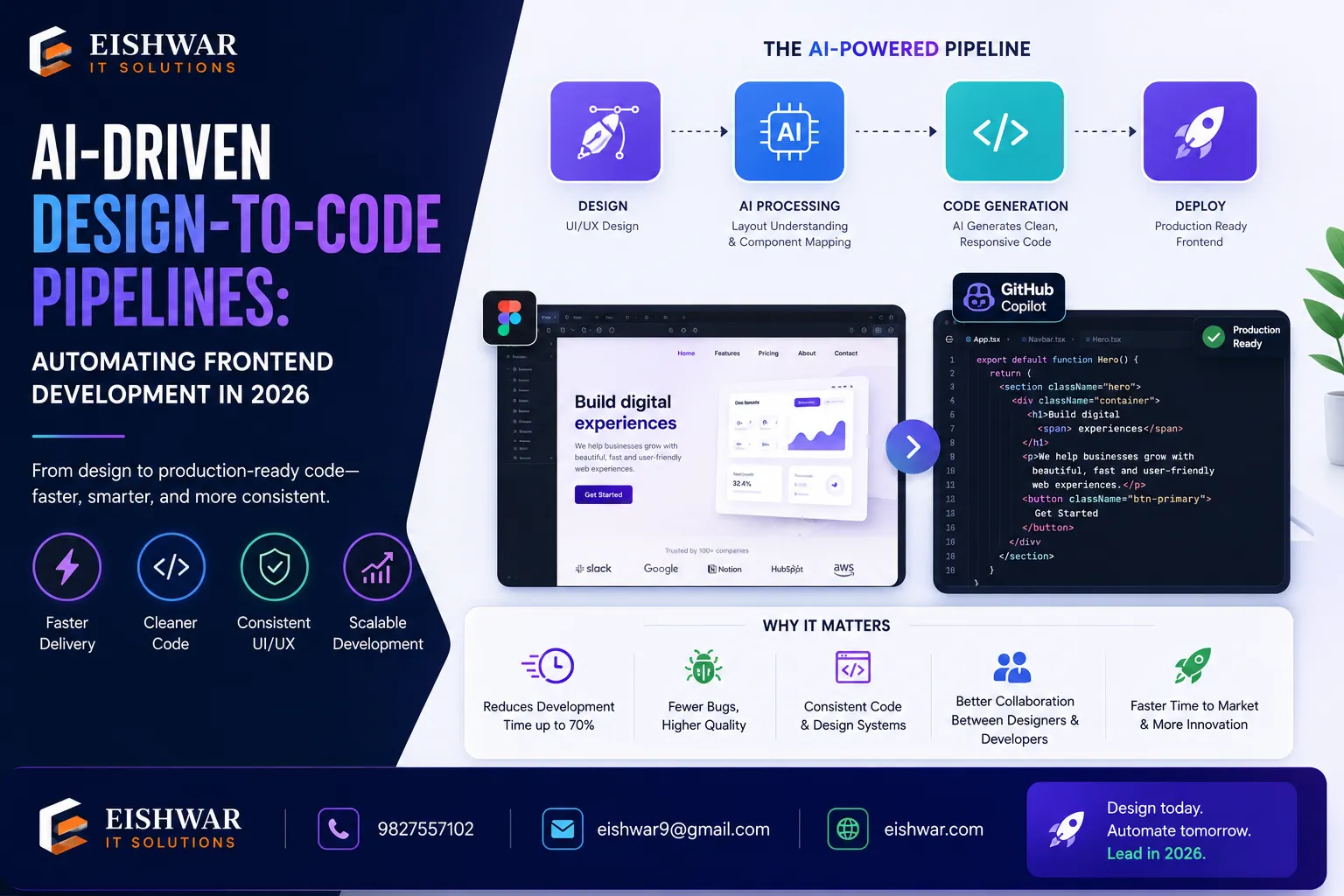
AI-Driven Design-to-Code Pipelines: Automating Frontend Development in
Published on: 15 Jun 2026
AI-Driven Design-to-Code Pipelines: Automating Frontend Development in 2026
Introduction
Imagine turning a Figma design into a fully functional React component in seconds—not hours. That's the promise of AI-driven design-to-code pipelines in 2026. For business owners, marketers, and professionals in India, this isn't just a tech trend; it's a strategic advantage. At EishwarITSolution, we've seen how automating frontend development with AI can slash project timelines by 50% and reduce manual errors. In this blog, we'll dive into what design-to-code pipelines are, how they work, and how you can leverage them to stay ahead.
Learn more about our Website services
Consider a typical scenario: a marketing team needs a landing page for a new product launch. Traditionally, this involves back-and-forth between designers and developers, multiple revisions, and days of coding. With an AI pipeline, the designer uploads the Figma file, and within minutes, the code is generated—complete with responsive breakpoints, hover states, and accessibility tags. The developer then reviews and tweaks, cutting the timeline from days to hours. This is the reality for businesses that have adopted these pipelines, and the gap between early adopters and laggards is widening fast.
Main Section 1: What Are AI-Driven Design-to-Code Pipelines?
Design-to-code pipelines use AI to convert visual designs (like those from Sketch, Figma, or Adobe XD) into clean, production-ready code. In 2026, these pipelines have matured beyond simple prototypes. They now handle responsive layouts, state management, and even accessibility standards. The core technology relies on computer vision and machine learning models trained on millions of design-code pairs. These models can recognize design patterns—like a button with a shadow or a card with an image—and map them to the appropriate code constructs.
Key components include:
- Design Parsing: AI analyzes layers, colors, typography, and spacing. For example, it can detect that a group of layers with a border radius and a drop shadow is a card component, not just a rectangle.
- Code Generation: Outputs HTML, CSS, JavaScript, or framework-specific code (React, Vue, Angular). Modern pipelines also generate styled-components, CSS modules, or Tailwind classes, depending on your project setup.
- Quality Assurance: Built-in linting and testing ensure code quality. Some tools even run visual regression tests to confirm the generated code matches the design pixel-perfectly.
For example, tools like Locofy.ai or TeleportHQ now integrate directly with your CI/CD pipeline, making automation seamless. Locofy, for instance, offers a Figma plugin that exports React components with hooks for state management, while TeleportHQ provides a visual editor to refine the generated code before committing it to your repository.
A practical tip: when using these tools, ensure your design layers are named consistently. A layer named "btn-primary" is easier for AI to interpret than "Rectangle 42." This small discipline can improve generation accuracy by up to 30%.
Main Section 2: Why Automate Frontend Development in 2026?
The benefits are clear: speed, consistency, and cost savings. Manual frontend development is prone to human error—misaligned margins, missing breakpoints, or inconsistent color schemes. AI eliminates these issues by strictly following design specs. In 2026, the pressure to deliver faster is immense. Users expect seamless experiences across devices, and businesses that can iterate quickly gain a competitive edge.
👉 Don't wait for the perfect moment; turn your vision into reality today.
Free ConsultationConsider a case study from an Indian e-commerce startup: They reduced their frontend build time from 4 weeks to 5 days using an AI pipeline. The result? Faster time-to-market and a 30% reduction in development costs. The startup, which sells handmade crafts, needed to launch a mobile-first website for a festival season. With a traditional approach, they would have missed the deadline. Instead, they used DhiWise to convert their Figma designs into a React app, and the developer only had to add the payment integration manually. The project was live in 5 days, and sales exceeded projections by 20%.
For Indian businesses, where skilled frontend developers are in high demand, automation bridges the talent gap. You don't need a large team; you need the right tools. A small team of two developers can now handle the workload of five, thanks to AI-generated boilerplate code. Moreover, the cost savings are significant. Hiring a senior frontend developer in India can cost ₹12-18 lakhs per annum; an AI pipeline subscription might be ₹50,000 per year. The ROI is clear.
Another benefit is consistency. When multiple developers work on the same project, code styles can diverge. AI pipelines enforce a unified codebase, making maintenance easier. For example, if your design system uses a specific button style, the AI will always generate the same code for that button, eliminating inconsistencies.
Main Section 3: How to Implement an AI Design-to-Code Pipeline
Ready to get started? Here's a step-by-step approach:
- Choose Your Tools: Evaluate options like Builder.io, DhiWise, or Anima. Look for integrations with your existing stack. For example, if you use React and Tailwind, ensure the tool supports those. Builder.io offers a visual CMS that syncs with your codebase, while Anima specializes in React and Vue exports.
- Standardize Your Design System: Use consistent components and tokens (colors, fonts, spacing). AI works best with structured design systems. Create a design token file in JSON format that defines your brand's colors, typography, and spacing. Tools like Figma's Design Tokens plugin can export this directly.
- Set Up a Feedback Loop: Use the generated code as a starting point. Customize and refine—AI learns from your edits. Some tools, like TeleportHQ, allow you to edit the generated code visually and then train the model on your preferences. Over time, the AI becomes more aligned with your coding style.
- Integrate with CI/CD: Automate code generation as part of your build process. This ensures designs always match live code. For instance, you can set up a GitHub Action that triggers code generation whenever a new Figma version is published. This eliminates manual handoffs.
- Monitor and Optimize: Track metrics like generation accuracy and developer productivity. Tools like GitHub Copilot can assist in refining AI output. Use dashboards to see how much time your team saves, and identify which design patterns the AI handles well versus those that need manual intervention.
Pro tip: Start with a small project, like a landing page, to test the pipeline before scaling. This allows your team to learn the tool's quirks and establish best practices. For example, you might discover that the AI struggles with complex animations, so you'll plan to handle those manually. Document these findings for future projects.
👉 Free Website Audit
Get Free AuditAnother practical step is to involve your designers early. They need to understand how their designs will be parsed. Encourage them to use auto-layout and constraints in Figma, as these translate directly to CSS flexbox and grid. A design that uses absolute positioning will generate messy code, so train your team on design-for-code principles.
Expert Tips
- Invest in Design Tokens: A well-defined design system is the foundation of accurate AI code generation. Tokens ensure that the AI uses your brand's exact colors and fonts, reducing the need for post-generation fixes.
- Use Hybrid Approaches: Combine AI-generated code with manual tweaks for complex interactions. For example, let the AI handle the layout and styling, but write the JavaScript logic for animations or API calls yourself.
- Train Your Team: Upskill developers to review and optimize AI output. The goal is augmentation, not replacement. Host workshops on how to read AI-generated code and spot inefficiencies, like unnecessary div wrappers.
- Leverage AI for Accessibility: Many pipelines now auto-generate ARIA labels and keyboard navigation. This can save hours of manual accessibility work and help you meet WCAG standards. For example, Anima automatically adds aria-labels to buttons based on their text content.
- Use Version Control for AI Models: Some tools allow you to version your AI model as you train it. This means you can roll back to a previous version if a new training cycle introduces errors.
Common Mistakes
- Over-reliance on AI: Don't skip manual review. AI can miss nuanced design intent, such as a specific emotional tone conveyed by a layout. Always have a developer review the output before deployment.
- Ignoring Performance: Generated code may be bloated. For instance, AI might generate excessive CSS classes or redundant HTML elements. Always optimize for load times by minifying and removing unused styles. Use tools like Lighthouse to audit performance.
- Neglecting Version Control: Keep AI-generated code in Git to track changes and rollback if needed. This is crucial because AI models can update and change the output unexpectedly. A commit history helps you understand what changed.
- Skipping Testing: Automated tests are essential to catch regressions introduced by AI updates. For example, if the AI changes a button's class name, your end-to-end tests should catch that. Integrate visual regression testing tools like Percy or Chromatic.
- Not Involving Designers: Designers might feel threatened by AI, but they are key to success. Involve them in the pipeline setup so they understand how their work is used. This collaboration leads to better design decisions.
Future Trends
By 2027, expect AI pipelines to handle full-stack generation, including backend APIs and database schemas. For example, a design for a login form could automatically generate not just the frontend code, but also the authentication API endpoint and the database table for user credentials. Predictive design—where AI suggests UI improvements based on user behavior—will become standard. Imagine an AI that analyzes your app's analytics and recommends layout changes to improve conversion rates, then generates the code for those changes.
👉 Free Homepage Demo
Book DemoFor Indian businesses, this means even faster innovation cycles and lower barriers to entry. A startup in a tier-2 city could launch a full-featured web app with a small team, competing with larger players. The cost of AI tools is also dropping, with many offering free tiers for small projects. Additionally, we'll see more localization features, where AI generates code optimized for Indian languages and regional design preferences.
Another trend is the rise of no-code AI pipelines. Tools like Bubble are already incorporating AI to generate code behind the scenes, allowing non-developers to create complex apps. However, for professional-grade applications, the hybrid approach—AI plus human expertise—will remain dominant.
FAQs
1. What is a design-to-code pipeline?
It's an automated process where AI converts visual designs (e.g., from Figma) into frontend code (HTML, CSS, JavaScript). This speeds up development and reduces manual errors. The pipeline typically involves design parsing, code generation, and quality assurance steps.
2. Which tools are best for AI design-to-code in 2026?
Top tools include Locofy.ai, Builder.io, DhiWise, and TeleportHQ. Choose based on your framework and design tool compatibility. For example, Locofy excels with React and Figma, while DhiWise supports multiple frameworks like Vue and Angular. Many offer free trials, so test a few before committing.
3. Can AI replace frontend developers?
No. AI automates repetitive tasks but still requires human oversight for creative decisions, complex logic, and user experience nuances. Developers are needed to review code, optimize performance, and handle edge cases. The role shifts from writing boilerplate to strategic problem-solving.
4. How much time can I save by using AI pipelines?
Businesses typically see 40-60% reduction in frontend development time, especially for standard components and responsive layouts. For a typical landing page, what used to take 2-3 days can now be done in a few hours. However, complex interactions may still require manual effort.
5. Is this technology suitable for small Indian businesses?
Absolutely. Many tools offer free tiers or pay-as-you-go models. It levels the playing field by reducing the need for large development teams. A small business can now build a professional website or app with just one developer and an AI pipeline, saving both time and money.
6. How do I ensure the generated code is secure?
AI pipelines generate frontend code, which is inherently client-side and less prone to security vulnerabilities. However, always review for common issues like cross-site scripting (XSS) in dynamic content. Use automated security scanners like Snyk or ESLint plugins to catch problems early.
7. What if the AI generates code that doesn't match the design?
Most tools allow you to provide feedback or manually adjust the code. Some, like TeleportHQ, let you edit the design visually and regenerate. Over time, as you train the AI with your corrections, accuracy improves. It's a learning process, so patience is key.
Conclusion
AI-driven design-to-code pipelines are revolutionizing frontend development in 2026. For Indian businesses, they offer a path to faster, more reliable web and app creation without inflating budgets. At EishwarITSolution, we help you navigate this transformation—from tool selection to full pipeline integration. The future of web development is automated, and it's here now. By embracing these technologies, you can focus on what matters most: delivering value to your customers and growing your business.
CTA
Ready to automate your frontend development? Contact EishwarITSolution today for a free consultation. Let's build smarter, faster, and better. Our team will assess your current workflow, recommend the best AI tools, and help you set up a pipeline that saves time and money. Don't get left behind—embrace the future of web development now.