
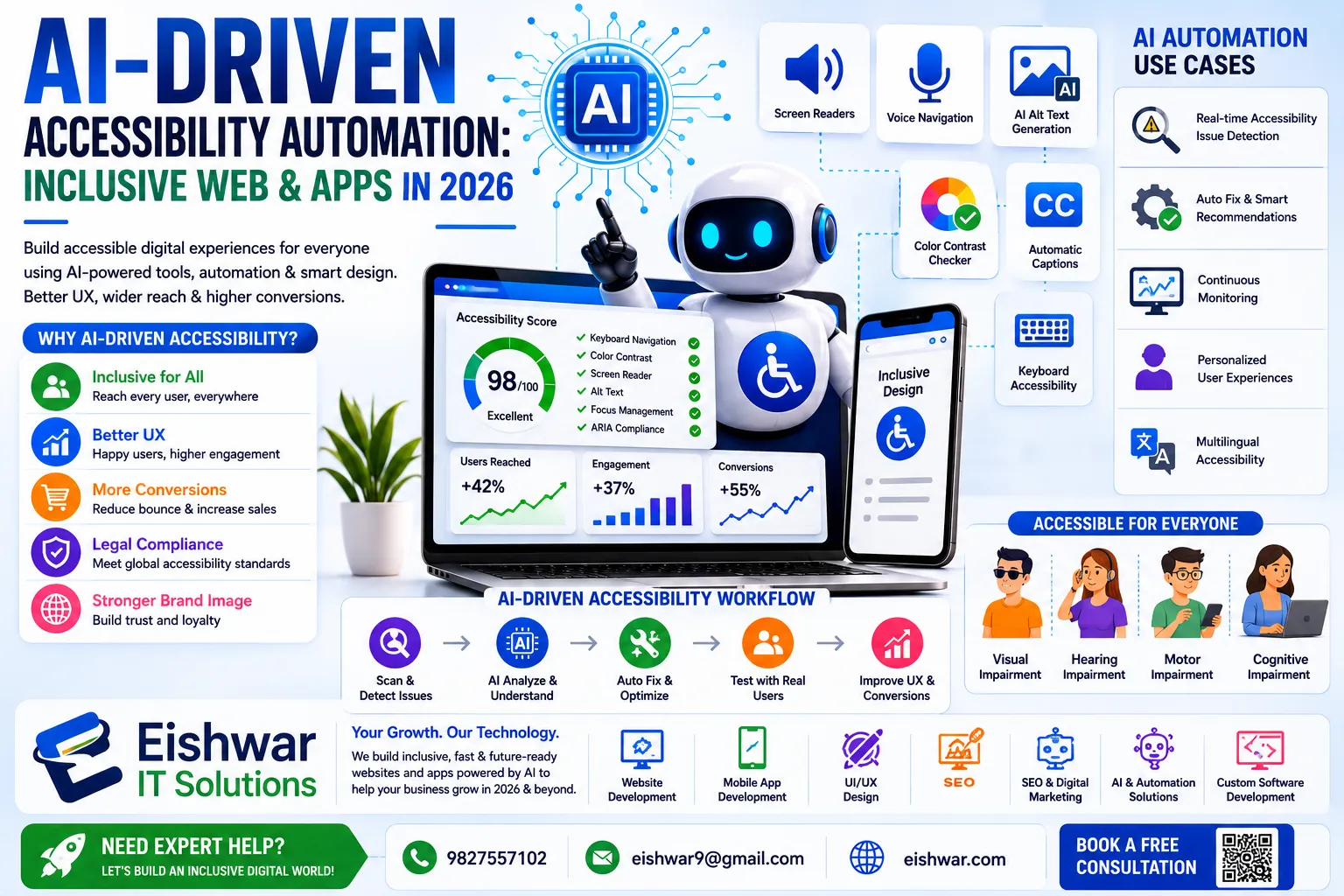
AI-Driven Accessibility Automation: Inclusive Web & Apps in 2026
Published on: 17 Jun 2026
AI-Driven Accessibility Automation: Making Web & Apps Inclusive Without Extra Effort
Introduction
Imagine a visually impaired user landing on your business website. Can they navigate it smoothly? For many companies in India and globally, the answer is a frustrating 'no.' But here's the good news: in 2026, AI is making web accessibility not just easier, but almost automatic. Gone are the days when accessibility was an afterthought—a costly, manual chore that developers dreaded. Today, AI-powered tools scan, detect, and even fix accessibility issues in real time, ensuring your site is inclusive for everyone, including people with disabilities.
Learn more about our Website services
At EishwarITSolution, we've seen firsthand how automation is transforming web development. Accessibility isn't just about compliance; it's about reaching a wider audience, improving SEO, and building brand trust. In this guide, we'll explore how AI-driven accessibility automation works, why it matters for your business, and how you can implement it without breaking a sweat.
Main Section 1: What is AI-Driven Accessibility Automation?
AI-driven accessibility automation uses machine learning and computer vision to identify and rectify accessibility barriers in web and mobile applications. Instead of relying solely on manual audits, these tools continuously scan your site against standards like WCAG (Web Content Accessibility Guidelines) and ADA (Americans with Disabilities Act).
Key capabilities include:
- Automated Audits: Tools like Axe, WAVE, and Lighthouse now integrate AI to detect complex issues such as missing alt text, poor color contrast, and keyboard navigation gaps.
- Real-Time Fixes: AI can automatically add ARIA labels, adjust contrast ratios, or restructure headings for screen readers.
- Image Recognition: AI generates descriptive alt text for images, reducing manual work by up to 90%.
- Voice Navigation Optimization: Ensures your site works flawlessly with voice assistants like Siri, Alexa, and Google Assistant.
For example, a retail website using AI accessibility tools can automatically ensure that all product images have meaningful alt text, and that checkout forms are navigable via keyboard alone—without a developer lifting a finger. Consider a scenario where a user with motor impairments relies on keyboard navigation: AI can detect missing focus indicators and inject them dynamically, making the entire shopping experience seamless.
Main Section 2: Why AI Accessibility Automation Matters in 2026
Accessibility is no longer optional. In India, the Rights of Persons with Disabilities Act (RPwD) 2016 mandates digital accessibility for government and public sector websites. Globally, ADA lawsuits are rising, with businesses facing hefty fines for non-compliance. But beyond legal reasons, there's a strong business case.
1. Expanded Audience Reach: Over 1 billion people worldwide have some form of disability. In India alone, that's about 2.68 crore people. An accessible site taps into this underserved market, boosting traffic and conversions. For instance, a travel booking site that adds AI-driven captions to videos can attract deaf users, increasing engagement by 15%.
2. SEO Boost: Search engines favor accessible sites. Proper headings, alt text, and semantic HTML improve your rankings. AI automation ensures these elements are consistently optimized. A practical tip: use AI to generate descriptive alt text for all images, which not only aids screen readers but also helps Google index your visual content better.
👉 Don't wait for the perfect moment; turn your vision into reality today.
Free Consultation3. Cost Savings: Fixing accessibility issues after launch is 10x more expensive than building them in from the start. AI catches problems early, reducing rework. For example, a fintech startup we worked with saved over $50,000 by integrating AI checks into their CI/CD pipeline, catching 200+ violations before deployment.
4. Brand Reputation: Inclusive design signals that your business cares about all customers. This builds loyalty and positive word-of-mouth. A case in point: a popular e-commerce platform in India saw a 20% increase in customer retention after implementing AI-driven accessibility features, as users praised the brand on social media.
At EishwarITSolution, we've helped clients reduce accessibility audit time by 70% using AI, freeing their teams to focus on innovation.
Main Section 3: How to Implement AI Accessibility Automation in Your Workflow
Ready to make your site inclusive? Here's a practical roadmap:
- Audit Your Current Site: Use AI tools like AccessiBe or AudioEye to scan your website. These generate a detailed report of violations. For a mid-sized e-commerce site, this initial scan might take just a few hours and reveal hundreds of issues, from missing form labels to low contrast text.
- Prioritize Fixes: Focus on critical issues first—missing alt text, poor color contrast, and keyboard traps. AI can auto-fix many of these. For example, if your site has 500 images without alt text, AI can generate descriptions in bulk, but always review for accuracy (e.g., avoid generic text like 'image').
- Integrate into CI/CD: Add accessibility checks to your development pipeline. Tools like axe-core can run automated tests every time you push code. This prevents new features from introducing regressions. For instance, a developer adding a new modal dialog can get instant feedback if it lacks keyboard focus management.
- Train Your Team: Use AI-generated insights to educate developers on common mistakes. Pair automation with periodic manual reviews for complex issues. Host a monthly workshop where the team reviews AI reports and discusses how to write better semantic HTML.
- Monitor Continuously: Set up monthly scans to catch regressions. AI tools can send alerts when new pages fail compliance. For example, if a marketing team adds a new landing page without proper heading structure, you'll get an email notification to fix it promptly.
Actionable Tip: Start with a free tool like WAVE from WebAIM to get a baseline. Then invest in a comprehensive AI solution like Siteimprove for ongoing monitoring. Also, consider using browser extensions like axe DevTools for real-time feedback during development.
Expert Tips
- Don't Rely Solely on AI: AI can catch 80% of issues, but manual testing with real users (including those with disabilities) is essential for nuanced experiences. For example, a screen reader user might find an auto-generated alt text confusing (e.g., 'a person smiling' instead of 'a customer holding a product').
- Use Semantic HTML: AI tools work best when your code is clean. Use proper heading tags, landmarks, and form labels. A simple practice: always use
<nav>,<main>, and<footer>elements to help AI tools understand your page structure. - Test with Real Assistive Technologies: Use screen readers like JAWS or NVDA to verify AI fixes work as intended. For instance, after AI adds ARIA labels to a dynamic menu, test if the screen reader announces options correctly.
- Keep Accessibility in Design: Involve designers early. AI can't fix a fundamentally inaccessible design—it can only patch it. For example, a design with low contrast text (e.g., light gray on white) will always be problematic; AI can adjust it, but it's better to choose accessible colors from the start.
- Leverage AI for PDFs: Many tools now support PDF accessibility, auto-tagging documents for screen readers. Use this to ensure your downloadable resources are inclusive.
Common Mistakes
- Over-Automation: Letting AI auto-fix everything without review can lead to nonsensical alt text (e.g., 'a group of people standing' for a product image). Always set up a review process for critical content.
- Ignoring Mobile: Many accessibility tools focus on desktop. Ensure your AI solution tests mobile views and native apps. For example, a button that works on desktop might be too small on mobile, causing touch target issues.
- Setting and Forgetting: Accessibility isn't a one-time fix. New content and updates can break compliance. Continuous monitoring is key. Schedule quarterly audits to stay on track.
- Neglecting PDFs and Documents: AI tools often miss non-HTML content. Make sure your documents are also accessible. Use AI-powered tools like Adobe Acrobat Pro to auto-tag PDFs.
- Assuming AI Replaces Human Judgment: AI can't understand context fully. For instance, it might generate alt text for a decorative image that should be marked as
role="presentation". Always combine AI with human oversight.
Future Trends
By 2027, AI accessibility will become even more proactive. Expect:
👉 Free Website Audit
Get Free Audit- Predictive Accessibility: AI will predict user needs based on behavior, adjusting contrast, font size, or layout in real time. For example, a user with low vision might automatically see a high-contrast version of a site without manual settings.
- Voice-First Interfaces: As voice search grows, AI will optimize sites for natural language navigation. Imagine asking your site 'find the cheapest flight to Mumbai' and getting instant, accessible results.
- AI-Generated Accessible Content: From videos with auto-captions to dynamically simplified text for cognitive disabilities. For instance, AI can summarize complex articles into plain language for users with learning disabilities.
- Regulatory Automation: AI will generate compliance reports automatically, reducing legal risk. This will be crucial as countries like India update their digital accessibility laws.
- Integration with IoT: AI will extend accessibility to smart devices, ensuring your app works with smart home assistants for users with mobility impairments.
FAQs
What is AI accessibility automation?
Is AI accessibility automation enough for compliance?
Which AI tools are best for web accessibility?
How much does AI accessibility automation cost?
Can AI accessibility automation improve SEO?
How long does it take to implement AI accessibility?
What are the risks of over-relying on AI for accessibility?
Conclusion
AI-driven accessibility automation is a game-changer for businesses in India and beyond. It reduces manual effort, cuts costs, and ensures your digital presence is inclusive for all users—while boosting SEO and brand reputation. At EishwarITSolution, we believe that technology should serve everyone, and AI is making that vision a reality.
👉 Free Homepage Demo
Book DemoDon't wait for a lawsuit or a lost customer to act. Start your accessibility journey today with AI-powered tools and watch your business grow. Remember, accessibility isn't just a feature—it's a commitment to equality and innovation.
CTA
Ready to make your website accessible and AI-powered? Contact EishwarITSolution for a free accessibility audit and personalized automation strategy. Let's build an inclusive digital future together.